or
1 answer
521 views
Hi,
My problem it's about Telerik.Windows.Controls.RichTextBoxUI. I'm on the process of upgrading a .NetFramework project to NET6, i've download the demo dlls for .NET6 and i'm setting up a Implicit Style, i've done everything this Link said, i've changed my Telerik UIs References to the NoXaml ones, i've merged the Xaml files and i've put the Office2019 themes on the project.
Now the problem is that RichTextBoxUI.xaml it's failing when compiling because can't find isStringNotEmptyToBoolConverter, and when i open the file, it's full of errors, saying it can find the assembly for Telerik.Windows.Controls.RichTextBoxUI. I'm guessing it's due to a missing DLL, but in \Binaries.NoXaml\WPF60 there's no dll for RichTextBoxUI, only RichTextBox.
Telerik.Windows.Documents.Xaml it's also failing and it's almost the same, failing references to other Documents. references that are not in the \Binaries.NoXaml\WPF60 folder.
It's there a place where i can find these dll? are they diferent for NET6 and i'm making a mistake with the setting of the Themes?
Thanks in advance.

Tanya
Telerik team

answered
on
11 May 2022
1 answer
280 views
Anchor tag with not text is by default not shown in HTML document. Such anchor tags are used for internal purpose.
<a href="/EORWeb/Download?/6971042495152-I.D card.pdf" target="_blank"/>Importing Html document in Rad rich text box is working as expected, but if same document is converted to RTF first by using RtfFormatProvider or save html imported document as rtf; you will notice such anchor tags are visible in Richtextbox editor.
This behavior make consumer annoying, as he/she is expecting same behavior in standard html document. I checked import/export settings for both RtfFormatProvider and HtmlFormateProvider to stop such anchor tags.
For reference I am attaching sample html document, which contains such anchor tags, but supposed not to be appear in editor. and following RadRichtextbox behvior.
Correct behavior when importing html document
RFT document behavior. (Highlighted anchors need to be hidden)
Tanya
Telerik team
answered
on
11 May 2022
1 answer
150 views
I would like my PanelBarItem to not change the background color while I move my move over it.
This is what is happening and not desired
This is what is desired
Is there an easy and simple way to accomplish this?
Note: I am okay with the Header area changing color while the mouse is over that area. (area containing text A,B,C.).
I would like to avoid extracting and changing the entire template just for this one small change.
Thanks in advance.

Stenly
Telerik team
answered
on
09 May 2022
1 answer
163 views
There are often cases that raisePropertyChanged() Method is called outside UI main thread.
Is it okay to call it in this way, or should I use Dispathcer.Invoke()?

Martin Ivanov
Telerik team
answered
on
09 May 2022
0 answers
415 views
I cannot install the RichTextBoxUI for Wpf (NoXAML or XAML) into a .NET Framework 4.7.x or 4.8 project
From the Private Telerik NuGet feed.
I see the other WPF Controls... but not RichTextBoxUI
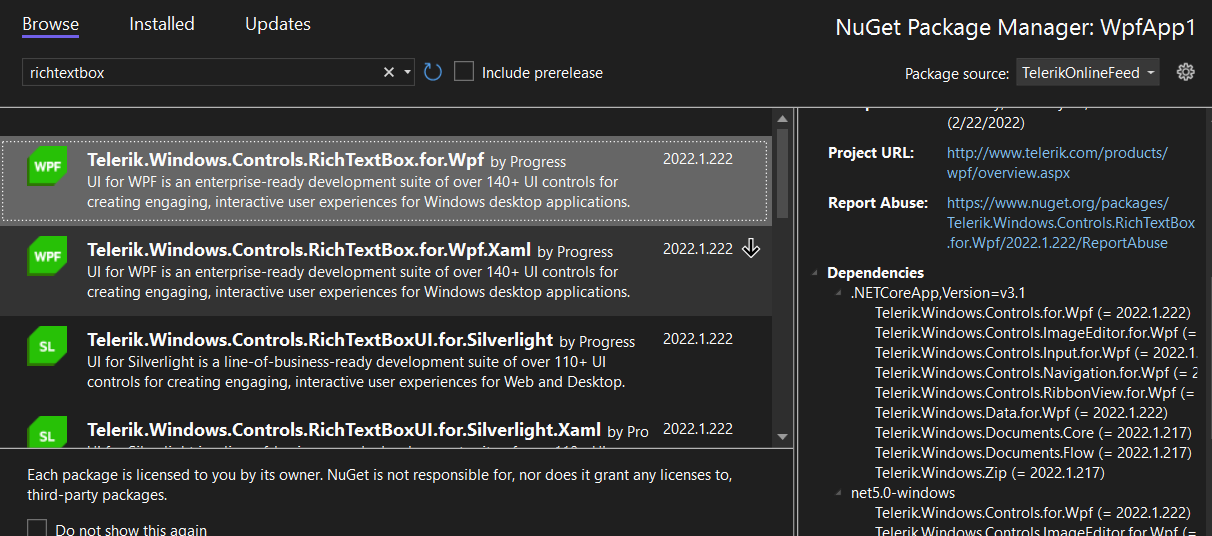
From the Private Telerik NuGet feed.
I see the other WPF Controls... but not RichTextBoxUI

Nick
Top achievements
 Rank 2
Rank 2
asked
on
09 May 2022
0 answers
162 views
I have a RadGridView in my application and did not explicitly set the style for it. It works well in normal contrast mode but when turn on the Aquatic high contrast mode in Windows 11, the contrast between the text and background on the header becomes minimal like below.
I tried changing the style like below but the text will stay at the defined color regardless of the contrast mode.
<Style TargetType="telerik:GridViewHeaderCell" BasedOn="{StaticResource GridViewHeaderCellStyle}">
                <Setter Property="Foreground" Value="Red"/>
                <Setter Property="HorizontalContentAlignment" Value="Center"/>
 </Style>

1 answer
177 views
Hi Team,
I have two questions, I am using RadNumericUpDownButton for getting time input. So I have used two separate numeric button to get hours and minutes.
- I want to show the hours and minutes in two numeric digits like 01, 02, 08. Any solution to achieve this?
- And I want get AM and PM with same RadNumericUpDownButton. Is there any way to do this?
Stenly
Telerik team
answered
on
06 May 2022
1 answer
183 views
Is it possible to let the drop down content open with bottom right aligned placement? Currently, when setting the drop down placement to "Bottom", it opens left aligned relative to the the split button.
Please see attachment for how it should look
Stenly
Telerik team
answered
on
05 May 2022
0 answers
213 views
I have a GridViewDataColumn that binds to a complex model (Custom class with a few properties and a ToString method)
The GridViewDataColumn also has a CustomGridFilter which is able to filter the column and has it's own popup.
But .. now the users also want to Order by this column - but nothing happens when clicking on the Column Header.
What am i missing ?
<telerik:GridViewDataColumn Width="100"
		DataMemberBinding="{Binding YearRange}"
		Header="Årgang">
	<telerik:GridViewDataColumn.FilteringControl>
		<local:CustomGridFilter Aargang="{Binding ElementName=root, Path=VintageYear, Mode=TwoWay}" />
	</telerik:GridViewDataColumn.FilteringControl>
</telerik:GridViewDataColumn>
public class YearRange : IEquatable<int>
{
public int FromYear { get; set; }
public int ToYear { get; set; }
public int Year { get; set; }
public override string ToString()
{
if (FromYear == ToYear)
return FromYear.ToString();
return FromYear + "-" + ToYear;
}
#region Equals, GetHashCode
#region Comparison operators override
}public partial class CustomGridFilter : UserControl, IFilteringControl, INotifyPropertyChanged
{
private GridViewBoundColumnBase column;
private CompositeFilterDescriptor compositeFilter;
private FilterDescriptor rangeFilter;
#region INotifyPropertyChanged
public void OnPropertyChanged(string name) => PropertyChanged?.Invoke(this, new PropertyChangedEventArgs(name));
public event PropertyChangedEventHandler PropertyChanged;
#endregion
#region IsActive DependencyProperty
public bool IsActive
{
get { return (bool)GetValue(IsActiveProperty); }
set { SetValue(IsActiveProperty, value); }
}
public static readonly DependencyProperty IsActiveProperty =
DependencyProperty.Register(
"IsActive",
typeof(bool),
typeof(CustomGridFilter),
new PropertyMetadata(false));
#endregion
#region Aargang DependencyProperty
public int? Aargang
{
get { return (int?)GetValue(AargangProperty); }
set { SetValue(AargangProperty, value); }
}
public static readonly DependencyProperty AargangProperty =
DependencyProperty.Register(
"Aargang",
typeof(int?),
typeof(CustomGridFilter),
new PropertyMetadata(
null,
(sender, evt) => { ((CustomGridFilter)sender).OnPropertyChanged("Aargang"); }
)
);
#endregion
public CustomGridFilter()
{
InitializeComponent();
DataContext = this;
PropertyChanged += CustomGridFilter_PropertyChanged;
}
private void CustomGridFilter_PropertyChanged(object sender, PropertyChangedEventArgs e)
{
if (e.PropertyName == "Aargang" && Aargang>1900 && Aargang<2100)
{
OnFilter(null, null);
}
}
public void Prepare(Telerik.Windows.Controls.GridViewColumn column)
{
this.column = column as GridViewBoundColumnBase;
if (this.column == null)
{
return;
}
if (compositeFilter == null)
{
CreateFilters();
}
}
private void CreateFilters()
{
string dataMember = column.DataMemberBinding.Path.Path;
compositeFilter = new CompositeFilterDescriptor();
rangeFilter = new FilterDescriptor(dataMember, FilterOperator.IsEqualTo, null);
compositeFilter.FilterDescriptors.Add(rangeFilter);
}
private void OnFilter(object sender, RoutedEventArgs e)
{
rangeFilter.Value = new YearRange { Year = Aargang ?? 0 };
if (!column.DataControl.FilterDescriptors.Contains(compositeFilter))
{
column.DataControl.FilterDescriptors.Add(compositeFilter);
}
IsActive = true;
var popup = this.ParentOfType<System.Windows.Controls.Primitives.Popup>();
if (popup != null)
{
popup.IsOpen = false;
}
}
private void OnClear(object sender, RoutedEventArgs e)
{
if (column.DataControl.FilterDescriptors.Contains(compositeFilter))
{
column.DataControl.FilterDescriptors.Remove(compositeFilter);
}
Aargang = 0;
IsActive = false;
var popup = this.ParentOfType<System.Windows.Controls.Primitives.Popup>();
if (popup != null)
{
popup.IsOpen = false;
}
}
}



0 answers
162 views
I am using RadGridView's ExportToXlsx. I have been able to provide some styling (background colors and cell borders) in the ElementExportingToDocument event. But I don't see a way to increase the row height and column width. Is there a way to do this?





