or
0 answers
344 views
I'm using the latest version of Telerik UI for WPF - Framework 4.8
and i have the same issue as described here: https://www.telerik.com/forums/the-scroll-bars-are-placed-in-the-tables
from April ..
Will this issue get fixed sometime soon ?
or is there a quick fix ?




1 answer
178 views
Want to select cell and freeze this selection by pushing a separate button. Cell should remains in selection state with loosing focus, selecting other cells. Another button will unfreeze all cells in the grid.
Is it possible?
Thanks,

Vladimir Stoyanov
Telerik team

answered
on
13 Jul 2022
1 answer
141 views
I want to select cell, perform some action on the cell value (focus is gone from cell now) and mark this cell as "processed".
I have a button to clear such "permanent" selections.
Is it possible? I saw multiple solutions based on overriding cell selection styles in xaml. Want to make it from view model.
Vladimir Stoyanov
Telerik team
answered
on
13 Jul 2022
1 answer
172 views
I would like to indicate/emphasize cells selected for the action.
Example scenario:
1. select 2 cells in the grid;
2. perform some action after pushing separate button "Process selection";
3. now i need to show those previously selected 2 cells despite of clicks on other grid cells or loosing focus on the grid.
There is another button "View All" which will reset grid and clear all "permanently" selected cells.
Looking for suggestions to implement such behavior. Thinking about changing background color, making cell text bold, disabling cells. Any ideas?
CellStyleSelector sample from xaml_sdk demonstrates a static custom cell selection in columns overriding xaml styles. I need to make it dynamic: select cell, perform action, mark cell as processed, select another cell, process it, unmark previous cell, mark new one as processed.
Thank you,
Gennady
Vladimir Stoyanov
Telerik team
answered
on
13 Jul 2022
0 answers
157 views
Good day! Which template is responsible for tooltip while dragging or resizing task? Can we customize this object?
Thank You for answers

Eugeny
Top achievements
 Rank 1
Rank 1
asked
on
12 Jul 2022
1 answer
143 views
In code behind, when a user moves the curser in the RadRichTextBox, we check information tagged to span elements. For certain spans, we want the contents to change color, so we set span.ForeColor to a new value, but this doesn't reflect in the UI. I assume there is some update mechanism, but it isn't obvious. I can select the entire span, copy, and paste it in place and it will show the new color, but we want it to happen when a user is moving the cursor.
We're tracking the cursor in the RadDocument.CaretPosition.PositionChanged event handler.

Tanya
Telerik team
answered
on
11 Jul 2022
1 answer
413 views
I'm investigating why / how to improve the rendering speed of a rather complex UserControl / Window
The Window contains a Tab-Control where one of these tabs contain a GridView which is very basic on its own.
Each of the ~60 rows are bound to an object which has a String + 3x bool properties.
Each time the Window is opene, the list is reset.
The list of elements is kept in an ObservableCollection (which isn't necessary since the list never change.. but what the heck)
Here's the thing - when Profiling, this Gridview spends 600 msec !! in the Layout phase on the UI Thread... 600 msec !
Is there anything i can do about it ?
(To be honest - the standard WPF ListView spends 2200 msec rendering this list !!!)
I'm aware of https://docs.telerik.com/devtools/wpf/controls/radgridview/performance/tips-tricks
- The container has a fixed size
- Each column has a fixed width
- Row Virtualization is enabled
- Scrollbars har hardcoded to be enabled/disabled in advance.
- Removing the CellTemplates didn't make a difference - time is still ~600msec
- The last thing i havent tried is using the lightweight styling, but i have some bad experiences with those.
<telerik:RadGridView x:Name="lvCompanyFabrikater"
			            telerik:StyleManager.Theme="Fluent"
			            AutoGenerateColumns="False"
			            Background="{DynamicResource MahApps.Brushes.ThemeBackground}"
			            CanUserFreezeColumns="False"
			            CanUserSearch="False"
			            CanUserSearchInHiddenColumns="False"
			            EnableRowVirtualization="True"
			            GridLinesVisibility="None"
			            GroupRenderMode="Flat"
			            IsFilteringAllowed="True"
			            IsPropertyChangedAggregationEnabled="False"
			            IsReadOnly="True"
			            RowIndicatorVisibility="Collapsed"
			            ScrollViewer.HorizontalScrollBarVisibility="Disabled"
			            ScrollViewer.VerticalScrollBarVisibility="Visible"
			            SelectionMode="Single"
			            ShowGroupPanel="False">
	<telerik:RadGridView.Columns>

		<telerik:GridViewDataColumn Width="100"
					                DataMemberBinding="{Binding FabrikatNavn}"
					                Header="Fabrikat" />

		<telerik:GridViewDataColumn Width="50" Header="Salg">
			<telerik:GridViewDataColumn.CellTemplate>
				<DataTemplate>
					<CheckBox IsChecked="{Binding Salg}" />
				</DataTemplate>
			</telerik:GridViewDataColumn.CellTemplate>
		</telerik:GridViewDataColumn>

		<telerik:GridViewDataColumn Width="60" Header="Service">
			<telerik:GridViewDataColumn.CellTemplate>
				<DataTemplate>
					<CheckBox IsChecked="{Binding Service}" />
				</DataTemplate>
			</telerik:GridViewDataColumn.CellTemplate>
		</telerik:GridViewDataColumn>

		<telerik:GridViewDataColumn Width="85" Header="Reservedele">
			<telerik:GridViewDataColumn.CellTemplate>
				<DataTemplate>
					<CheckBox IsChecked="{Binding Reservedele}" />
				</DataTemplate>
			</telerik:GridViewDataColumn.CellTemplate>
		</telerik:GridViewDataColumn>

	</telerik:RadGridView.Columns>
</telerik:RadGridView>
1 answer
236 views
After opening the RadComboBox in RadGridView (GridViewComboBoxColumn), it is displaying values are in the dropdown.
Scenario-1:
Now, if I don't select any value in the dropdown list (while it is in open) and also click the button. In the 1st click, the dropdown is closed and only in the 2nd click
button will trigger the function.
I've attached my demo project for your reference. Can you please help me to fix the above issue on the 1st click itself? Is there any possible way to do it, if so please guide me.
Thanks in advance.
4 answers
276 views
Is it possible to customize the Telerik grid display number column header (row indicator) width in WPF? If so, please let me know how to change the width.
I have used material theme for the Telerik grid, I need to reduce the width of the header column for number displaying column (first column) that extra space I need to adjust narrow.
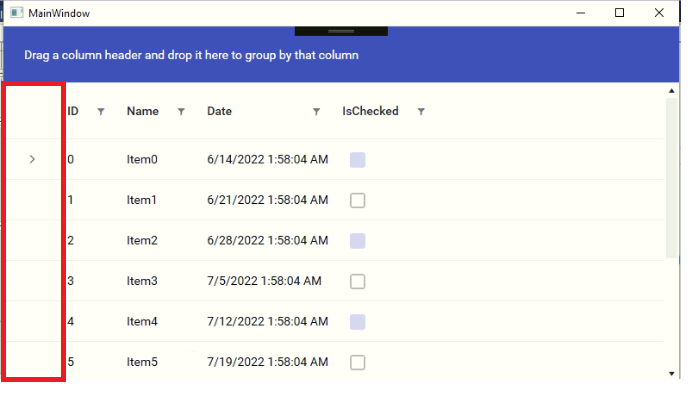
Also, I've noticed that other than material theme the number column is displayed as expected.
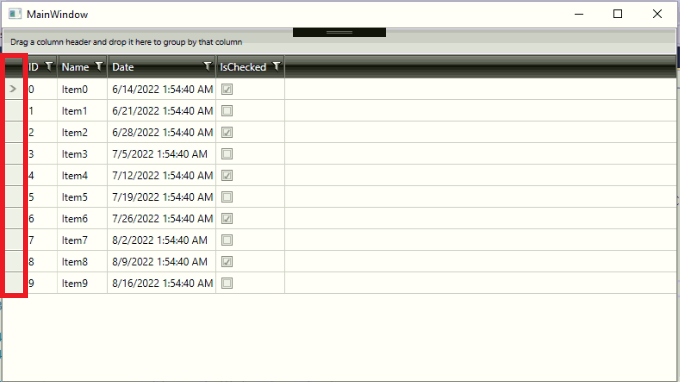
Please let me know how to modify the width of the header column (first column).
Thanks in advance.
I have used material theme for the Telerik grid, I need to reduce the width of the header column for number displaying column (first column) that extra space I need to adjust narrow.
Also, I've noticed that other than material theme the number column is displayed as expected.
Please let me know how to modify the width of the header column (first column).
Thanks in advance.
Masha
Telerik team
answered
on
11 Jul 2022
0 answers
147 views
I have a gridview with horizontally merged cells. Its an overview of weekly tasks.
I have 5 columns representing monday-friday in there, and I want to be able to copy values from another item to a mergedcell.
Basically, If the same person is responsible for a task on a monday, and another task the whole week, I want to be able to copy that person to a mergedcell, and make its value apply to all underlying cells.
I'd like to be able to do this with the actual underlying collectionview, but for now I'm using a workaround with the visual tree. My only issue is that I can find a certain row/column index in the mergedcells, which reflects the virtualized position, i.e. where it is on the screen, which includes group headers.
Is there a way I can get to the collection of all items currently visible myself? including group headers? So I can find the dataitem?





