or
1 answer
7 views
I've recently had several instances where callingRadMessageBox throws an exception deep inside the Telerik WinForms framework.
This was using version 2026.1.415.48, I have just today updated to 2026.2.520.48.
In both cases the calling code is similar to this
RadMessageBox.SetThemeName ( ScenarioGlobal.G_Theme.ThemeName );
RadMessageBox.Instance.TopMost = true;
RadMessageBox.Show ( null, successText, ScenarioGlobal.G_Form_Title, MessageBoxButtons.OK, Resources.Info_48x48 );
The resulting stack trace in both cases, is as follows
System.InvalidOperationException: Invoke or BeginInvoke cannot be called on a control until the window handle has been created.

   at System.Windows.Forms.Control.MarshaledInvoke(Control caller, Delegate method, Object[] args, Boolean synchronous)

   at System.Windows.Forms.Control.Invoke(Delegate method, Object[] args)

   at Telerik.WinControls.UIAutomation.RadControlBaseRootUIAutomationProvider`1.get_BoundingRectangle() in C:\a\1\s\RadControls\RadControlsUI\Accessibility\UIAutomation\RadControlBaseRootUIAutomationProvider.cs:line 50

   at Telerik.WinControls.UIAutomation.Window.RadFormUIAutomationProvider.Form_Resize(Object sender, EventArgs e) in C:\a\1\s\RadControls\RadControlsUI\Accessibility\UIAutomation\Window\RadFormUIAutomationProvider.cs:line 261

   at System.Windows.Forms.Control.OnResize(EventArgs e)

   at System.Windows.Forms.Form.OnResize(EventArgs e)

   at System.Windows.Forms.Control.OnSizeChanged(EventArgs e)

   at System.Windows.Forms.Control.UpdateBounds(Int32 x, Int32 y, Int32 width, Int32 height, Int32 clientWidth, Int32 clientHeight)

   at System.Windows.Forms.Control.UpdateBounds(Int32 x, Int32 y, Int32 width, Int32 height)

   at System.Windows.Forms.Control.SetBoundsCore(Int32 x, Int32 y, Int32 width, Int32 height, BoundsSpecified specified)

   at System.Windows.Forms.Form.SetBoundsCore(Int32 x, Int32 y, Int32 width, Int32 height, BoundsSpecified specified)

   at Telerik.WinControls.UI.RadFormControlBase.SetBoundsCore(Int32 x, Int32 y, Int32 width, Int32 height, BoundsSpecified specified) in C:\a\1\s\RadControls\RadControlsUI\RadForm\RadFormNew\RadFormControlBase.cs:line 1909

   at System.Windows.Forms.Control.SetBounds(Int32 x, Int32 y, Int32 width, Int32 height, BoundsSpecified specified)

   at System.Windows.Forms.Control.set_Size(Size value)

   at System.Windows.Forms.Control.SetClientSizeCore(Int32 x, Int32 y)

   at System.Windows.Forms.Form.SetClientSizeCore(Int32 x, Int32 y)

   at Telerik.WinControls.UI.RadFormControlBase.SetClientSizeCore(Int32 x, Int32 y) in C:\a\1\s\RadControls\RadControlsUI\RadForm\RadFormNew\RadFormControlBase.cs:line 1861

   at Telerik.WinControls.UI.RadFormControlBase.OnThemeChanged() in C:\a\1\s\RadControls\RadControlsUI\RadForm\RadFormNew\RadFormControlBase.cs:line 1578

   at Telerik.WinControls.ComponentThemableElementTree.set_ThemeName(String value) in C:\a\1\s\RadControls\RadControl\TPF\Control\ComponentThemableElementTree.cs:line 144

   at Telerik.WinControls.UI.RadFormControlBase.set_ThemeName(String value) in C:\a\1\s\RadControls\RadControlsUI\RadForm\RadFormNew\RadFormControlBase.cs:line 2091

   at Telerik.WinControls.RadMessageBox.SetThemeName(String themeName) in C:\a\1\s\RadControls\RadControlsUI\UIElements\RadMessageBox\RadMessageBox.cs:line 37
Is this somethingmy application is doing / not doing or a "feature" of the RadMessageBox?
Cheers
Toby

Nadya | Tech Support Engineer
Telerik team

answered
on
19 Jun 2026
1 answer
214 views
i want to custimize RadMessageBox
example : set the TitleBar.Font BackColor
set radLabel1 font and backcolor
set button 's font and button's szie ....

Dinko | Tech Support Engineer
Telerik team
answered
on
30 Dec 2025
1 answer
197 views
Our application doesn't explicitly set a default theme so it defaults to ControlDefault.
One screen uses the MaterialBlueGrey theme, so I wanted the related MessageBoxes to also use that theme.
Per the instructions I used the following code:
RadMessageBox.SetThemeName("MaterialBlueGrey");
RadMessageBox.Show("MESSAGE");
RadMessageBox.SetThemeName("ControlDefault");
The problem is that, although the overall look goes back to the default theme, some elements stay with the MaterialBlueGrey theme. For example: the button height & caption font.
I tried all these with the same result:
RadMessageBox.SetThemeName("");
RadMessageBox.ThemeName = "";
RadMessageBox.ThemeName = "ControlDefault";
Nadya | Tech Support Engineer
Telerik team
answered
on
18 Nov 2025
2 answers
145 views
Is it possible to assign an SVG image to use as the image displayed in the RadMessageBox?
I notice that PictureBox is used rather than RadPictureBox, RadPictureBox supports SVG and it seems that PictureBox does not. Is there a reason why it cannot use RadPictrureBox?
The reason I ask, is that when specifying the image directly, it does not scale nicely when used on monitors with different DPI.
Thanks
Toby

Toby
Top achievements
 Rank 3
 Iron
Iron
 Iron
Iron
 Iron
Iron
Rank 3
Iron
Iron
Iron
answered
on
17 Apr 2025
1 answer
155 views
We are currently working with Telerik Winforms 2021.1.223.40
and We'd like to seek advice on.
In our Winforms application, we call the Click event of RadRepeatButton.
When occurs the click event of this button, we show Telerik messagebox after certain data checks.
When showing Telerik messagebox, we make layout of RadMessageBox through a method named "SetDesing()".
To this end we call a method name ""RadMessageBox.Show".
The problem occurs after calling "RadMessageBox.Show()". Even though we wrote the code that return after this call, the return does not occur. Instead, It repeatedly triggers the Click event of the RadRepeatButton. (It almost like a recursive function.)
Below are the detailed codes and the call stacks.
and We'd like to seek advice on.
In our Winforms application, we call the Click event of RadRepeatButton.
When occurs the click event of this button, we show Telerik messagebox after certain data checks.
When showing Telerik messagebox, we make layout of RadMessageBox through a method named "SetDesing()".
To this end we call a method name ""RadMessageBox.Show".
The problem occurs after calling "RadMessageBox.Show()". Even though we wrote the code that return after this call, the return does not occur. Instead, It repeatedly triggers the Click event of the RadRepeatButton. (It almost like a recursive function.)
Below are the detailed codes and the call stacks.
Nadya | Tech Support Engineer
Telerik team
answered
on
05 Feb 2024
1 answer
183 views
Hi,
I'm wondering if it could be possible to add an auto close functionnality on RadMessageBox ?
- With a formattable string like this : "Popup will close in {0} seconds"
- We should be able to specify a duration in seconds
- It would only be useable if the MessageBox is not a YesNo(Cancel)
Using an internal timer, the MessageBox would update the formattable string at each tick.
I think it can easily be achieved.
Thanks.
Dinko | Tech Support Engineer
Telerik team
answered
on
22 Dec 2023
1 answer
325 views
Here is some sample code:
Imports Telerik.WinControls
Imports Telerik.WinControls.UI

Public Class RadForm1
    Private Sub RadForm1_Load(sender As Object, e As EventArgs) Handles MyBase.Load
        RadOverlayManager.Show(Me)
        For x = 0 To 1999999999

        Next
        RadOverlayManager.Close()
        RadMessageBox.Show("You will never see this.", "Nope", MessageBoxButtons.OK, RadMessageIcon.Info)
    End Sub
End Class
What you'll see is, the overlay will appear and disappear as expected. However the radmessagebox will never appear.
If you comment out the overlay lines, then the message box will appear.
Looks like a threading issue, but I'll leave that to the professionals to figure out. =)
Dinko | Tech Support Engineer
Telerik team
answered
on
02 Jan 2023
1 answer
307 views
I did a search and found this thread from... 13 years ago: https://www.telerik.com/forums/radmessagebox-focus-on-buttons-in-mdi-app
Wasn't sure if I should necro it or not, but regardless, is there a way around this? For example, when I do a .Show on it I expect it to have focus and also that a button on there have focus. Especially if its just an "ok" button, as with the default .NET msgbox I could just hit the spacebar to continue. As it is, you HAVE to use your mouse to select the button.
Also, there's no TAG for the radmessagebox here on the forum so I used "messageBox"

Dess | Tech Support Engineer, Principal
Telerik team
answered
on
23 Aug 2022
1 answer
439 views
Hello community!!!
My question is really simple I think... Is there any way to use RadMessageBox as input dialog? Something like this...
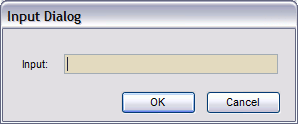
If yes, how can I do that? Is there any document or example online?
Thank you for your time!!!
My question is really simple I think... Is there any way to use RadMessageBox as input dialog? Something like this...
If yes, how can I do that? Is there any document or example online?
Thank you for your time!!!
Dess | Tech Support Engineer, Principal
Telerik team
answered
on
11 Aug 2022
1 answer
199 views
Hi,
I'm having issues in my application when displaying and moving RadMessageBox from HD screen to 4K screen. The size of the default icon is very small when shown on the 4K monitor also the location of the buttons seems to go awrywhen moving dialog between monitors. I also get a strange sizing issue when showing a custom bitmap for an image, it's not scaling at all when shown on the 4K monitor.
Luckily the scaling / layout issues can be easily reproduced using the latest Demo Application (Demo Application - Telerik UI for WinForms R2 2022 SP1) by following these steps.
On the HD monitor - start demo app, select Explore all controls, select "Message Box"
Change message type to "Info" and set buttons to "Yes, No, Cancel"
Click "Show RadMessageBox" - Message box is displayed as expected
Drag to 4K monitor - size and layout is wrong and icon image is small
Press cancel whilst its shown on 4K monitor
Click "Show RadMessageBox" - Message box is displayed on HD monitor with overlapping buttons and large image icon
Press Close / cancel and try again - this time it shows correctly
Sometimes when playing with the demo I get also see
and
I'm aware that RadMessageBox is persistant throughout the life of the applicationso you might have to shut down the demo app and restart it.
And another issue, this time starting in my own HDPI aware application on 4K monitor - this time the size of the message text is too large.
Kind regards
Toby
Dinko | Tech Support Engineer
Telerik team
answered
on
29 Jul 2022








