

Hello,
I'm trying to merge several PDF files into one and then print them.
I am using version 2022.2.621.
My code looks like this
My problem is, that befor print pdf looks like this

But after print

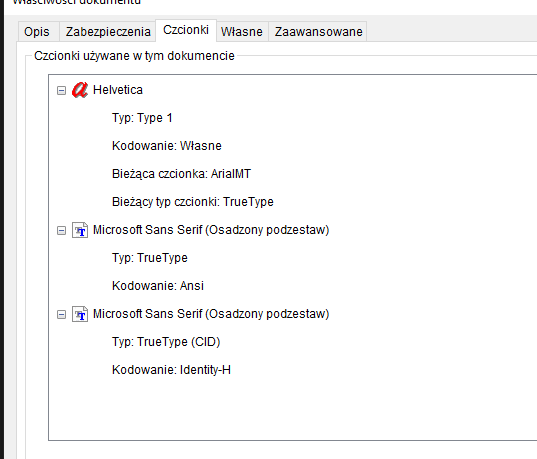
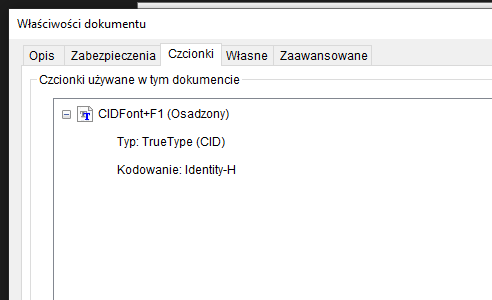
What I discoverd, that file befor print has more fonts then after.
Befor:
After
How can I handle this problem?
I'm trying to merge several PDF files into one and then print them.
I am using version 2022.2.621.
My code looks like this
       public static void Print(List<string> files)
       {
           using (MemoryStream stream = new MemoryStream())
           {
               using (PdfStreamWriter fileWriter = new PdfStreamWriter(stream, leaveStreamOpen: true))
               {
                   foreach (string path in files)
                   {
                       using (PdfFileSource fileSource = new PdfFileSource(new MemoryStream(File.ReadAllBytes(path))))
                       {
                           for (int i = 0; i < fileSource.Pages.Length; i++)
                           {
                               PdfPageSource sourcePage = fileSource.Pages[i];
                               using (PdfPageStreamWriter resultPage = fileWriter.BeginPage(sourcePage.Size))
                               {
                                   // set content
                                   resultPage.WriteContent(sourcePage);
                               }
                           }
                       }
                   }
               }

               var pdfViewer = new RadPdfViewer();
               PdfFormatProvider provider = new PdfFormatProvider();
               RadFixedDocument document = provider.Import(stream);
               pdfViewer.Document = document;
               var printdlg = new PrintDialog();
               printdlg.UserPageRangeEnabled = true;
               printdlg.SelectedPagesEnabled = true;
               if (printdlg.ShowDialog() == true)
               {
                   var printSettings = new PrintSettings(Path.GetFileNameWithoutExtension("file"), false);
                   pdfViewer.Print(printdlg, printSettings);
               }
           }
       }
My problem is, that befor print pdf looks like this
But after print
What I discoverd, that file befor print has more fonts then after.
Befor:
After
How can I handle this problem?
When I replace font with my own it works
var fontData = File.ReadAllBytes(@"...\helvetica-255\Helvetica.ttf"); FontsRepository.RegisterFont(new FontFamily("Helvetica"), FontStyles.Normal, FontWeights.Bold, fontData); FontsRepository.TryCreateFont(new FontFamily("Helvetica"), FontStyles.Normal, FontWeights.Bold, out var helvetica1); //Appy the font to the text fragments in the document foreach (RadFixedPage page in xx.Pages) { foreach (ContentElementBase contentElement in page.Content) { if (contentElement is Telerik.Windows.Documents.Fixed.Model.Objects.Form form) { foreach (var f in form.FormSource.Content) { if (f is Telerik.Windows.Documents.Fixed.Model.Objects.Form ff) { foreach (var f1 in ff.FormSource.Content) { if (f1 is TextFragment textFragment) { if (textFragment.Font.Name == "Helvetica") { textFragment.Font = helvetica1; } else if (textFragment.Font.Name == "Verdana,Bold") { // textFont = verdanaBold; } } } } } } } }Hello John,
Thank you for the follow-up feedback. Please correct me if I am wrong, but from what I understand, you were able to resolve the issue on your own. It is indeed possible that some fonts might not support certain characters, so switching to other fonts that do provide this support can always serve as a workaround.
Regards,
Yoan
Unfortunately, the workaround I provided doesn't solve my problem. I'm unable to swap fonts in my application due to its architecture. Could I send you a sample PDF file that you could analyze and make any necessary corrections on your end?
Hi John,
Thanks for confirming that the issue continues to reproduce.
I would gladly like to help you with this case, however, I would require some additional resources in order to assist you to the best of my abilities. As you suggested, it would be much appreciated if you could attach the PDF files you are using to achieve the undesired behavior. This way, I can try to achieve the same results on my end by using them with the provided code snippet, investigate the issue further, try to identify the cause, and get back to you with details and feedback.
NOTE: Please keep in mind that this is a Q&A Forum thread and anything attached here will be publicly accessible to anyone. I you have any concerns, try stripping any sensitive data from the files, as long as the issue continues to reproduce.
Thank you in advance for your cooperation.
Regards,
Yoan
Hi Yoan,
Can I send sample PDFs by email? Attaching the files here results in an error.
Hello John,
Thank you for reporting this issue.
The behavior you described is unexpected on our side. Normally, when a PDF file is attached directly to a support ticket, the system should automatically compress it into a ZIP file before uploading, so the file extension should still be accepted.
Before we look at alternative ways to receive the file, could you please help us with a few additional details?
As a troubleshooting step, could you also try manually compressing the PDF into a ZIP archive and then attaching the ZIP file instead?
Once we have this information and the ZIP upload test results, we can continue investigating further. If the issue still persists after these steps, we can discuss an alternative way to receive the file.
Thank you in advance for your cooperation.
Regards,
Yoan