or
3 answers
694 views
Hello! I'm using KendoUI with ASP.NET MVC (IIS Web Server), I would like that kendo.all.min.js (size 2.8M) could be cached by browser (Chrome basically). I've noticed that with no secure protocolo (HTTP) this happens if I include in _Layout.cshtml the library like this:
<script src="@Url.Content("~/Scripts/kendo/kendo.all.min.js")"></script> or <script src="~/Scripts/kendo/kendo.all.min.js"></script>
but if I use HTTPS the library will be partially cached (816KB) or not at all as you can see from attached image.
I've tried also using ASP.NET Bundles with no solution.
I've noticed that if I link the library from your CDN like this:
<script src="//kendo.cdn.telerik.com/2016.3.914/js/kendo.all.min.js"></script>
it's cached also with HTTPS, but this can't be a solution because I can't assume that our customers have a global internet connection always available (welcome to Italy in 2016 -_-").
Any suggestions to solve this issue?
Thank you!

Mac P
Top achievements
 Rank 1
Rank 1
answered
on
13 Mar 2017
2 answers
800 views
Hi,
I have a datasource attached to a Kendo spreadsheet with AngularJS.
In the onchange method of the spreadsheet, we iterate datasource.data() to see which records are changed. I then use a webservice (not the transport layer of the datasource) to validate the changes.
The user can then choose to press a save button, which will use a webservice (not the transport layer) to save the records. However, after the datasource has iterated the data to run the validation specified above, all the records dirty flags are set back to false. I have tried in this same loop the following, to reset the dirty flag but it doesn't seem to work.
datasource.data()[i].dirty = true;
Thanks
Marc
Marc
Top achievements
Rank 1
Rank 1
answered
on
13 Mar 2017
3 answers
250 views
I have a number 67.75, with the format mask "###,###,##0.00%". I would expect 67.75%, however I am getting 6775.00%
I have the mask because I need comma's for thousand separator, and always 2 decimal places with the percentage sign.
Why isn't this working?
Marc
Top achievements
Rank 1
Rank 1
answered
on
13 Mar 2017
5 answers
437 views
Hi,
I'm using the grid with server binding and asp.net mvc.
When I click "add new item"-button to open popup editing, the window wont center on the screen.
As you see in image below it placed below the grid.
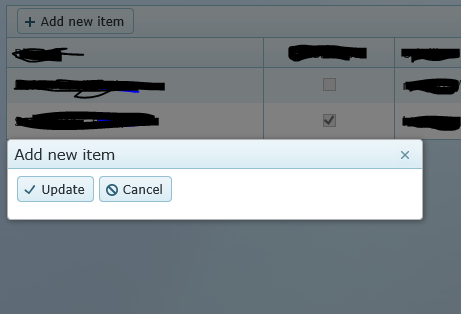
What have I done wrong?
Just for test I took one of your javascript demogrids and added to the page, and that one is centered when I click its button.
So the problem is just with mvc grid and server binding.
Regards,
Mattias
I'm using the grid with server binding and asp.net mvc.
When I click "add new item"-button to open popup editing, the window wont center on the screen.
As you see in image below it placed below the grid.
What have I done wrong?
@(Html.Kendo().Grid(Model.Items) .Name("PlacesGrid") .ToolBar(commands => commands.Create()) .DataSource(dataBinding => { dataBinding.Server().Model(mod => mod.Id(x => x.ID)) .Create("Insert", "Place") .Update("Update", "Place") .Destroy("Delete", "Place"); }) .Editable(editing => editing.Mode(Kendo.Mvc.UI.GridEditMode.PopUp)) .Columns(columns => { columns.Bound(x => x.Name).Title(Resources.Resource.PlaceName); columns.Bound(x => x.IsPublished).Title(Resources.Resource.IsPublished) .HeaderHtmlAttributes(new { @class = "center" }) .HtmlAttributes(new { @class = "center" }); columns.Bound(x => x.WebserviceUrl).Title(Resources.Resource.WebserviceUrl); columns.Bound(x => x.CreateDate).Title(Resources.Resource.CreateDate).Format("{0:g}") .HeaderHtmlAttributes(new { @class = "right" }) .HtmlAttributes(new { @class = "right" }); columns.Command(commands => { commands.Edit(); commands.Destroy(); }).Width(200).Title("").HtmlAttributes(new { @style = "text-align:right" }); }))So the problem is just with mvc grid and server binding.
Regards,
Mattias
Preslav
Telerik team

answered
on
13 Mar 2017
5 answers
529 views
Hi,
I have a bar chart with 1000+ datapoints and the rendering is really slow in IE and Edge and it even make the browser to not respond, in other browsers (Chrome, FF), it is still slow but manageable.
I searched for solutions for this and I came across this post: http://www.telerik.com/forums/chart-rendering-performance-dropped-(2015-q3-vs-2014-q3) about not including the categoryAxis labels in the rendering. I tried setting visible to 'false' and it seems to fix the slowness but I have to display the categoryAxis. The poster suggested to use 'step' but my categoryAxis are strings.
Any ideas or suggestions?
Ollie
Neovation

Stefan
Telerik team
answered
on
13 Mar 2017
1 answer
775 views
Hi,
Here is our requirement, we have to display 3 grid on 3 different button click. The data of the 3 grid will come from the same table (ex: tblCustomer). The grid also contains some dropdown field. The only different column will be displayed in each grid depending on button click.
We also need to provide batch add/edit/delete, and we 'll allow add/edit/delete only if the user has the permission.
Could you please tell me what is the best way to implement this. We are using MVC4 project.
Should we use shared data source or we should use 3 different data source for each grid? Is the batch edit supported by MVC4 grid? Please help.
Any js fiddle link or guideline will be appreciated.
Regards,
Ujjwal

Viktor Tachev
Telerik team
answered
on
13 Mar 2017
2 answers
248 views
Hello,
I'm using the Kendo Charts with a category axis to provide additional labels to our charts. I'm attempting to push the labels to the top of the graph using the padding attribute on the labels and that's working fine when the chart starts at 0.
However, once the chart goes into negative values this offset is no longer working. It appears that the padding is being applied at the position of the 0 line rather than the base of the chart.
Is there a way to calculate or determine where that 0 axis line is located to adjust the offset appropriately?
http://dojo.telerik.com/Alele/2
Thanks
3 answers
303 views
I have a grid with 2 locked columns. When editing a cell, the parent TR element gets a class of 'k-grid-edit-row'. When done editing, or when the row is blurred, the k-grid-edit-row class goes away, except on the locked columns.
Here is a working example. http://dojo.telerik.com/iCoDo/2
How can this be fixed? seems like a bug to me.
Thanks!

Dimo
Telerik team
answered
on
13 Mar 2017
1 answer
263 views
I am new with KendoUI and was attempting to use kendoButton.
I installed:
$ npm install -S @progress/kendo-angular-buttons
gridexample@0.0.0 H:\ECLIPSE_WORKSPACE\GridExample\frontend\src\main\frontend
`-- @progress/kendo-angular-buttons@0.20.4
npm WARN optional SKIPPING OPTIONAL DEPENDENCY: fsevents@^1.0.0 (node_modules\chokidar\node_modu
les\fsevents):
npm WARN notsup SKIPPING OPTIONAL DEPENDENCY: Unsupported platform for fsevents@1.1.1: wanted {"
os":"darwin","arch":"any"} (current: {"os":"win32","arch":"x64"})
When attempting to use kendoButton in html I receive the following error:
Multiple annotations found at this line:
- Undefined attribute name
(kendoButton).
- Undefined attribute name
Veselin Tsvetanov
Telerik team
answered
on
13 Mar 2017
1 answer
136 views
Is there any support for using SelectListItems as a datasource for ComboBoxes?
I would like to use it to do grouping, but I am unsure how to group where my datasource is a list of SelectListItems:
The following causes an error When I try to group on the Group's Name. Any other way of doing it?
<div class="demo-section k-content"> <h4>Customers</h4> @(Html.Kendo().ComboBox() .Name("customers") .DataTextField("Text") .DataValueField("Value") .MinLength(3) .HtmlAttributes(new { style = "width:100%;" }) .Height(400) .DataSource(source => source .Custom() .Group(g => g.Add("Group.Name", typeof(string))) .Transport(transport => transport .Read(read => { read.Action("Customers_Read", "ComboBox") .Data("onAdditionalData"); })) .ServerFiltering(true)) )</div><script> function onAdditionalData() { return { text: $("#customers").val() }; }</script>
Nencho
Telerik team
answered
on
13 Mar 2017








