or
1 answer
433 views
Hi,
Is there any alternative of using AdditionalViewData if I need to include some data to my editortemplate?
The AdditionalViewData option is better than nothing but there should be a "better" way instead of using ViewData.
If there isn't anyway today, here is two options:
1. Create a similar method to AdditionalViewData and use it like:
In this way I can add some data to my editortemplates viewmodel from the current model of the view.
2. Fire a "Create" ActionResult
In a way like a normal MVC flow, when clicking "Add new item"-button, the page reloads and fires an action method like "Create" instead of the current one "Index". And in this method I can add the data I need.
I can't figure out how no 2 would work but maybe you can come up with a smart solution. Or at least no 1 would be possible I think. :)
Regards,
Mattias
Is there any alternative of using AdditionalViewData if I need to include some data to my editortemplate?
The AdditionalViewData option is better than nothing but there should be a "better" way instead of using ViewData.
If there isn't anyway today, here is two options:
1. Create a similar method to AdditionalViewData and use it like:
.Editable(editing => editing.AdditionalData(m => m.MyData = Model.MyData })2. Fire a "Create" ActionResult
In a way like a normal MVC flow, when clicking "Add new item"-button, the page reloads and fires an action method like "Create" instead of the current one "Index". And in this method I can add the data I need.
public ActionResult Index(GridCommand command){ var model = ... return View(model);}public ActionResult Create(GridCommand command){ var model = ... model.MyData = ... return View("Index", model);}Regards,
Mattias

Petur Subev
Telerik team

answered
on
28 Nov 2012
9 answers
455 views
Hi,
I have a mobile project, where I need fill ListView with JSON data. All data is on one row.
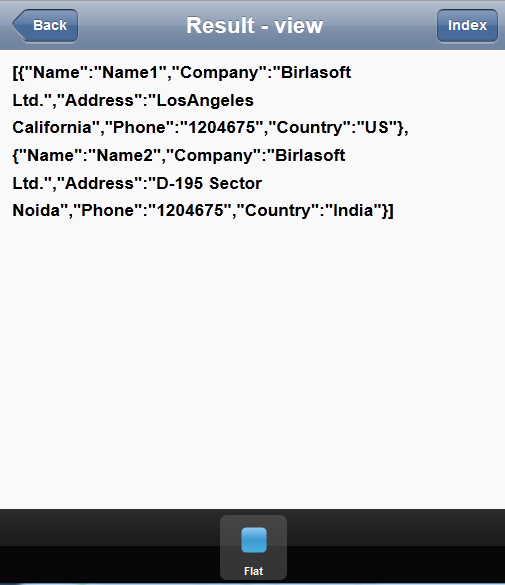
I try to change data, model, ... and another settings, but nothing is help me.
This is my source code.
Webservice:
I need get list view with rows, I get only one row with all data.
I don't know, where I do mistake. Can you help me.
Thanks.
Roman
I have a mobile project, where I need fill ListView with JSON data. All data is on one row.
I try to change data, model, ... and another settings, but nothing is help me.
This is my source code.
<%@ Page Title="" Language="C#" AutoEventWireup="true" CodeBehind="Default.aspx.cs" Inherits="Ecommerce.m.Default" %><!DOCTYPE html><html> <head> <title>Ecommerce</title> <meta name="viewport" content="width=device-width, initial-scale=1.0, maximum-scale=1.0, user-scalable=no;" /> <meta charset="utf-8"> <link href="styles/kendo.mobile.all.min.css" rel="stylesheet" type="text/css" /> <script src="js/jquery.min.js" type="text/javascript"></script> <script src="js/kendo.mobile.min.js" type="text/javascript"></script> </head> <body> <div data-role="view" id="tabstrip-flat" data-title="Result - view" data-init="mobileListViewDataBindInitFlat" data-layout="mobile-tabstrip"> <ul id="flat-listview"></ul> </div> <div data-role="layout" data-id="mobile-tabstrip"> <header data-role="header"> <div data-role="navbar"> <a class="nav-button" data-align="left" data-role="backbutton">Back</a> <span data-role="view-title"></span> <a data-align="right" data-role="button" class="nav-button" href="#index">Index</a> </div> </header> <footer data-role="footer"> <div data-role="tabstrip"> <a href="#tabstrip-flat" data-icon="stop">Flat</a> </div> </footer> </div> <script type="text/javascript"> var searchDataSource; searchDataSource = new kendo.data.DataSource( { schema: { data: function (data) { alert(data.d); /*Data Return Successfully*/ return data.d; }, //model: {} model: { fields: { Name: { type: "string" }, Company: { type: "string" }, Address: { type: "string" }, Phone: { type: "string" }, Country: { type: "string" } } } }, transport: { read: { contentType: "application/json; charset=utf-8", type: "POST", dataType: "json", url: "WebServiceData.asmx/TestJSON" } } }); function mobileListViewDataBindInitFlat() { $("#flat-listview").kendoMobileListView({ dataSource: searchDataSource //group: "Country" }); } </script> <script type="text/javascript"> //new kendo.mobile.Application($(document.body), { layout: "foo" }); var app = new kendo.mobile.Application(); </script> </body></html>Webservice:
[WebService(Namespace = "http://tempuri.org/")] [WebServiceBinding(ConformsTo = WsiProfiles.BasicProfile1_1)] [System.ComponentModel.ToolboxItem(false)] // To allow this Web Service to be called from script, using ASP.NET AJAX, uncomment the following line. [System.Web.Script.Services.ScriptService] public class WebServiceProduct : System.Web.Services.WebService { [WebMethod] [ScriptMethod(ResponseFormat = ResponseFormat.Json)] public string TestJSON() { Employee[] e = new Employee[2]; e[0] = new Employee(); e[0].Name = "Name1"; e[0].Company = "Birlasoft Ltd."; e[0].Address = "LosAngeles California"; e[0].Phone = "1204675"; e[0].Country = "US"; e[1] = new Employee(); e[1].Name = "Name2"; e[1].Company = "Birlasoft Ltd."; e[1].Address = "D-195 Sector Noida"; e[1].Phone = "1204675"; e[1].Country = "India"; string sReturn = new JavaScriptSerializer().Serialize(e); return new JavaScriptSerializer().Serialize(e); } public class Employee { public string Name { get; set; } public string Company { get; set; } public string Address { get; set; } public string Phone { get; set; } public string Country { get; set; } } }I need get list view with rows, I get only one row with all data.
I don't know, where I do mistake. Can you help me.
Thanks.
Roman
Bavya
Top achievements
 Rank 1
Rank 1
answered
on
28 Nov 2012
2 answers
144 views
Hi,
We are in the process of evaluating Kendo. But I cannot find Radio Box, Check Box and Input Box. I think we need these widgets for our application.
Are they available in Kendo?
Thanks,
Kevin
We are in the process of evaluating Kendo. But I cannot find Radio Box, Check Box and Input Box. I think we need these widgets for our application.
Are they available in Kendo?
Thanks,
Kevin
Murray
Top achievements
Rank 1
Rank 1
answered
on
28 Nov 2012
0 answers
188 views
I have a situation where the data for the grid will be returned in batches of 1000 records. I need to poll for this data and update the grid. I've tried using dataSource.add() and passing in a bunch of items, but it only ever adds the first item. Am I going to need to add one item at a time to the dataSource or is there something I am missing?
var myGrid = $('#grid').data('kendoGrid');

myGrid.dataSource.add({
name: 'Name 2', fileType: 'Microsoft Outlook Note', pathName: '/Evidence 2/Something/Collection/' }, { name: 'Name 3', fileType: 'Microsoft Word Document', pathName: '/Evidence 3/Something/Collection/' }, { name: 'Name 4', fileType: 'JPEG/JFIF Image', pathName: '/Evidence 4/Something/Collection/' }, { name: 'Name 1', fileType: 'Portable Document Format', pathName: '/Evidence 1/Something/Collection/' }, { name: 'Name 2', fileType: 'Microsoft Outlook Note', pathName: '/Evidence 2/Something/Collection/' }, { name: 'Name 3', fileType: 'Microsoft Word Document', pathName: '/Evidence 3/Something/Collection/' }, { name: 'Name 4', fileType: 'JPEG/JFIF Image', pathName: '/Evidence 4/Something/Collection/' }, { name: 'Name 1', fileType: 'Portable Document Format', pathName: '/Evidence 1/Something/Collection/' });
Mr. Gravity
Top achievements
Rank 1
Rank 1
asked
on
27 Nov 2012
2 answers
2.4K+ views
My grid is defined by:
$('#formGrid').kendoGrid({ dataSource: [ { FormDesc: 'hello', FormID: 1, IsEnabled: true }, { FormDesc: 'two', FormID: 2, IsEnabled: false } ] , columns: [ { field: 'FormDesc', title: 'Form Name', width: 140 }, { field: 'IsEnabled', title: 'Enabled', width: 40 } ] , filterable: true , resizable: true , scrollable: true });If a user filters the column on Enabled the grid never returns. This appears to be caused by the boolean value of IsEnabled.
You can see this in the following jsfiddle: http://jsfiddle.net/berandorFiddle/wYQy2/1/
An obvious workaround is to convert my boolean to a string. Is there a more elegant way to work around this?

Stef Heyenrath
Top achievements
Rank 1
Rank 1
answered
on
27 Nov 2012
0 answers
128 views
Hi,
I am using Kendo UI Web and am trying to format a DateTime. The code snippet is shown as below:
...
My model contains the DateTime data but displays as shown below
2012-11-27T11:22:16.5049451-06:00
I have also tried the following but similarly does not work
template: '#= kendo.toString(StartDateTime,"MM/dd/yyyy") #'
Please help. Thanks in advance.
I am using Kendo UI Web and am trying to format a DateTime. The code snippet is shown as below:
$(
"#reportListGrid").kendoGrid({
columns: [
{ field:
"StartDateTime", title: "Upload Start Date", type: "date", width: "70px", format: "{0:dd/MM/yyyy}"},
...
My model contains the DateTime data but displays as shown below
2012-11-27T11:22:16.5049451-06:00
I have also tried the following but similarly does not work
template: '#= kendo.toString(StartDateTime,"MM/dd/yyyy") #'
Please help. Thanks in advance.
2 answers
224 views
If you add a model programmatically to your grid datasource - for example using the add()-method - set the corresponding row to edit mode and cancel the edit without changing anything, the model will be deleted.
This is the kind of behaviour you'd expect if you add an empty row to the grid and then cancel the edit without entering any information.
See this fiddle: http://jsfiddle.net/MM5Ke/3/
To reproduce, click the edit button, then the update button. The row will disappear.
There's also an uncaught TypeError.
If this is to be intended behaviour, errors should be dealt with and the behaviour should be better documented.
This is the kind of behaviour you'd expect if you add an empty row to the grid and then cancel the edit without entering any information.
See this fiddle: http://jsfiddle.net/MM5Ke/3/
To reproduce, click the edit button, then the update button. The row will disappear.
There's also an uncaught TypeError.
If this is to be intended behaviour, errors should be dealt with and the behaviour should be better documented.
Alexander Valchev
Telerik team
answered
on
27 Nov 2012
1 answer
254 views
here i will explain what i am facing exactly in kendo ui mvc.
my requarement is displaying values in Grid from the database based on the comboBox selection.
here i successfully binding values from database to combobox ,as well as passing selected value to controller and view AND again retriving row information up to controller.but the problem is row details is not binding to grid (in view)..please let me know how to bind those values in view.....thanks in advance
code in Index.cshtml page
@{
ViewBag.Title = "Home Page";
}
<h2>@ViewBag.Message</h2>
<div id="tshirt-view" class="k-header">
<h3>
Employee Name
</h3>
<input id="comboBox1" />
<br />
<h3>
Employee Details
</h3>
<div id="empgrid">
</div>
</div>
<script type="text/javascript">
var cmbvalue;
var s;
var dataSource = new kendo.data.DataSource({
transport: {
read: "/Home/PutempDataValue"
// update: {
// url: "/Products/Update",
// type: "POST"
// },
// destroy: {
// url: "/Products/Destroy",
// type: "POST"
// },
// create: {
// url: "/Products/Create",
// type: "POST"
// }
},
schema: {
model: {
id: "eid",
fields: {
eid: {
//this field will not be editable (default value is true)
editable: false,
// a defaultValue will not be assigned (default value is false)
nullable: true
},
ename: {
validation: { //set validation rules
required: true
}
},
age: {
//data type of the field {Number|String|Boolean} default is String
type: "number",
validation: {
required: true,
min: 25
}
},
salary: {
type: "long",
validation: {
min: 5000
}
}
}
}
},
// determines if changes will be send to the server individually or as batch
batch: true
//...
});
$(document).ready(function () {
//comboBoxInformation
$("#comboBox1").kendoComboBox({
change: function (e) {
cmbvalue = $("#comboBox1").data("kendoComboBox").text();
//var gridvalue = $("#empgrid").data("kendoGrid");
//alert(gridvalue);
debugger
$.ajax({
url: "Home/PutempDataValue", // controllerName/MethodName
type: 'POST',
contentType: "application/json; charset=utf-8",
data: '{"cmbvalue":"' + cmbvalue + '"}',
dataSource: {
type: "json",
serverFiltering: true,
serverPaging: true,
pageSize: 5,
transport: {
read: {
url: "Home/PutempDataValue"
}
}
}
});
// gridvalue.refresh();
// Console:debug(gridvalue);
},
index: 0,
dataTextField: "ename",
dataValueField: "eid",
filter: "contains",
dataSource: {
type: "json",
serverFiltering: true,
serverPaging: true,
pageSize: 5,
transport: {
read: "Home/GetData"
}
}
});
//gridInformation
s = $("#empgrid").kendoGrid({
pageable: true,
toolbar: ["create", "save", "cancel"],
editable: true,
async: false,
// dataSource:dataSource,
// dataSource: {
// type: "json",
// serverFiltering: true,
// serverPaging: true,
// pageSize: 5,
// transport: {
// read: {
// url: "Home/PutempDataValue"
// }
// }
// },
// dataSource: {
// transport: {
// read: {
// type: "json",
// contentType: "Application/json; charset=utf-8",
// url: "Home/PutempDataValue"
// }
// }
// },
columns: [
{ title: 'Age', field: 'age', width: '25%', flex: 1, sortable: true },
{ title: 'Employee Id', field: 'eid', width: '25%', sortable: true },
{ title: 'Employee Name', field: 'ename', width: '35%', flex: 1, sortable: true },
{ title: 'Salary', field: 'salary', width: '35%', flex: 1, sortable: true }
],
sortable: true
});
});
</script>
code in Controller
using System;
using System.Collections.Generic;
using System.Linq;
using System.Web;
using System.Web.Mvc;
using System.Data;
using KendoUIMvcApplication1.Models;
namespace KendoUIMvcApplication1.Controllers
{
public class HomeController : Controller
{
string Value;// = string.Empty;
public ActionResult Index()
{
//ViewBag.Message = "Welcome to ASP.NET MVC!";
//Movie objMv=new Movie();
//var products = from m in objMv.subname select m;
////DataTable dt = Movie.GetData();
////return View(dt);
var products = new Movie().GetData();
ViewData["products"] = products;
return View();
}
[AcceptVerbs(HttpVerbs.Get)]
public JsonResult GetData()
{
var emp = new Movie().GetData();
return Json(emp, JsonRequestBehavior.AllowGet);
}
[HttpPost]
public ActionResult PutempDataValue(string cmbvalue)
{
Value = cmbvalue;
var emp = new Movie().PutData(Value);
return Json(emp, JsonRequestBehavior.AllowGet);
}
//[AcceptVerbs(HttpVerbs.Get)]
////[HttpPost]
//public ActionResult PutData(string cmbvalue)
//{
// var emp = new Movie().PutData(cmbvalue);
// return Json(emp, JsonRequestBehavior.AllowGet);
//}
public ActionResult About()
{
return View();
}
}
}
code in model
using System;
using System.Collections.Generic;
using System.Linq;
using System.Web;
using System.Data;
using System.Data.SqlClient;
namespace KendoUIMvcApplication1.Models
{
public class Movie
{
DataTable Datatable = new DataTable();
DataSet Dataset = new DataSet();
public List<EmpPro> PutData(string Value)
{
string str = "Data Source=SHANKAR-PC\\SQLEXPRESS;Initial Catalog=Occumen;Integrated Security=true";
SqlConnection connection = new SqlConnection(str);
SqlCommand command = connection.CreateCommand();
command.CommandText = "select * from emp where ename='" + Value + "'";
SqlDataAdapter sda = new SqlDataAdapter();
sda.SelectCommand = command;
DataSet ds = new DataSet();
try
{
connection.Open();
sda.Fill(ds);
List<EmpPro> objlist = new List<EmpPro>();
for (int i = 0; i < ds.Tables[0].Rows.Count; i++)
{
EmpPro objemp = new EmpPro();
objemp.eid = Convert.ToInt32(ds.Tables[0].Rows[i]["eid"]);
objemp.ename = ds.Tables[0].Rows[i]["ename"].ToString();
objemp.age = Convert.ToInt32(ds.Tables[0].Rows[i]["age"]);
objemp.salary = Convert.ToInt64(ds.Tables[0].Rows[i]["salary"]);
objlist.Add(objemp);
}
//return ds.Tables[0];
return objlist;
}
catch
{
return null;
}
finally
{
if (connection.State != ConnectionState.Closed)
connection.Close();
}
}
public List<EmpPro> GetData()
{
//string str = "Data Source=(local);Initial Catalog=Student;Persist Security Info=True;Integrated Security=SSPI";
string str = "Data Source=SHANKAR-PC\\SQLEXPRESS;Initial Catalog=Occumen;Integrated Security=true";
SqlConnection connection = new SqlConnection(str);
SqlCommand command = connection.CreateCommand();
command.CommandText = "select * from emp";
SqlDataAdapter sda = new SqlDataAdapter();
sda.SelectCommand = command;
DataSet ds = new DataSet();
try
{
connection.Open();
sda.Fill(ds);
List<EmpPro> objlist = new List<EmpPro>();
for (int i = 0; i < ds.Tables[0].Rows.Count; i++)
{
EmpPro objemp = new EmpPro();
objemp.eid = Convert.ToInt32(ds.Tables[0].Rows[i]["eid"]);
objemp.ename = ds.Tables[0].Rows[i]["ename"].ToString();
objemp.age = Convert.ToInt32(ds.Tables[0].Rows[i]["age"]);
objemp.salary = Convert.ToInt64(ds.Tables[0].Rows[i]["salary"]);
objlist.Add(objemp);
}
//return ds.Tables[0];
return objlist;
}
catch
{
return null;
}
finally
{
if (connection.State != ConnectionState.Closed)
connection.Close();
}
}
}
public class EmpPro
{
public int eid { get; set; }
public string ename { get; set; }
public int age { set; get; }
public long salary { set; get; }
}
}
Alexander Valchev
Telerik team
answered
on
27 Nov 2012
5 answers
214 views
Setting an img to absolute positioning does not work in your editor. I had to resort to jquery ui draggable using the iframeFix property to accomplish this. Is this a bug in your editor or can you provide a way to allow this functionality?
1 answer
116 views
How would I go about having a grid widget within an accordion widget? is it possible? I'm using something like this
<ul id="accordion">
<li class="k-state-active">
grid
<ul>
<li><div id="grid"></div></li>
</ul>
</li>
</ul>
$('#gird).kendoGrid({ ... });
$("#accordion").kendoPanelBar({ ... });
<ul id="accordion">
<li class="k-state-active">
grid
<ul>
<li><div id="grid"></div></li>
</ul>
</li>
</ul>
$('#gird).kendoGrid({ ... });
$("#accordion").kendoPanelBar({ ... });

Dimo
Telerik team
answered
on
27 Nov 2012











