or
2 answers
262 views
Hi there,
slowly getting used to this MVVM thing but I still have some problems.
I set up my viewmodel as a kendo.observable and also set a datasource and a method:
My orders (the list) is displayed without any problem (tho it took me some time to accomplish that)
Now I'm trying to display the corresponding details for each order in my detailsView:
Nothing happens...
When I am moving the showOrderDetail out of my viewmodel (as function showOrderModel(e){ ...} everything works.
But I want to capsule the corresponding functions of a model (which is showing details) into that model. Or am I missing sth?
Hope someone can point me into the right direction.
Thx
slowly getting used to this MVVM thing but I still have some problems.
I set up my viewmodel as a kendo.observable and also set a datasource and a method:
var orderViewModel = kendo.observable({ orderList: orderDS, showOrderDetail: function(e) { var view = e.view; orderDS.fetch(function() { var model = view.model, item = orderDS.get(view.params.id); model.set("order", item) }); }});My orders (the list) is displayed without any problem (tho it took me some time to accomplish that)
Now I'm trying to display the corresponding details for each order in my detailsView:
<div id="orderDetail" data-role="view" data-layout="mobile-tabstrip" data-title="Orders" data-model="orderViewModel" data-show="showOrderDetail"> <p data-bind="text: order.total"></p></div>Nothing happens...
When I am moving the showOrderDetail out of my viewmodel (as function showOrderModel(e){ ...} everything works.
But I want to capsule the corresponding functions of a model (which is showing details) into that model. Or am I missing sth?
Hope someone can point me into the right direction.
Thx

Petyo
Telerik team

answered
on
15 Feb 2013
1 answer
137 views
I have two views that use the same data for different purposes (only showing the one with a problem below, they are basically the same thing). They each have a button group at the top and bottom of the list. The problem I have is when I scroll to the bottom of one of my groups such as the A-E group, then click one of the button group buttons to load another set, it can be quite a bit shorter and nothing shows in the view. I have to "double-click/drag" on the surface to get it to "come down" and show the list. So I have been trying to get the scroller reset to work. Scroller reset works fine in other areas of my app where the data-show function has access to the view. But the data-select from the button group does not seem to pass the view to the function. At least that is what I see from your sample code for button groups and data-select. So when I try to get the view in the function from data-select, it works for one of the views but not for the other. The one that does not work executes a data-show function from a different view, or rather it does the scroll work, but then also calls this unrelated function which renders a different view for another part of the app. The extra function it calls is mobileCompanyPackageDataBind which is for the view in the code below the one I am working with. If I use the Back button it shows the correctly scrolled alpha group I wanted, but there has got to be something wrong that it does this extra thing. What is going on and can I work around it?
EDIT:
I figured out a work around. I save the appropriate view similar to above but do the scroller and scroller.reset in the change event of the datasource. That seems to consistently work.
<div id="servicerLeadFlow" data-role="view" data-title="Adjust Lead Flow" data-show="mobileLeadFlowDataBind" style="display:none"> <ul id="leadFlowBtnGroup1" data-role="buttongroup" data-index="0" data-select="servicerLoadGroup"> <li>A-E</li> <li>F-J</li> <li>K-O</li> <li>P-T</li> <li>U-Z</li> </ul> <ul data-role="listview" data-style="inset"> <ul id="servicerLeadFlowView"></ul> </ul> <ul id="leadFlowBtnGroup2" data-role="buttongroup" data-index="0" data-select="servicerLoadGroup"> <li>A-E</li> <li>F-J</li> <li>K-O</li> <li>P-T</li> <li>U-Z</li> </ul></div><div id="listCompanyPackages" data-role="view" data-title="Company Packages" data-show="mobileCompanyPackageDataBind" style="display:none"> <div id="divShowCompany2"></div> <ul data-role="listview" data-style="inset"> <ul id="companyPackageView"></ul> </ul></div>function servicerLoadGroup() { servicerGroup = this.current().index(); var view; if (sevicerViewShown) { view = $("#servicerOnOff").data("kendoMobileView"); setServicerGroupIndex(); } if (leadFlowViewShown) { view = $("#servicerLeadFlow").data("kendoMobileView"); setLeadFlowGroupIndex(); } var scroller = view.scroller; scroller.reset(); dsCompany.read();}EDIT:
I figured out a work around. I save the appropriate view similar to above but do the scroller and scroller.reset in the change event of the datasource. That seems to consistently work.
Petyo
Telerik team
answered
on
15 Feb 2013
0 answers
197 views
how to get the device ip address using cordova or jquery mobile
i tried the following example but does not work
http://simonmacdonald.blogspot.com/2012/08/so-you-wanna-write-phonegap-200-android.html
i tried the following example but does not work
http://simonmacdonald.blogspot.com/2012/08/so-you-wanna-write-phonegap-200-android.html
M Kumar
Top achievements
 Rank 1
 Iron
Iron
 Iron
Iron
 Veteran
Rank 1
Iron
Iron
Veteran
asked
on
15 Feb 2013
1 answer
358 views
Hi, I am having problems using an instance of a kendo.Data.Model in a HierarchicalDataSource.
I tried this simple model for a folder object:
var folderModel = kendo.data.Model.define({
id: "Id",
hasChildren: "HasChildren",
children: "Children",
fields: {
Id: { editable: false, nullable: true },
Name: { validation: { required: true} },
ParentFolderId: { editable: false, nullable: true }
}
});
Then created a simple data source using that as the model:
var folderStore = new kendo.data.HierarchicalDataSource({
transport: {
read: {
url: "/Folders/",
dataType: "json",
type: "POST"
},
},
schema: {
model: folderModel
}
});
The datasource is then used to bind a TreeView.
$(function () {
$("#folderTreeView").kendoTreeView({
dataSource: folderStore,
dataTextField: ["Name"]
});
});
This fails and the treeview is not bound.
However, it does work if I use an inline approach when defining the datasource:
var folderStore = new kendo.data.HierarchicalDataSource({
transport: {
read: {
url: "/Folders/",
dataType: "json",
type: "POST"
},
},
schema: {
model: {
id: "Id",
children: "Children",
hasChildren: "HasChildren"
}
}
});
Even if I simplify the model down to:
var folderModel = kendo.data.Model.define({
id: "Id",
children: "Children",
hasChildren: "HasChildren"
});
I cannot use it in the datasource.
Must be missing something here, please advice. Would like to use the model for CRUD operations elsewhere and want to use the same model in the treeview.
I tried this simple model for a folder object:
var folderModel = kendo.data.Model.define({
id: "Id",
hasChildren: "HasChildren",
children: "Children",
fields: {
Id: { editable: false, nullable: true },
Name: { validation: { required: true} },
ParentFolderId: { editable: false, nullable: true }
}
});
Then created a simple data source using that as the model:
var folderStore = new kendo.data.HierarchicalDataSource({
transport: {
read: {
url: "/Folders/",
dataType: "json",
type: "POST"
},
},
schema: {
model: folderModel
}
});
The datasource is then used to bind a TreeView.
$(function () {
$("#folderTreeView").kendoTreeView({
dataSource: folderStore,
dataTextField: ["Name"]
});
});
This fails and the treeview is not bound.
However, it does work if I use an inline approach when defining the datasource:
var folderStore = new kendo.data.HierarchicalDataSource({
transport: {
read: {
url: "/Folders/",
dataType: "json",
type: "POST"
},
},
schema: {
model: {
id: "Id",
children: "Children",
hasChildren: "HasChildren"
}
}
});
Even if I simplify the model down to:
var folderModel = kendo.data.Model.define({
id: "Id",
children: "Children",
hasChildren: "HasChildren"
});
I cannot use it in the datasource.
Must be missing something here, please advice. Would like to use the model for CRUD operations elsewhere and want to use the same model in the treeview.
Daniel
Telerik team
answered
on
15 Feb 2013
4 answers
262 views
Hi,
I am unable to send parameters for a DELETE (destroy) as urlencoded (it gets sent in the request body instead). I am able to send parameters for GET as urlencoded, but not for DELETE. I have the following defined in a datasource below.
Any ideas?
Cheers,
Vaughn
KendoUI version: 2012.3.1315
Platform: Phonegap 2.2.0 on Android 2.2 API (running on Android 4.2 Phone).
----
var access_token = "something";
var url = "http://something.com/something";
read: {
url: url,
dataType: "json",
contentType: "application/x-www-form-urlencoded",
data: {
access_token: access_token,
}
},
destroy: {
url: "determined at runtime",
type: "DELETE",
contentType: "application/x-www-form-urlencoded",
data: {
access_token: access_token,
},
},
parameterMap: function(options, type) {
return options;
}
I am unable to send parameters for a DELETE (destroy) as urlencoded (it gets sent in the request body instead). I am able to send parameters for GET as urlencoded, but not for DELETE. I have the following defined in a datasource below.
Any ideas?
Cheers,
Vaughn
KendoUI version: 2012.3.1315
Platform: Phonegap 2.2.0 on Android 2.2 API (running on Android 4.2 Phone).
----
var access_token = "something";
var url = "http://something.com/something";
read: {
url: url,
dataType: "json",
contentType: "application/x-www-form-urlencoded",
data: {
access_token: access_token,
}
},
destroy: {
url: "determined at runtime",
type: "DELETE",
contentType: "application/x-www-form-urlencoded",
data: {
access_token: access_token,
},
},
parameterMap: function(options, type) {
return options;
}
Vaughn
Top achievements
Rank 1
Rank 1
answered
on
14 Feb 2013
4 answers
111 views
My grid has lost it's mind. Why am I seeing two pager sections? One that seems to work and the other has no idea?
Does any one know how or why this could happen? Code Below.
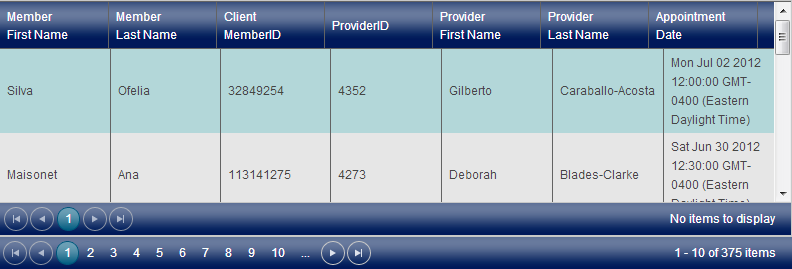
Does any one know how or why this could happen? Code Below.
View
@(Html.Kendo().Grid<AppointmentsDTO>()
.Name("divgrid")
.Columns(columns =>
{
columns.Bound(o => o.MemberFirstName).Title("Member<br/>First Name");
columns.Bound(o => o.MemberLastName).Title("Member<br/> Last Name");
columns.Bound(o => o.ClientMemberID).Title("Client<br/>MemberID");
columns.Bound(o => o.ProviderID).Title("ProviderID");
columns.Bound(o => o.ProviderFirstName).Title("Provider<br/> First Name");
columns.Bound(o => o.ProviderLastName).Title("Provider<br/> Last Name");
columns.Bound(o => o.AppointmentDate).Title("Appointment<br/> Date");
columns.Bound(o => o.IHAAppointmentID).Hidden(true);
})
.DataSource(dataSource => dataSource
.Ajax()
.Read(read => read.Action("ScheduledAppointments", "AppointmentScheduling")
.Data("additionalData")
//the name of the JavaScript function which will return the additional data
))
.Pageable()
.AutoBind(false)
.Scrollable()
)
JavaScript
$('#btnSearch').click(function () {
DoSearch();
});
function DoSearch() {
var grid = $("#divgrid").data("kendoGrid");
grid.dataSource.read();
}
function additionalData() {
return {
beginDate: $("#startDate").val(),
endDate: $("#finishDate").val()
};
}
Controller
[HttpPost]
public ActionResult ScheduledAppointments([DataSourceRequest]DataSourceRequest request, string beginDate, string endDate)
{
//calling service
var result = model.AppointmentList.ToDataSourceResult(request);
JsonResult jresult = GetJsonResult(result, true);
return jresult;
}
1 answer
119 views
Hello,
I'm not sure if this should be posted here or in a premium forum?
We have an MVC4 based web app we need to run in Android and IOS based browsers.
We are looking to use Kendo UI Mobile from our but need to ask a few questions?
I'm not sure if this should be posted here or in a premium forum?
We have an MVC4 based web app we need to run in Android and IOS based browsers.
We are looking to use Kendo UI Mobile from our but need to ask a few questions?
- Can we use the MVC4 Data Annotations built-in validation and optimize the MVC4 validation summary style for mobile?
- Can we use the MVC4 HtmlHelper ValidationSummary method?
- We do not want to use the Kendo UI validators. Can we instead use the validator script generated by the MVC4 runtime inspecting the Model attributes (ie Required, Range, etc)?
Will Kendo UI Mobile support what we are trying to do?
Thanks...Bob Baldwin
Trabon Solutions
Devcraft Complete Licensed Customer
Daniel
Telerik team
answered
on
14 Feb 2013
3 answers
380 views
Hello,
I have run into a problem when trying to use several ViewModels referencing the same model.
ViewModels and models are all ObservableObjects.
Please, consider the following simple example:
// observable for model
var model = kendo.observable({ mf: 0 });
// observables for two viewmodels
var vm1 = kendo.observable({ vmFld1: null });
var vm2 = kendo.observable({ vmFld2: null });
// set fields of both viewmodels to the same
// observable model
vm1.set("vmFld1", model);
vm2.set("vmFld2", model);
Both ViewModels bind CHANGE event handlers in ObservableObject.wrap() method.
They are added to the array of CHANGE event handlers of the model and are to be triggered when model field is changed.
E.g. like in the line of code below
// change the value of model field
vm1.set("vmFld1.mf", 1);
These event handlers are invoked in a loop of Observable.trigger() method.
But each event handler modifies the e.field in event argument e.
wrap: function(object, field, parent) {
var that = this;
…
(function(field) {
...
object.bind(CHANGE, function (e) {
e.field = field + "." + e.field;
that.trigger(CHANGE, e);
});
})(field);
...
}
It should work just fine for the case when we have a linear chain of nested ObservableObjects, but in my case it is rather a tree with single ObservableObject root. The second ViewModel gets incorrect "path" to changed field in CHANGE event handler.
In example above the first ViewModel gets "vmFld1.mf" in CHANGE event. Then it modifies the path in its handler and the second ViewModel vm2 gets incorrect path "vmFld2.vmFld1.mf".
As a result, vm2 does not refresh view when View-ViewModel binding is used.
I'm not sure if you already know about this and it might be even already fixed in latest version. But I can look only into available for download open source code which is of 2012.3.1114 version.
I very appreciate if you can resolve this issue. Thank you.
Daniel
Telerik team
answered
on
14 Feb 2013
1 answer
140 views
I have loaded the demo page: http://demos.kendoui.com/web/autocomplete/events.html and that works fine in IE9
I tried to duplicate a problem I was having using jsbin here:http://jsbin.com/uhamom/1/edit
I can't even type in the box.
What am I missing on why I can't even type in the box in IE? I don't see any script errors and I think I am loading everything correctly.
Ok, quick update on this: http://jsfiddle.net/jmann/MemJr/ I can get it to type (I'm guessing something with jsbin in IE)
Now that being said, when I have suggest: true and highlightFirst: true and I press enter it works great.
If I press enter for an entry that does not match, it launches some random button on the page. Weird?
I'm hoping it is just a return false or preventDefault issue. Any one else encountering this in IE only? (works great in Firefox and Chrome)
-me-
I tried to duplicate a problem I was having using jsbin here:http://jsbin.com/uhamom/1/edit
I can't even type in the box.
What am I missing on why I can't even type in the box in IE? I don't see any script errors and I think I am loading everything correctly.
Ok, quick update on this: http://jsfiddle.net/jmann/MemJr/ I can get it to type (I'm guessing something with jsbin in IE)
Now that being said, when I have suggest: true and highlightFirst: true and I press enter it works great.
If I press enter for an entry that does not match, it launches some random button on the page. Weird?
I'm hoping it is just a return false or preventDefault issue. Any one else encountering this in IE only? (works great in Firefox and Chrome)
-me-
Dimiter Madjarov
Telerik team
answered
on
14 Feb 2013
1 answer
135 views
hello,
i've inserted a new column field with grid.options.columns.push({title:"name", field:"field"}).
then i read the datasource and refresh the grid but nothing happens...
The new column field is defined in options.dataSoruce.schema.model.fields but not, at starting grid init , in the options.columns.
dataSource.transport is so defined: {read: { url: "aaa.json",dataType: "json" }}
i've inserted a new column field with grid.options.columns.push({title:"name", field:"field"}).
then i read the datasource and refresh the grid but nothing happens...
The new column field is defined in options.dataSoruce.schema.model.fields but not, at starting grid init , in the options.columns.
dataSource.transport is so defined: {read: { url: "aaa.json",dataType: "json" }}
Alexander Valchev
Telerik team
answered
on
14 Feb 2013








