or
1 answer
214 views
How to change the editor>insert link default web address content from "http://" to "https://"
See screenshot

Lyuboslav
Telerik team

answered
on
01 Nov 2022
0 answers
145 views
Hi!
There is a problem, when spreadsheet contains "ROW" or "COLUMN" function with self reference.
To reproduce this, open dojo:
https://dojo.telerik.com/IciGiroC
A3=OFFSET(A3, 1, COLUMN(A3)-1)
A4=1
A1=A3
What is expected: A1 value is 1
Actual result: A1 contains "#CIRCULAR"
Kendo UI Spreadsheet 2022.3.913
Ryabinin
Top achievements
 Rank 1
Rank 1
asked
on
01 Nov 2022
1 answer
200 views
Hi,
I have a data display problem, multi-column header error showing foreign key column as shown in attached video.
Can someone help me, many thanks.
The foreign key column property is declared as below:
        col.dataTextField = col.dataTextField ?? "text";
        col.dataValueField = col.dataValueField ?? "value";
        col.dataSource = {
            type: "json",
            transport: {
                read: function (options) {
                    ufn_ApiGetLookup({
                        data: col.source,
                        success: function (d) {
                            options.success(ufn_GetData(d));
                        }
                    });
                }
            }
}1 answer
164 views
Hello,
We have a diagram with layered layout, aligned to right. The diagram can have one or more root nodes.
The problem is that when we have multiple roots, we want to align them one under another, instead, if they are not very long, they are aligned to the right of each other.
Is there a way to achieve this alignment? We searched documentation but didn't find any specific property.
I attach images of how the diagram looks now and how we need it to look.
Thanks,
Iuliana
Nikolay
Telerik team
answered
on
27 Oct 2022
0 answers
255 views
I am using a boolean field in my kendo grid:
"activePin"
model: {
id: "id",
fields: {
accountId: { editable: false },
accountName: { validation: { required: true } },
operatorGroupName: {},
pinCode: { editable: false },
email: { },
cellPhone: { },
note: { },
activePin: { type: "boolean" },
eqpAccess: { editable: false },
}
}
The value of this field is set to true or false based on the value of a status field in the read data:
parse: function(response) {
for (var i = 0; i < response.length; i++) {
if (response[i].status === 'A') {
response[i].activePin = true;
}
else {
response[i].activePin = false;
}
}
return response;
},
The column in my grid displays correctly, and when the row is edited, correctly displays a checked checkbox
when true, and an unchecked checkbox when false.
In edit mode, if I check the checkbox and press update, the model data being sent to my transport Update or
Create functions is always false, regardless if the box is checked before clicking update.
Not sure what I am missing?

0 answers
455 views
Is there an equivalent in Kendo Spreadsheet for ScrollTo. I'm building a Time Sheet App and I want to set the current day, which is represented by a column, as the home column. Setting focus to the first row of the column is easy enough, but I would also like to scroll to that column if possible.
Daniel
Top achievements
Rank 1
 Iron
Iron
Rank 1
Iron
asked
on
26 Oct 2022
1 answer
266 views
When columns virtualization is activated, grouping rows automatically expand (if collapsed), when scrolling the grid content.
Using this JsFiddle, try to scroll the grid vertically to reproduce the bug.
Georgi Denchev
Telerik team
answered
on
25 Oct 2022
0 answers
161 views
Hi,
I'm trying to set the width of the column filed ( in the picture "organization Name") but the width of the item is not to the end of the row(only goes up to 15cm)
The solution I came up with is to set the two fields("organization Name" and "amount" ) width like following:
What can I do to make both columns length the same and the items inside the dropdown go all the way to the edges.
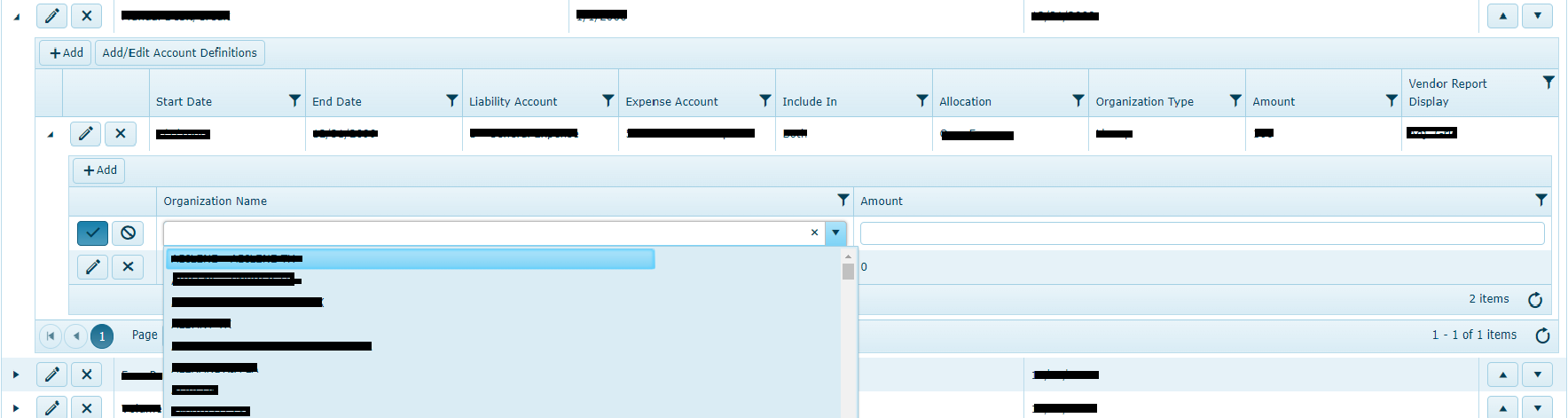
I'm trying to set the width of the column filed ( in the picture "organization Name") but the width of the item is not to the end of the row(only goes up to 15cm)
The solution I came up with is to set the two fields("organization Name" and "amount" ) width like following:
                    columns:
    [
        {
            field: "OrganizationName"//,
                                //width: "35%"
                            },
        {
            field: "Amount"//,
                                //width: "65%"
                            }
    ],
but the problem is that now "Organization Name" column is shorter than "Amount" column.What can I do to make both columns length the same and the items inside the dropdown go all the way to the edges.
Yishay
Top achievements
Rank 1
Rank 1
asked
on
25 Oct 2022
0 answers
138 views
We have a page with many spark lines, for example:
As the user hovers over the chart we have a toot tip display as you can see in the example above. The user can click any of the charts at the point that they want to drill into more detail. For example, in the example above the user has moved the mouse over the Corrective Work Orders spark line and then to the 16th week of 2022. The tooltip is telling the user there are 55 work orders in that week.
The problem: The click event is not always in line with the tool tip. In the above example what actually loaded was the data for week 17 (not 16). It's a very specific issue in that if you click in the top part of the chart it will always load correctly but if you click in the bottom 30% or so of the chart it seems quirky, sometimes it will load the correct week, sometimes the wrong one. You can see in the diagram the mouse cursor is behind the highlighter line at week 17 (I've circled that line in red), but the tool tip shows week 16. We could tell users "make sure you click in a perfectly vertical line to the highlighter line" but users do what user do and will expect the tooltip to be accurate to the detail they see when they click. The problem with this we give the wrong information and something bad happens. I tried setting absolute heights and widths because it was previously even worse and this got me to the 70% right vs 30% wrong situation I have now but I'd like to fix it.
Has anyone run into this previously and found a solution? Can anyone recommend any course of action to narrow down the issue further?
3 answers
159 views
hi,
I am trying to implement the following example
https://docs.telerik.com/kendo-ui/api/javascript/ui/orgchart/configuration/editable.fields
But it doesn't seem to work even on the website
Am I right?
I expect that after the implementation I will not be able to edit the fields shown in the edit popup.
Lyuboslav
Telerik team
answered
on
24 Oct 2022












