or
0 answers
133 views
I'm creating a window with the window service and setting a title. But then user selection may change and the contents of the window might change. I can get the instance of the component and change its inputs so the content of the window changes, but how do I change the title of the window without closing it and reopening a new window with a different title?




1 answer
185 views
So far our library structure was that we create libraries which use kendo and those libraries use scss kendo variables. However since we updated to angular 15 and the latest kendo libraries those things don't work anymore.
When we troubleshoot those things we get several errors, first the variable names are completly missing from the file. However even when we remove those and rename the ones which are renamed its still not working saying that inside _variables.scss kendo requires e.g. (look image below) some undefined variable.
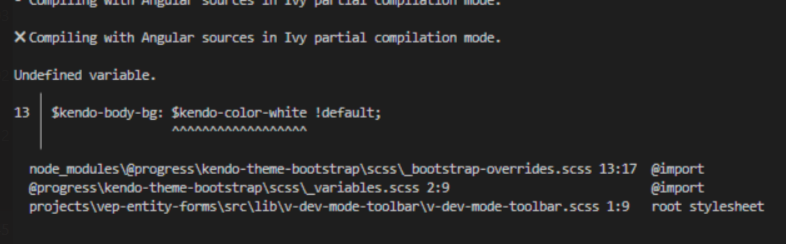
This might be a angular problem that angular should allow building libraries even when scss variables are missing, cause inside the root app we will import all scss which is required to make those things build?
OR
There are some new changes in kendo and we arent aware of them. Is there any tutorial on the docs explaining how to build other libraries and use kendo themes e.g. bootstrap to then overwrite default kendo style?
Please if possible provide detailed informations cause we really don't get futher with this.
OR
Maybe now you have split up that theme library into multiple ones and we need to install a new library and import the scss? However we would still like to maybe just use variables and let the root app provide the scss properly.
When we troubleshoot those things we get several errors, first the variable names are completly missing from the file. However even when we remove those and rename the ones which are renamed its still not working saying that inside _variables.scss kendo requires e.g. (look image below) some undefined variable.
This might be a angular problem that angular should allow building libraries even when scss variables are missing, cause inside the root app we will import all scss which is required to make those things build?
OR
There are some new changes in kendo and we arent aware of them. Is there any tutorial on the docs explaining how to build other libraries and use kendo themes e.g. bootstrap to then overwrite default kendo style?
Please if possible provide detailed informations cause we really don't get futher with this.
OR
Maybe now you have split up that theme library into multiple ones and we need to install a new library and import the scss? However we would still like to maybe just use variables and let the root app provide the scss properly.

Stoyan
Telerik team

answered
on
16 Mar 2023
0 answers
884 views
Hello,
I am generating a template that contains a dynamic button panel, and I need to assign a click event to an <a> element within a dynamically generated <li> list. I get the values from a Json object.
The function value of each element of the list comes from a Json object value (fieldChildren.action), but when trying to assign the event (click)="fieldchildren.action", it is not being created correctly.
Please help me with some indication in this regard.
I am using kendo multistep form with angular 15
<ul ngbDropdownMenu id="addoptions" aria-labelledby="Button_Add" class="dropdown-menu">
<li *ngFor = "let campoChildren of campodisplay.children">
<a class="dropdown-item" (click)="campoChildren.action">{{campoChildren.name}}</a>
</li>
</ul>


0 answers
239 views
We have a problem whereby the paging dropdown is displaying the number list dropdown on all views:
Does anyone have any suggestions as to what might be happening here? I assume the dropdown should only display on small screens, not on large.
2 answers
1.2K+ views
I have multiple grids in a view and when the user drags on the scrollbar of one grid I want it to automatically scroll the other grids exactly the same amount up or down.
So in my ngAfterViewInit() method I have the following:
document.querySelector(".k-grid .k-grid-content").addEventListener("scroll", (e) => {
console.log('scroll event', e);
}
The idea is that I can then capture this event and pass it to the other grids so they can scroll too. However this isn't working as the event listener doesn't fire. Can you suggest a way to make this work?
0 answers
154 views
Following example is what we don't want
We have 2 series a and b, one of them renders one y-axis the other is supposed to render another. We would like to have the min and max of the axis based on the series which is linked to it.
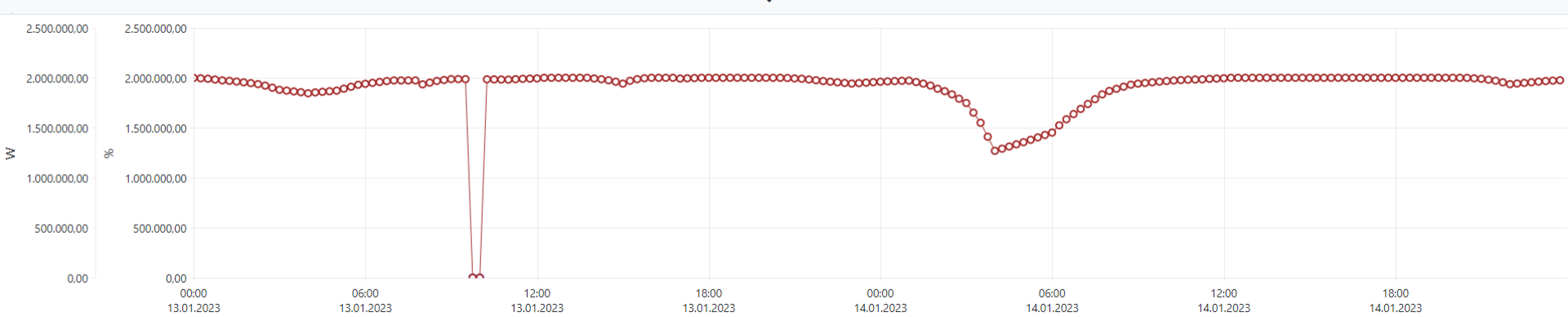
In the above example we would like one y-axis to start from 0-10 and the other from 0-10000.
The points should be displayed on the chart relative to the y-axis they belong.
We have 2 series a and b, one of them renders one y-axis the other is supposed to render another. We would like to have the min and max of the axis based on the series which is linked to it.
In the above example we would like one y-axis to start from 0-10 and the other from 0-10000.
The points should be displayed on the chart relative to the y-axis they belong.
0 answers
252 views
cssClass not working in kendo-menu-item (cssStyle works)
HTML:
<kendo-menu>
<kendo-menu-item text="1" cssClass="x">
<kendo-menu-item text="1.1"></kendo-menu-item>
<kendo-menu-item text="1.2"></kendo-menu-item>
</kendo-menu-item>
</kendo-menu>LESS:
.x {
background-color: red;
}Module:
import { MenusModule } from '@progress/kendo-angular-menu';
const telerikModules = [
...
MenusModule,
...
];
@NgModule({
imports: telerikModules,
exports: telerikModules,
})
export class TelerikModule {
}
0 answers
294 views
I'm trying to check if there are any changes in a form so that I can warn the user of changes, but when setting the model and binding a null value to the MaskedTextbox it changes it to an empty string and the user gets the message that something has changed. Is there a way to prevent the MaskedTextbox from doing that?
Pablo
Top achievements
 Rank 1
Rank 1
asked
on
11 Mar 2023
1 answer
181 views
Hello,
I am using a TreeList with a custom cell editor defined in a kendoTreeListEditTemplate. In my code I'm switching between different editors for different scenarios, but here's a basic example with just one:
        <ng-template kendoTreeListEditTemplate
             let-column="column"
             let-formGroup="formGroup">
             <kendo-numerictextbox [formControl]="formGroup.get(column.field)" [spinners]="false"></kendo-numerictextbox>
        </ng-template>
I am using the TreeListComponent.editCell function to edit the cell. Right now, the text box is not being focused, so the user has to click an additional time in order to start entering data.
How would I get the TreeList to automatically focus the editor when editCell is called?
0 answers
281 views
Hello,
I'm trying to write a custom ToolBar ToolComponent with unit tests - using Angular 15.2.1 with jasmine.
My simplified component code:
import { Component, ElementRef, forwardRef, Input, TemplateRef, ViewChild } from '@angular/core';
import { ToolBarComponent, ToolBarToolComponent } from '@progress/kendo-angular-toolbar';

@Component({
  template: `
    <ng-template #toolbarTemplate>
      <span #toolbarElement>
        <h4>{{ text }}</h4>
      </span>
    </ng-template>
  `,
  providers: [{ provide: ToolBarToolComponent, useExisting: forwardRef(() => ToolbarTitleComponent) }]
})
export class ToolbarTitleComponent extends ToolBarComponent {
  @Input() text = '';
  @ViewChild('toolbarTemplate', { static: true })
  public toolbarTemplate!: TemplateRef<unknown>;
  @ViewChild('toolbarElement', { static: false })
  public toolbarElement!: ElementRef;
}
with corresponding .spec file
import { ComponentFixture, TestBed } from '@angular/core/testing';
import { LocalizationService } from '@progress/kendo-angular-l10n';
import { RefreshService, ToolBarModule } from '@progress/kendo-angular-toolbar';

import { ToolbarTitleComponent } from './toolbar-title.component';

describe('ToolbarTitleComponent', () => {
  let component: ToolbarTitleComponent;
  let fixture: ComponentFixture<ToolbarTitleComponent>;

  beforeEach(async () => {
    await TestBed.configureTestingModule({
      declarations: [ToolbarTitleComponent],
      providers: [
        { provide: LocalizationService, useValue: LocalizationService },
        { provide: RefreshService, useValue: RefreshService }
        // { provide: NavigationService, useValue: NavigationService } // <--- this doesn't work, even when trying to use a spy object
      ],
      imports: [ToolBarModule]
    }).compileComponents();

    fixture = TestBed.createComponent(ToolbarTitleComponent);
    component = fixture.componentInstance;
    fixture.detectChanges();
  });

  it('should create', () => {
    expect(component).toBeTruthy();
  });
});
When trying to run the test, I get the following error (which is expected, since I'm not providing the navigation service in the spec):
NullInjectorError: R3InjectorError(DynamicTestModule)[NavigationService -> NavigationService]:
  NullInjectorError: No provider for NavigationService!
Unfortunately, the NavigationService does not seem to be exported from the package definition so I don't think there's an injection token being generated by Angular, and I cannot figure out how to properly provide the NavigationService to the TestBed so my test can run without bombing.
Is there a way to do this to enable me to test these types of components?


