or
1 answer
248 views
I'm struggling to find a way to display 2 different measures in the Angular Pivot Grid at the same time.
When I provide multiple measures, it appears to just aggregate both values together. One is supposed to represent a dollar amount, and the other is the number of hours worked.
  public measures: Measure[] = [
    {
      name: 'Cost',
      value: (item) => item.GpCosts,
      aggregate: sumAggregate,
    },
    {
      name: 'TotalHours',
      value: (item) => item.TotalHours,
      aggregate: sumAggregate,
    },
  ];
It looks like this behavior is available on the JQueryUI version of the grid. I'm not sure what I'm missing, configuration wise on the Angular one.

Yanmario
Telerik team

answered
on
07 Feb 2024
1 answer
105 views
Hello!
Can I to create footer for entire kendo angular data grid (not for column)?
I need to add additional control between grid 's data and grid's pager control.
Maybe I can create my own custom pager control in two lines, but I haven’t found how to do it.
<ng-template kendoPagerTemplate> - arranges controls in one line.



1 answer
623 views
Hello,
we work in angular and typescript.
I need to make a button who reset all control in the form to empty value.
How I can clear the value of kendo-datepicker ?
When we load the the form the kendo-datekiper is blank (like the sampe https://www.telerik.com/kendo-angular-ui/components/dateinputs/datepicker/)
A user select a date. If the user clear manually the date all work.
I need the code for reset the value kendo-datepicker to "bank" ? null? undefined?
I have tried woth the binding of the value properties.
variable:
dt_value!: Date;
<kendo-datepicker [(value)] = "dt_value" > </kendo-datepicker>
But if I set variable dt_value to undefined I receive an error.
Thanks for any help.
LSo

Zornitsa
Telerik team
answered
on
06 Feb 2024
1 answer
321 views
Is it possible to import/export a CSV file format with the Spreadsheet component?

Martin Bechev
Telerik team
answered
on
06 Feb 2024
0 answers
99 views
Hello,
I would like to know if this is expected behavior, if I have to possibly adjust my code, or if this is a bug.
The issue is when typing and selecting a font family or size and then selecting the left button of the color gradient or background the style will get reset to the default values for font family and style. Or, maybe this is due to the underlying ProseMirror change in node.
Please see my ScreenPal for demonstration of the issue.
Thank you for your help.
Stephanie
Top achievements
 Rank 1
Rank 1
updated question
on
05 Feb 2024
1 answer
131 views
Hi, we're currently using the TreeList and we've encountered an issue... while trying to edit a cell of a column named with a dot inside as "AR32.2" for example... the edit input doesn't show up
Could you help us with this case, please? :D
Thank you,
Uscatu Cosmin
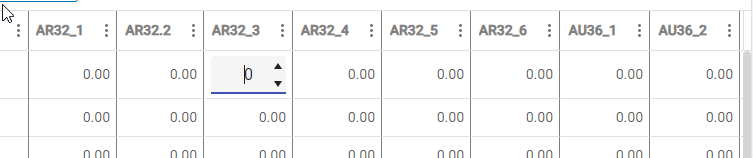
Could you help us with this case, please? :D
Thank you,
Uscatu Cosmin
Zornitsa
Telerik team
answered
on
05 Feb 2024
0 answers
132 views
I am currently using the DatePicker component, and I have already localized it to zh-Hant using i18n.
However, I have encountered a specific issue and would appreciate your professional assistance.
The current display of dates in the DatePicker shows the AD (Anno Domini) year, but I wish to convert it to the ROC year format for Taiwan . According to the ROC calendar system, this involves subtracting 1911 from the AD year to obtain the corresponding ROC year.
As an example, for the AD year "2023," I would like the displayed format to be "112."
Could you please advise me on how to achieve this specific date format adjustment while using the DatePicker component?
I look forward to your guidance and suggestions. Thank you!
Carol
Top achievements
Rank 1
Rank 1
asked
on
05 Feb 2024
0 answers
94 views
Hi,
currently I'm adding some extra function to the kendo grid. Within this I also add some styles to table cells. But if editing is allowed, after cell closing the added styles are disappearead, because the internal logic of the grid somehow refreshes the entire row.
So, the question is, how can I avoid this? Or is there some event, to which I can subscribe? Note, that I'm already subscribed to the cellClose event. Of course I can prevent the cell from closing, but then the cell remains edited.
0 answers
300 views
PDFViewer is showing images rotated on some of our systems. On this particular user it shows up rotated on Chrome, Edge, and Firefox. This is happening on at least 2 computers. When they open the PDF directly, the native browser view shows the PDF in the correct orientation. I don't see a rotation function in the API. Fortunately (or unfortunately?), this isn't happening on every system. I'm at a loss to what's happening.
0 answers
429 views
I've been using the SheetJS CE library for importing and exporting XLSX files.
However the public library is having some issues (issue 1 and issue 2 [amongst others...]) and we want to move away from it.
I see that Kendo has a fairly new component called "Spreadsheet" which appears to be able to do what I need.
However I'm not sure the API features I'm interested in are public, or I'm having trouble finding them.
If this is already possible can someone point me to it? If not, then I'm asking the Kendo Angular team to add the feature (to the public API).
Here's what I need to do:
- User uploads an xlsx file via a regular Kendo FileSelector
- In the code I need to be able to see and manipulate the data as JSON, navigate sheets, rows and columns
- Load it into a Kendo grid for viewing (this is more of an example, not really something I can't figure out what to do)
and
- Given a "properly formed/typed" JSON object (e.g. Kendo Grid data that the user manipulated)
- Be able to export (allow user to download) the data as an xlsx file
Thanks!

Sergey
Top achievements
Rank 1
Rank 1
asked
on
02 Feb 2024






