Rename Invalid P3P Headers
Updated on Oct 5, 2026
- Install the Privacy Scanner Fiddler Classic add-on.
Fiddler Classic will gain a new top-level menu named Privacy.
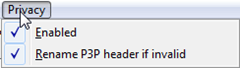
- Ensure Privacy > Enabled and Privacy > Rename P3P header if invalid are checked.
Now, if a session presents a P3P statement that is malformed, that P3P header will be renamed to Malformed-P3P to prevent the browser from interpreting it as the P3P 1.0 specification suggested (for example, ignoring the unknown tokens).