Overview
Telerik Document Processing includes the RadSpreadStreamProcessing library for importing and exporting large spreadsheet files with a low memory footprint. Use the SpreadExporter and SpreadImporter APIs to process XLSX and CSV documents sequentially. The library has no dependency on Microsoft Excel, Microsoft Office, or third-party UI components.
To skip this introductory article, see how to get started with RadSpreadStreamProcessing.
If you do not yet have Telerik Document Processing installed, see the first steps for installation.
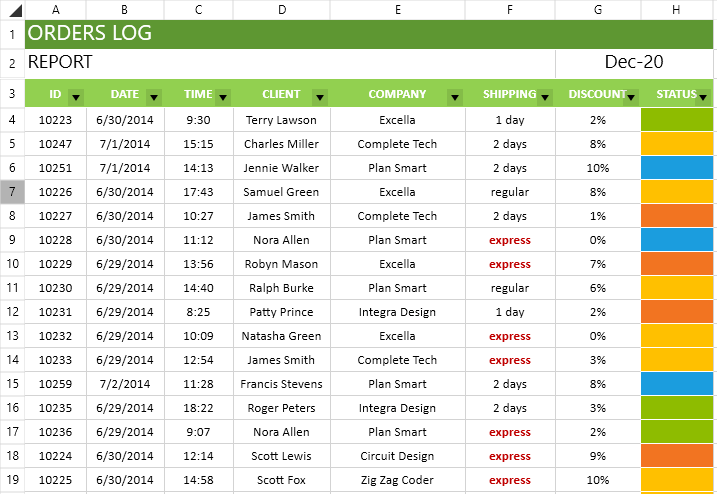
You can find the code sample from the previous image in the Document Processing SDK repository on GitHub.
What Is Spread Streaming
Spread streaming is a document-processing approach that lets you create or read large spreadsheet documents with high performance and low memory use.
The library saves memory by writing spreadsheet content directly to a stream instead of keeping a full workbook model in memory. Exporters write content as you create worksheets, rows, and cells, and finalize the file when you dispose them.
During import, RadSpreadStreamProcessing parses only the required data chunk. This approach helps keep CPU and memory use low.
Key Features
The library supports the following features:
-
Generate large XLSX and CSV documents (1M+ rows).
-
Create documents from scratch, or append worksheets to existing workbooks.
-
Write directly to a stream, or read only the required data.
-
Use less memory than RadSpreadProcessing for large-file scenarios.
-
Append new worksheets to an existing workbook.
-
Grouping: Organize data in sections, and show or hide the relevant ranges.
-
Hidden rows and columns: Set the hidden state of each row or column.
-
AutoFilter: Show or hide rows based on column values.
AutoFiltersupports value, custom comparison, top or bottom N, and dynamic date filters. -
Cell formatting: Apply the required appearance to cells.
-
Cell styles: Apply multiple format options in one step and keep formatting consistent.
-
Merge cells: Merge adjacent cells across multiple rows and columns.
You can also control the view state of a sheet:
- Set the scale factor.
- Control the selection and active cell.
- Show or hide gridlines.
- Show or hide row and column headers.
- Freeze panes to keep part of the worksheet visible while scrolling.
- Change the first visible cell to control the part of the sheet that appears when a viewer opens the document.
RadSpreadStreamProcessing versus RadSpreadProcessing
The main differences between the two spreadsheet processing libraries include:
RadSpreadStreamProcessingwrites directly to a stream, while RadSpreadProcessing builds an in-memory document model. As a result, the streaming library uses much less memory.- RadSpreadStreamProcessing does not run formula or layout-related calculations, so file generation is faster than with RadSpreadProcessing.
When to Use RadSpreadStreamProcessing
Use the RadSpreadStreamProcessing library when you need to create or read large datasets with low memory use. You can also append data to an existing document stream. Export the generated document directly to a file or stream, for example, to send it to a client.
Online Demos
The following demos show common RadSpreadStreamProcessing scenarios:
| Demo | Description |
|---|---|
| SpreadStreamProcessing Large Document Export | With the SpreadStreamProcessing APIs, you can generate large XLSX and CSV files. |
| SpreadStreamProcessing Import Document | This example shows how you can retrieve data from XLSX or CSV files using the SpreadStreamProcessing library. |