Prerequisites
Optical Character Recognition (also known as OCR) is the electronic or mechanical conversion of images of typed, handwritten, or printed text into machine-encoded text from a scanned document.
This topic describes the requirements for the PdfProcessing library to use OcrFormatProvider.
The default Tesseract implementation is at this point Windows and Linux-only. You can still use the OCR feature with a custom implementation.
Used images must be 300 DPI for best results.
Required Packages
To use OcrFormatProvider, add the following packages:
| .NET Framework | .NET Standard-compatible |
|---|---|
| Telerik.Windows.Documents.Core | Telerik.Documents.Core |
| Telerik.Windows.Documents.Fixed | Telerik.Documents.Fixed |
| Telerik.Windows.Documents.Fixed.FormatProviders.Ocr | Telerik.Documents.Fixed.FormatProviders.Ocr |
| Always add this reference as a NuGet package. It adds the required Tesseract references and files automatically. Otherwise, a manual setup might be required. | |
| Telerik.Windows.Documents.TesseractOcr | Telerik.Documents.TesseractOcr |
| To export images different than Jpeg and Jpeg2000 or ImageQuality different than High, add a reference to the following assembly: | |
| - | Telerik.Documents.ImageUtils |
| - |
SkiaSharp
Telerik.Documents.ImageUtils depends on SkiaSharp. |
| - |
SkiaSharp.NativeAssets.* (version 3.119.1)
May differ according to the used platform. For Linux (starting with Q2 2025) use SkiaSharp.NativeAssets.Linux.NoDependencies and execute the required commands. |
| - |
SkiaSharp.Views.Blazor and wasm-tools
For Blazor Web Assembly. |
Verify that all Tesseract dependencies are properly set up.
Language Data Setup
Create a "tessdata" folder and populate it with the desired languages. The languages are in the form of .traineddata files and are crucial for Tesseract OCR because they contain the machine learning models that Tesseract uses to recognize text. English (eng.traineddata) is always required by default. You can download the language data files from the official Tesseract GitHub repository. Results may vary depending on the language version:
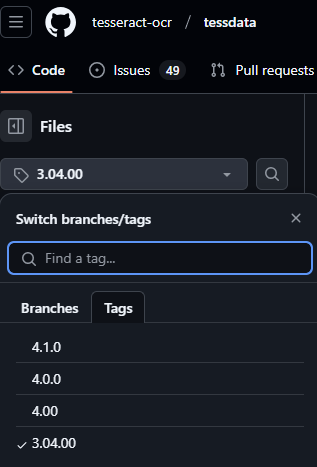
The "tessdata" folder placement is determined by the user. The DataPath property of the TesseractOcrProvider points to the parent folder that contains "tessdata", which allows the provider to locate and use it.
"tessdata" Structure:
tessdata
├── due.traineddata
├── eng.traineddata
└── spa.traineddata
Manually Set Up the Tesseract Native Assemblies
Verify that the following files exist in the root directory of your project:
-
The
Tesseract.dllassembly. -
The Tesseract native assemblies (x86, x64):
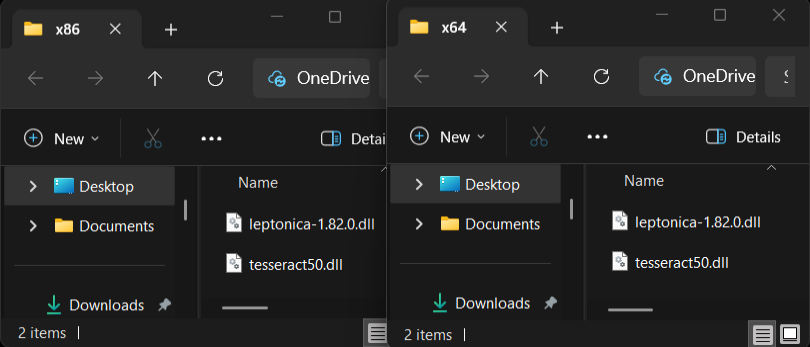
If these requirements are not met, go through the following steps:
- Download the
tesseract50.dllandleptonica-1.82.0.dllnative assemblies from the listed links: - Create the following structure and add the two folders to the root of the application.
- Folder Structure:
plaintextRootFolder ├── x64 │ ├── tesseract50.dll │ └── leptonica-1.82.0.dll └── x86 ├── tesseract50.dll └── leptonica-1.82.0.dll
Linux-Specific Steps
Execute the following commands in the environment:
| Ubuntu | Alpine | Fedora |
|---|---|---|
sudo apt update | sudo apk update | sudo dnf install tesseract |
sudo apt install tesseract-ocr | sudo apk add tesseract-ocr | sudo dnf install leptonica |
sudo apt install libleptonica-dev | sudo apk add leptonica |
If the generated tesseract/leptonica .so files cannot be found, they were likely installed with different names than expected. Copy their names and location, and set them to the corresponding properties:
TesseractEnvironment.TesseractUnixLibNameTesseractEnvironment.LeptonicaUnixLibNameTesseractEnvironment.CustomSearchPath