Welcome to Progress Control Panel
Progress Control Panel is a standalone desktop application for Windows that enables developers to install, monitor, and manage their Telerik products and license key. It requires authentication with a Telerik account.
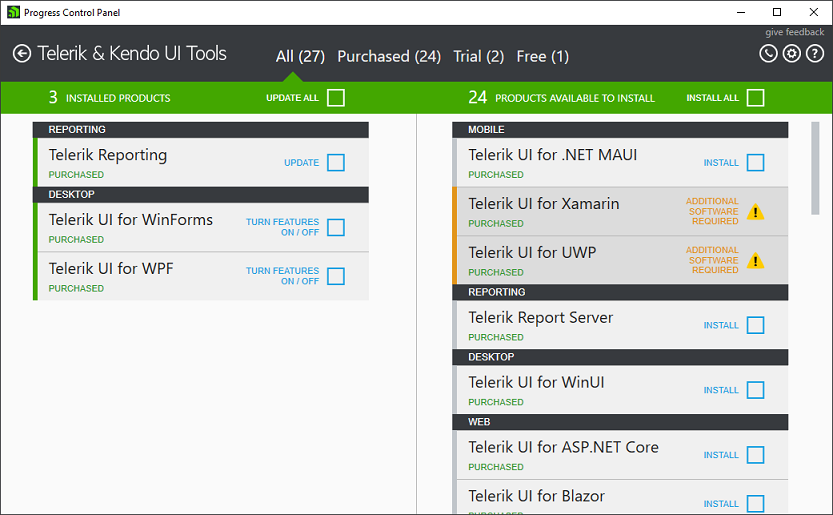
Key Features
-
Install, uninstall, or repair Telerik products
-
Update installed Telerik products
-
Manage licenses
Supported Products
The Control Panel allows developers to manage the installation and updates of a wide range of Telerik products, including UI components, developer tools, and platform-specific solutions for web, desktop, and mobile applications.
| Supported Product | Documentation |
|---|---|
| Kendo UI for jQuery | UI for jQuery documentation |
| Telerik Reporting | Telerik Reporting documentation |
| Telerik Report Server | Telerik Report Server documentation |
| Telerik UI for .NET MAUI | UI for .NET MAUI documentation |
| Telerik UI for ASP.NET AJAX | UI for ASP.NET AJAX documentation |
| Telerik UI for ASP.NET Core | UI for ASP.NET Core documentation |
| Telerik UI for ASP.NET MVC | UI for ASP.NET MVC documentation |
| Telerik UI for Blazor | UI for Blazor documentation |
| Telerik UI for Xamarin | UI for Xamarin documentation |
| Telerik UI for WinForms | Installing WinForms from Progress Control Panel |
| Telerik UI for WPF | Installing WPF from Progress Control Panel |
| Telerik UI for WinUI | UI for WinUI documentation |
Getting Support
For any issues you might encounter while working with Progress Control Panel, use any of the available support channels:
-
Commercial Telerik license holders and active trialists can take advantage of our outstanding customer support delivered by the developers of the application. To submit a support ticket, use the Telerik dedicated support system.
-
The Progress Control Panel forum is a part of the free support you can get from the community and from the Telerik team on all kinds of general issues.
-
The Progress Control Panel feedback portal provides information about the planned new features and lets you vote for those you need. It also allows you to submit bug reports.
Improving the Progress Control Panel Documentation
We believe that the documentation for a product is at its best when the content is a collaboration between the developers and consumers of that product. We encourage you to help us in the way that you choose:
-
Create a pull request on GitHub—If you find an issue in the docs or even feel like creating new content, we'd be happy to have your contributions! Just fork our documentation, make your changes using standard markdown, and submit a pull request.
-
Submit a new issue on GitHub—If you find an issue with our docs, let us know is by creating an issue in our Github repository. When creating an issue, please provide a descriptive title, be as specific as possible and link to the documentation in question. If you can provide a link to the closest anchor to the issue, that is even better.