AI Crash Course: Prompt Engineering

Summarize with AI:
AI models function more like they’re completing a transcript than holding a conversation. Providing plenty of context in our prompts helps them output the results we’re actually looking for.
Prompting is the primary way we provide input to AI models. When we need a model to generate something for us, we begin the process by prompting it with a plain-language request to complete the task. When we’re having simple, back-and-forth personal exchanges with conversational models, our prompts can be extremely casual—sometimes even identical to the way we’d talk to another human being!
However, when we’re considering generative AI in the context of a feature we’re adding to our applications, casual prompts will no longer suffice. To leverage AI in production applications, the results need to be 1) relatively consistent and 2) formatted in an expected, parseable structure. If a user asks the same question twice, the output should be similar both times. If our frontend was built to map over a JSON object, we don’t want the model to output markdown.
Because AI models are non-deterministic by nature, even the most perfect, precise prompt cannot prevent the occasional hallucination or error. However, prompt engineering is one of our most effective and accessible tools for getting a model to behave in the way we would like.
Why Engineer Prompts?
In the 2020 paper Language Models are Few-Shot Learners, Brown, et al. demonstrate that GPT-3 is able to successfully leverage in-prompt demonstrations (or “shots”) to perform tasks it was not explicitly trained to complete.
This approach is known as “in-context learning.” The team tested the model with “zero-shot” (only the instruction), “one-shot” (one demonstration) and “few-shot” prompts (in the case of this study, 10-100 demonstrations, depending on available context—but worth noting that the term “few-shot” prompting today generally only refers to the inclusion of 2-10 demonstrations).
As we can see in the chart below, they prove that, “While zero-shot performance improves steadily with model size, few-shot performance increases more rapidly, demonstrating that larger models are more proficient at in-context learning.”
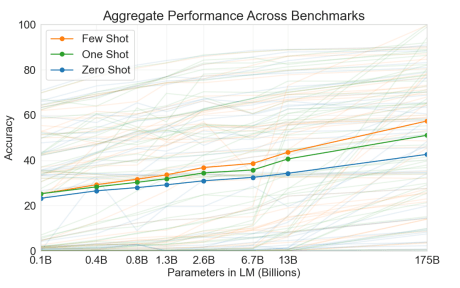
The important takeaway from this study for us is that, by using this approach, they were able to achieve results with non-finetuned models that were on par or exceeding the results from finetuned models.
Models have, of course, advanced since the writing of this paper—it’s no longer entirely accurate to say that prompt engineering alone will offer equivalent results to finetuning (or other newer techniques, like RAG). However, it is still fair to say that if we engineer our prompts, we will achieve noticeably high-quality results. Depending on our project goal and budget, that may be good enough.
The Structure of a Well-Engineered Prompt
As of the time of this writing, there’s a common structure that has emerged as a best practice approach for prompt engineering: role + task + format + example.
Prompts that include at least one of each of these pieces tend to perform better than prompts that do not—although there has been some documented difference between the models as to which order is preferable. For example, one model might do better when the task is the first thing listed, another when the task is last. Experimenting with your model of choice to see what gets the best results is still a required aspect of the prompt engineering process.
If you’re totally new to prompt engineering and would like a deeper dive into that structural method, you might enjoy Understanding the Architecture of a Prompt, which explains in greater detail how to most effectively write each part.
To look at a sample prompt using this structure, this is the system prompt from a playlist generating app I built with my fellow Progress DevRel (and friend) Alyssa Nicoll:
const SYSTEM_PROMPT =You are a music recommendation assistant.
Given a user's prompt (mood, activity, genre, era, etc.), return a JSON object with a "tracks" array that includes at least 10 tracks.
Each track must have: title (string), artist (string), album (string), release year (number), confidence ranking for how well this song fits the prompt (number 0-100), one sentence explaining why this song fits the prompt (string). Return an error for unusable prompts: offensive content, gibberish, or explicitly impossible requests. Otherwise always try to generate recommendations. Return ONLY valid JSON, no markdown or explanation.
Example success: {"tracks":[{"title":"Song Name","artist":"Artist Name","album":"Album Name","year":2020,"confidence":92,"reason":"The driving rhythm and anthemic chorus perfectly match the high-energy workout vibe."}]}``;As we do in that example, you may also find it helpful to think about the “system prompt” and the “user prompt” separately. In fact, many model APIs offer these as distinct inputs. The system prompt is intended to specify the context and description for the task, while the user prompt contains the task itself.
In the playlist generator example, you’ll note that the end user’s input (the actual genre, mood, etc. that the model is meant to generate the playlist around) is not included. In this case, the system and user prompts get passed in via the OpenAI API under separate system and user roles.
const completion = await openai.chat.completions.create({
      model: "gpt-4o-mini",
      messages: [
        { role: "system", content: SYSTEM_PROMPT },
        { role: "user", content: prompt.trim() },
      ],
      temperature: 0.7,
    });
Why Does Prompt Engineering Work?
While it’s helpful to know best practices, as developers it often serves us better to know the “why” behind the methodology. In this case, why does a prompt that’s engineered like the one above perform better than a prompt that just says, “Recommend 10 songs based on the user’s input and format it as a JSON object”?
Mostly, it has to do with how models work at a high level. Prompts tend to be more successful when they mirror the types of data that the model was trained on.
For now, what’s most important to remember is that AI models are—at their core—document completion machines. Early AI models (before the chat interface became popular) didn’t “respond” to a prompt, they just continued them. So if my prompt was “Mary had a little,” the LLM would likely return “lamb” to complete the line. If you haven’t read the Tokens, Predictions and Temperature article from earlier in this series, I’d encourage you to go give it a quick skim—it explains that prediction process in more detail.
Even the chat models we’re so familiar with today are still doing exactly this. They’ve just been trained on transcripts of conversations, so they can “understand” the patterns of a back-and-forth exchange. When we interact with a conversational AI (like ChatGPT or Claude), the API is just wrapping our inputs (and its own outputs) in the structure of a transcript, so that the LLM can process them together in a structured context—like a document. This allows it to leverage its prediction mechanisms in order to “complete” that document. To the user, it feels like having a real conversation. To the LLM, it’s more like we submitted a half-finished play script and asked it to generate the rest for us.
There is, admittedly, very little functional difference between thinking that a model is conversing with us vs. understanding that it’s completing our conversational transcript. However, making that mental shift can help us shape our prompts more effectively.
Often, when we think about NLP, we assume it means that because a computer can understand our “natural” language, we can instruct it in the same way we would another human. While it’s true that we can use natural language—as in words and sentences instead of code—the LLM is not going to process our request like a human would. Instead, it’s going to insert our prompt as the most recent line in its script, and attempt to continue the script to the best of its ability, based on all the other sample scripts it was trained on.
By phrasing our requests like the samples in the training data and giving it as much context as possible directly in the prompt, we can enable it to make better, more accurate completions.
Next up: Join us in the ever-evolving AI Crash Course: Jailbreaking, Prompt Extraction and Bad Actors.

Kathryn Grayson Nanz
Kathryn Grayson Nanz is a developer advocate at Progress with a passion for React, UI and design and sharing with the community. She started her career as a graphic designer and was told by her Creative Director to never let anyone find out she could code because she’d be stuck doing it forever. She ignored his warning and has never been happier. You can find her writing, blogging, streaming and tweeting about React, design, UI and more. You can find her at @kathryngrayson on Twitter.
Related Posts
Comments
All articles
Topics
Web MobileMobile
Desktop
Design
Productivity
People