Creating a RadGrid Programmatically
This help article describes two options for creating a RadGrid instance dynamically, and provides code examples.
-
You can declare the RadGrid control in the ASPX file and define its structure in the code-behind.
-
You can create the RadGrid entirely in the code-behind.
This article demonstrates how to create and configure the RadGrid control programmatically on the code-behind, given that the data source structure will remain the same. If you want to dynamically change the columns of the grid depending on user selection or some dynamic condition (remove or add columns with different DataFields than the initial loaded structure), this might mess up the ViewState. For this scenario, please refer to the next Changing the Grid Structure Dynamically on Postback article.
When defining the structure of a hierarchical grid (by either method), you should follow these rules:
-
Create the GridTableView objects for every detail table. You do not need to create an object for the MasterTableView of the grid, as this is created automatically when the RadGrid itself is created.
-
Add each detail table to the DetailTables collection of its parent table.
-
Ensure that each table in the grid has its own data source.
-
If you are using declarative data sources, set the DataSourceID property of each table to the ID of a DataSource object. For each parent table, set the DataKeyNames property to an array containing the names of each field in the table's data source that is used to link to detail tables. For each detail table, add GridRelationFields objects to the ParentTableRelation collection, each of which specifies a link between a field in the detail table to a field in the DataKeyNames array of the parent table.
-
If you are not using declarative data sources, add event handlers for the NeedDataSource and DetailTableDataBind events. In the DetailTableDataBind event handler, you can determine which data source should be related to the current table view by checking whether the GetDataKeyValue method of the detail table's ParentItem returns a value.
-
Hierarchical structure is not supported with simple data binding (calling DataBind()).
Dynamically Defining the Structure of a Statically-declared Grid
To define the structure of a RadGrid control that is declared in the ASPX page, use the Page_Load event handler. Columns and detail tables should be added to the corresponding collection first, before the values for their properties are set. This is important because no ViewState is managed for the object before it has been added to the corresponding collection.
Be sure to check that IsPostBack is False . Otherwise, you will end up adding the same objects to the RadGrid multiple times.
<telerik:RadGrid RenderMode="Lightweight" ID="RadGrid1" runat="server" />
<asp:SqlDataSource ID="SqlDataSource1"
      ConnectionString="<%$ ConnectionStrings:NorthwindConnectionString %>"
      ProviderName="System.Data.SqlClient"
      SelectCommand="SELECT * FROM Customers" runat="server"></asp:SqlDataSource>
<asp:SqlDataSource ID="SqlDataSource2"
      ConnectionString="<%$ ConnectionStrings:NorthwindConnectionString %>"
      ProviderName="System.Data.SqlClient"
      SelectCommand="SELECT * FROM Orders Where CustomerID = @CustomerID" runat="server">
      <SelectParameters>
            <asp:SessionParameter Name="CustomerID" SessionField="CustomerID" Type="string" />
      </SelectParameters>
</asp:SqlDataSource>
<asp:SqlDataSource ID="SqlDataSource3"
      ConnectionString="<%$ ConnectionStrings:NorthwindConnectionString %>"
      ProviderName="System.Data.SqlClient"
      SelectCommand="SELECT * FROM [Order Details] where OrderID = @OrderID" runat="server">
      <SelectParameters>
            <asp:SessionParameter Name="OrderID" SessionField="OrderID" Type="Int32" />
      </SelectParameters>
</asp:SqlDataSource>RadGrid does not support mixing declarative grid columns with grid columns added dynamically at runtime. You should either create all the columns in the grid programmatically, or else define them all in the ASPX file.
Creating columns in the Page_Load event handler does not work for template columns. For the controls inside a template to persist their ViewState , the grid must be generated completely in the code-behind using the Page_Init event (see below). That way, template controls are instantiated before the LoadViewState event of the page.
Creating the Grid Entirely in the Code Behind
When generating a RadGrid instance entirely in code, you should use the Page_Init or Page_Load event handlers.
Creating a RadGrid on Page_Load
When creating a RadGrid on a Page_Load event, the columns or detail tables should be added to the corresponding collection first and then values for the properties of this instance should be set.
Properties are set only at initial load, while event handlers are attached on every postback.
<asp:PlaceHolder ID="PlaceHolder1" runat="server"></asp:PlaceHolder>Creating a RadGrid on Page_Init
When generating a grid in the Page_Init event handler, grid columns should be added to the Columns collection of the MasterTableView after their attributes are set.
No ViewState is required for grid structure to be persisted as it is recreated on each page initialization:
<asp:PlaceHolder ID="PlaceHolder1" runat="server" />
<asp:SqlDataSource ID="SqlDataSource4"
      ConnectionString="<%$ ConnectionStrings:NorthwindConnectionString %>"
      ProviderName="System.Data.SqlClient"
      SelectCommand="SELECT * FROM Customers" runat="server"></asp:SqlDataSource>
<asp:SqlDataSource ID="SqlDataSource5"
      ConnectionString="<%$ ConnectionStrings:NorthwindConnectionString %>"
      ProviderName="System.Data.SqlClient"
      SelectCommand="SELECT * FROM Orders Where CustomerID = @CustomerID" runat="server">
      <SelectParameters>
            <asp:SessionParameter Name="CustomerID" SessionField="CustomerID" Type="string" />
      </SelectParameters>
</asp:SqlDataSource>When creating a grid in the Page_Init event handler, you can use the Page_Load event to add an AJAX setting for the grid to a RadAjaxManager so that the grid uses asynchronous callbacks.
Creating a Hierarchical Grid Programmatically
You should follow these basic steps in order to create hierarchical RadGrid programmatically in the code-behind (having a data source control for data content generation):
-
Create the grid dynamically in the Page_Init handler of the page by calling its constructor.
-
Specify the preferred settings for your grid instance through its properties.
-
Create columns for the grid dynamically. Keep in mind that you have to first set their properties and then add them to the MasterTableView/GridTableView collection (discussed in the first paragraph of this same topic). Thus, their ViewState will be properly persisted (as LoadViewState is raised after the Init event of the page).
-
Set the proper ParentTableRelations for the GridTableViews (along with their MasterKeyField and DetailKeyField attributes) and DataKeyNames for the MasterTableView/GridTableViews in the code-behind of the page.
-
Assign data sources (through the DataSourceID attribute) for each table in the grid hierarchy.If you do not want to use declarative relations, generate the data in the NeedDataSource/DetailTableDataBind handlers of the grid. On DetailTableDataBind you can determine which data source should be related to the currently bound GridTableView by checking its Name/DataSourceID property. Here, the Name property must have a unique value for each detail table (this value has to be defined previously by the developer) and the DataSourceID is the ID of the DataSource control responsible for the corresponding detail table content generation.
Here is a complete source code sample:
private void DefineGridStructure()
{
    RadGrid RadGrid1 = new RadGrid();
    RadGrid1.DataSourceID = "SqlDataSource1";
    RadGrid1.MasterTableView.DataKeyNames = new string[] { "CustomerID" };
    RadGrid1.Skin = "Default";
    RadGrid1.Width = Unit.Percentage(100);
    RadGrid1.PageSize = 15;
    RadGrid1.AllowPaging = true;
    RadGrid1.AutoGenerateColumns = false;
    //Add columns
    GridBoundColumn boundColumn;
    boundColumn = new GridBoundColumn();
    boundColumn.DataField = "CustomerID";
    boundColumn.HeaderText = "CustomerID";
    RadGrid1.MasterTableView.Columns.Add(boundColumn);
    boundColumn = new GridBoundColumn();
    boundColumn.DataField = "ContactName";
    boundColumn.HeaderText = "Contact Name";
    RadGrid1.MasterTableView.Columns.Add(boundColumn);

    //Detail table - Orders (II in hierarchy level)
    GridTableView tableViewOrders = new GridTableView(RadGrid1);
    tableViewOrders.DataSourceID = "SqlDataSource2";
    tableViewOrders.DataKeyNames = new string[] { "OrderID" };
    GridRelationFields relationFields = new GridRelationFields();
    relationFields.MasterKeyField = "CustomerID";
    relationFields.DetailKeyField = "CustomerID";
    tableViewOrders.ParentTableRelation.Add(relationFields);
    RadGrid1.MasterTableView.DetailTables.Add(tableViewOrders);
    //Add columns
    boundColumn = new GridBoundColumn();
    boundColumn.DataField = "OrderID";
    boundColumn.HeaderText = "OrderID";
    tableViewOrders.Columns.Add(boundColumn);
    boundColumn = new GridBoundColumn();
    boundColumn.DataField = "OrderDate";
    boundColumn.HeaderText = "Date Ordered";
    tableViewOrders.Columns.Add(boundColumn);
    //Detail table Order-Details (III in hierarchy level)
    GridTableView tableViewOrderDetails = new GridTableView(RadGrid1);
    tableViewOrderDetails.DataSourceID = "SqlDataSource3";
    tableViewOrderDetails.DataKeyNames = new string[] { "OrderID" };
    GridRelationFields relationFields2 = new GridRelationFields();
    relationFields2.MasterKeyField = "OrderID";
    relationFields2.DetailKeyField = "OrderID";
    tableViewOrderDetails.ParentTableRelation.Add(relationFields2);
    tableViewOrders.DetailTables.Add(tableViewOrderDetails);
    boundColumn = new GridBoundColumn();
    boundColumn.DataField = "UnitPrice";
    boundColumn.HeaderText = "Unit Price";
    tableViewOrderDetails.Columns.Add(boundColumn);
    boundColumn = new GridBoundColumn();
    boundColumn.DataField = "Quantity";
    boundColumn.HeaderText = "Quantity";
    tableViewOrderDetails.Columns.Add(boundColumn);
    //Add the RadGrid instance to the controls
    this.PlaceHolder1.Controls.Add(RadGrid1);
}
protected void Page_Init(object source, System.EventArgs e)
{
    DefineGridStructure();
}Creating Template Columns Programmatically
When creating template columns programmatically, the grid must be generated completely in the code-behind using the Page_Init event. Then, you must create the templates dynamically in the code-behind and assign them to the ItemTemplate and EditItemTemplate properties of the column. To create a template dynamically, you must define a custom class that implements the ITemplate interface. Then you can assign an instance of this class to the ItemTemplate or EditTemplateTemplate property of the GridTemplateColumn object.
Column templates must be added in the Page_Init event handler, so that the template controls can be added to the ViewState .
The following example shows a Page_Init event handler that creates a grid, which includes a template column that shows data from multiple fields:
protected void Page_Init(object sender, EventArgs e)
{
    RadGrid grid = new RadGrid();
    grid.AutoGenerateColumns = false;
    grid.DataSourceID = "SqlDataSource1";
    string templateColumnName = "ContactName";
    GridTemplateColumn templateColumn = new GridTemplateColumn();
    templateColumn.ItemTemplate = new MyTemplate(templateColumnName);
    templateColumn.HeaderText = templateColumnName;
    GridBoundColumn boundColumn1 = new GridBoundColumn();
    boundColumn1.DataField = "ContactName";
    boundColumn1.UniqueName = "ConactName";
    boundColumn1.HeaderText = "Bound Column";
    grid.MasterTableView.Columns.Add(templateColumn);
    grid.MasterTableView.Columns.Add(boundColumn1);
    grid.AllowPaging = true;
    grid.PageSize = 3;
    grid.Skin = "Outlook";
    PlaceHolder1.Controls.Add(grid);
}
private class MyTemplate : ITemplate
{
    protected LiteralControl lControl;
    protected RequiredFieldValidator validatorTextBox;
    protected HyperLink searchGoogle;
    protected TextBox textBox;
    protected CheckBox boolValue;
    private string colname;
    public MyTemplate(string cName)
    {
        colname = cName;
    }
    public void InstantiateIn(System.Web.UI.Control container)
    {
        lControl = new LiteralControl();
        lControl.ID = "lControl";
        lControl.DataBinding += new EventHandler(lControl_DataBinding);
        textBox = new TextBox();
        textBox.ID = "templateColumnTextBox";
        validatorTextBox = new RequiredFieldValidator();
        validatorTextBox.ControlToValidate = "templateColumnTextBox";
        validatorTextBox.ErrorMessage = "*";
        searchGoogle = new HyperLink();
        searchGoogle.ID = "searchGoogle";
        searchGoogle.DataBinding += new EventHandler(searchGoogle_DataBinding);
        boolValue = new CheckBox();
        boolValue.ID = "boolValue";
        boolValue.DataBinding += new EventHandler(boolValue_DataBinding);
        boolValue.Enabled = false;
        Table table = new Table();
        TableRow row1 = new TableRow();
        TableRow row2 = new TableRow();
        TableCell cell11 = new TableCell();
        TableCell cell12 = new TableCell();
        TableCell cell21 = new TableCell();
        TableCell cell22 = new TableCell();
        row1.Cells.Add(cell11);
        row1.Cells.Add(cell12);
        row2.Cells.Add(cell21);
        row2.Cells.Add(cell22);
        table.Rows.Add(row1);
        table.Rows.Add(row2);
        cell11.Text = colname + ": ";
        cell12.Controls.Add(lControl);
        cell21.Text = "Search Google for: ";
        cell22.Controls.Add(searchGoogle);
        container.Controls.Add(textBox);
        container.Controls.Add(validatorTextBox);
        container.Controls.Add(table);
        container.Controls.Add(new LiteralControl("<br />"));
        container.Controls.Add(boolValue);
    }
    void boolValue_DataBinding(object sender, EventArgs e)
    {
        CheckBox cBox = (CheckBox)sender;
        GridDataItem container = (GridDataItem)cBox.NamingContainer;
        cBox.Checked = (bool)((DataRowView)container.DataItem)["Bool"];
    }
    void searchGoogle_DataBinding(object sender, EventArgs e)
    {
        HyperLink link = (HyperLink)sender;
        GridDataItem container = (GridDataItem)link.NamingContainer;
        link.Text = ((DataRowView)container.DataItem)[colname].ToString();
        link.NavigateUrl = "http://www.google.com/search?hl=en&q=" + ((DataRowView)container.DataItem)["ContactName"].ToString() + "&btnG=Google+Search";
    }
    public void lControl_DataBinding(object sender, EventArgs e)
    {
        LiteralControl l = (LiteralControl)sender;
        GridDataItem container = (GridDataItem)l.NamingContainer;
        l.Text = ((DataRowView)container.DataItem)[colname].ToString() + "<br />";
    }
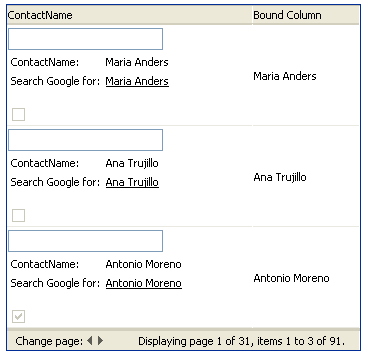
}The code sample above results in the following grid:
For more information on creating templates programmatically, see the MSDN article: Creating Web Server Control Templates Programmatically.