Special Slots
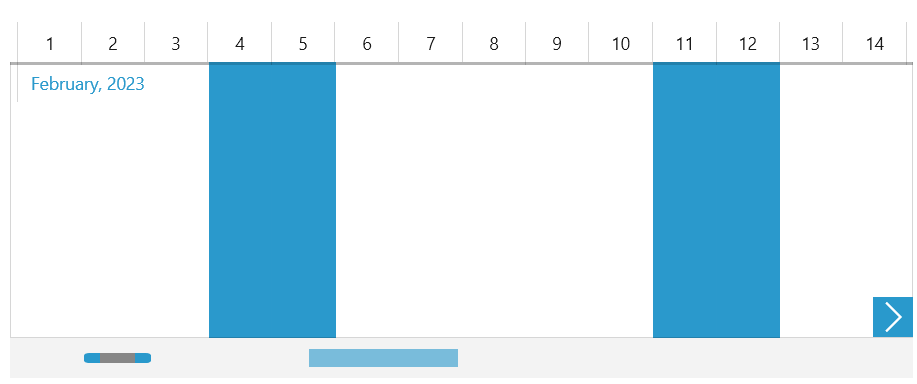
RadTimeBar provides an easy way to mark certain intervals along the visible range of the control as special slots. This is done through a custom class, which implements the ITimeRangeGenerator interface. This interface defines the GetRanges method. Given the current visible period, this method returns IEnumerable<IPeriodSpan> - an array of PeriodSpan instances, each of which defines a special slot with a start and end date.
Below you can find a sample weekends generator implementation:
Implementing the ITimeRangeGenerator in a new class
public class WeekendsGenerator : ITimeRangeGenerator
{
	public System.Collections.Generic.IEnumerable<IPeriodSpan> GetRanges(SelectionRange<DateTime> visibleRange)
	{
		TimeSpan slotSpan = TimeSpan.FromDays(2);
		var differenceFirstVisible = DayOfWeek.Saturday - visibleRange.Start.DayOfWeek;
		DateTime day = new DateTime(visibleRange.Start.Year, visibleRange.Start.Month, visibleRange.Start.Day);

		for (DateTime current = day.AddDays(differenceFirstVisible); current < visibleRange.End; current += TimeSpan.FromDays(7))
		{
			yield return new PeriodSpan(current, slotSpan);
		}
	}
}
Using the SpecialSlotsGenerator property of the RadTimeBar control you can specify a custom ITimeRangeGenerator instance that defines certain time intervals as special.
The following example shows how to set the custom WeekendsGenerator from the above code snippet to the RadTimeBar control:
Setting a custom ITimeRangeGenerator to the SpecialSlotsGenerator property of RadTimeBar
<telerik:RadTimeBar x:Name="timeBar">
	<telerik:RadTimeBar.Intervals>
		<telerikDataVisualization:MonthInterval/>
		<telerikDataVisualization:DayInterval/>
	</telerik:RadTimeBar.Intervals>
	<telerik:RadTimeBar.SpecialSlotsGenerator>
		<local:WeekendsGenerator/>
	</telerik:RadTimeBar.SpecialSlotsGenerator>
</telerik:RadTimeBar>
RadTimeBar with custom special slots