Visual Structure
This article will help you understand the main concepts used in the scope of the RadSparkline controls.


-
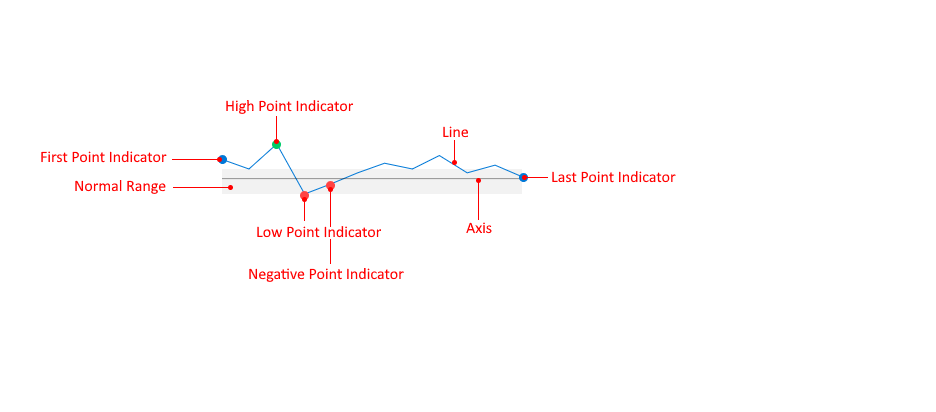
Marker/Data Point Visual: A visual element presenting the associated data item from the ItemsSource of the RadLinearSparkline, RadAreaSparkline and RadScatterSparkline controls.
-
Column/Bar: A visual element presenting the associated data item from the ItemsSource of the RadColumnSparkline and RadWinLossSparkline controls.
-
Line: The line formed by the data items in the ItemsSource of the RadLinearSparkline and RadAreaSparkline controls.
-
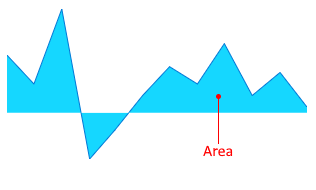
Area: The area formed by the data items in the ItemsSource of the RadAreaSparkline control.
-
Axis: A horizontal axis that marks a point on the vertical (Y) axis.
-
First Point Indicator: A marker displayed for the first data item.
-
Last Point Indicator: A marker displayed for the last data item.
-
High Point Indicator: A marker displayed for the data item with the biggest value on the vertical (Y) axis.
-
Low Point Indicator: A marker displayed for the data item with the lowest value on the vertical (Y) axis.
-
Negative Point Indicator: Markers displayed for the data items with negative values on the vertical (Y) axis.
-
Normal Range: A rectangular area between two points on the vertical (Y) axis that annotates a range on the axis.