New to Telerik UI for WinUI? Start a free 30-day trial
Customizations
Updated on Mar 26, 2026
This article explains how the shape of the rating items can be customized.
Empty State
- EmptyIconContent: Gets or sets the content of the RadRatingItem icon when the item is not selected.
- EmptyIconStyle: Gets or sets the style of the RadRatingItem icon content when the item is not selected.
- EmptyIconContentTemplate: Gets or sets the content template of the RadRatingItem when the item is not selected.
Filled State
- FilledIconContent: Gets or sets the content of the RadRatingItem icon when the item is selected.
- FilledIconStyle: Gets or sets the style of the RadRatingItem icon content when the item is selected.
- FilledIconContentTemplate: Gets or sets the content template of the RadRatingItem when the item is selected.
Highlighted State
- HighlightedIconStyle: Gets or sets the style of the RadRatingItem icon content in highlighted state.
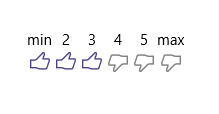
Example 1 demonstrate how you can use the above properties to further customize the RadRating control.
Example 1: Customize RadRating Control
XAML
<input:RadRating AutoGeneratedItemsCount="0" Grid.Row="1">
	<input:RadRatingItem Content="min" />
	<input:RadRatingItem Content="2" />
	<input:RadRatingItem Content="3"/>
	<input:RadRatingItem Content="4" />
	<input:RadRatingItem Content="5" />
	<input:RadRatingItem Content="max"/>

	<input:RadRating.EmptyIconContentTemplate>
		<DataTemplate>
			<SymbolIcon Symbol="Dislike" Foreground="Gray" Margin="3"/>
		</DataTemplate>
	</input:RadRating.EmptyIconContentTemplate>
	<input:RadRating.FilledIconContentTemplate>
		<DataTemplate>
			<SymbolIcon Symbol="Like" Margin="3"/>
		</DataTemplate>
	</input:RadRating.FilledIconContentTemplate>
	<input:RadRating.HighlightedIconStyle>
		<Style TargetType="ContentPresenter">
			<Setter Property="Foreground" Value="SlateBlue" />
		</Style>
	</input:RadRating.HighlightedIconStyle>
	<input:RadRating.FilledIconStyle>
		<Style TargetType="ContentPresenter">
			<Setter Property="Foreground" Value="DarkSlateBlue" />
		</Style>
	</input:RadRating.FilledIconStyle>
</input:RadRating>