New to Telerik UI for WinUI? Start a free 30-day trial
Item Content
Updated on Mar 26, 2026
This article explains how a content can be set to each of the rating items.
The RadRatingItem can have a content: from simple text to a very compex objects. To set the content of the items, however, they must be added manually and not through the AutoGeneratedItemsCount property.
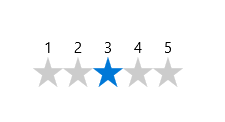
Example 1 demonstrate how values can be added as a content to make it easier for the end-user to select the desired rating value:
You can access the RadRating control through an alias pointing to the Telerik.UI.Xaml.Controls.Input namespace:
xmlns:input="using:Telerik.UI.Xaml.Controls.Input"
Example 1: Create Custom Content for RadRating Items
XAML
<input:RadRating>
	<input:RadRating.Items>
		<input:RadRatingItem Content="1"/>
		<input:RadRatingItem Content="2"/>
		<input:RadRatingItem Content="3"/>
		<input:RadRatingItem Content="4"/>
		<input:RadRatingItem Content="5"/>
	</input:RadRating.Items>
</input:RadRating>
Here is the result: