Text Selection
The PdfViewer supports text selection both from the UI and programmatically.
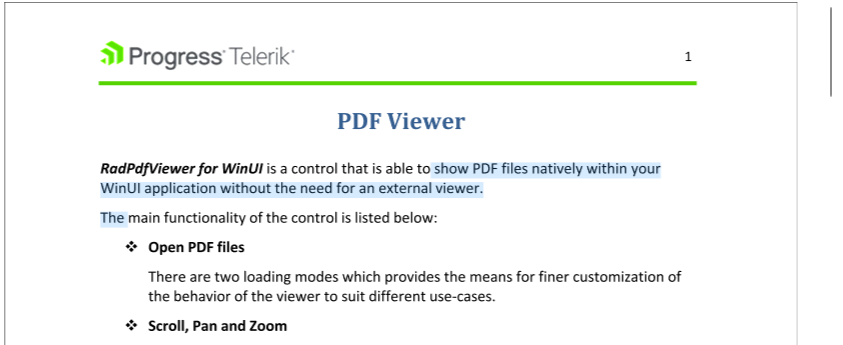
Selecting Text with the UI
To enable text selection from the UI, set the Mode property of RadPdfViewer to TextSelection. For more information refer to the article on the PdfViewer interaction modes.
TextSelectionis part of the RadPdfProcessing library which is used for the document model of the PdfViewer.
Set the mode of the PdfViewer
this.pdfViewer.Mode = FixedDocumentViewerMode.TextSelection;Programmatic Selection
The programmatic selection is part of the RadFixedDocument API (the Document property value of RadPdfViewer). To access it, use its Selection property, which gives access to a TextSelection object that provides a set of properties and methods for selecting text.
The TextSelection class introduces the StartPosition and EndPosition properties that can be used to access the selection range. For more information, refer to the article on text positioning.
Access the current selection positions
TextPosition selectionStart = this.pdfViewer.Document.Selection.StartPosition;
TextPosition selectionEnd = this.pdfViewer.Document.Selection.EndPosition;
To set the selection, use one of the TextSelection methods:
When setting the selection programmatically, the UI will display the selection visual even if the mode of PdfViewer is not set to
TextSelection.
SetSelectionStartSetSelectionEnd
Set the selection by using the SetSelectionStart and Set SelectionEnd methods
	RadFixedPage page = this.pdfViewer.Document.Pages[0];
	TextPosition start = new TextPosition(page, 100);
	TextPosition end = new TextPosition(page, 200);
	this.pdfViewer.Document.Selection.SetSelectionStart(start);
	this.pdfViewer.Document.Selection.SetSelectionEnd(end);
SetSelection
Set the selection by using the SetSelection method
RadFixedPage page = this.pdfViewer.Document.Pages[0];
TextPosition start = new TextPosition(page, 100);
TextPosition end = new TextPosition(page, 200);
this.pdfViewer.Document.Selection.SetSelection(start, end);
SelectAll
Select all the text
this.pdfViewer.Document.Selection.SelectAll();Clear
Clear the text selection
this.pdfViewer.Document.Selection.Clear();To get the selected text, use the GetSelectedText method of TextSelection.
Getg the selected text
string text = this.pdfViewer.Document.Selection.GetSelectedText();Events
TextSelection provides the SelectionChanging and SelectionChanged events that can be used to listen for changes in the position.
Subscribe to selection changing events
void SubscribeToEvents()
{
	this.pdfViewer.Document.Selection.SelectionChanging += Selection_SelectionChanging;
	this.pdfViewer.Document.Selection.SelectionChanged += Selection_SelectionChanged;
}

private void Selection_SelectionChanging(object sender, EventArgs e)
{
}

private void Selection_SelectionChanged(object sender, EventArgs e)
{
}