New to Telerik UI for WinUI? Start a free 30-day trial
HexHubTile
Updated on Mar 26, 2026
The RadHexHubTile is a hexagonal tile with a picture, title, message and notification.
Properties
The RadHexHubTile exposes the following properties on top of the common ones for all tiles:
- ImageSource (ImageSource): Gets or sets the source of the image.
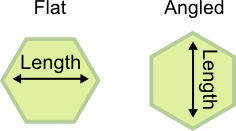
- Length (double): Gets or sets the longest dimension of the hexagon.
- StrokeThickness (double): Gets or sets the thickness of the hexagon border.
- Orientation (HexOrientation): Gets or sets the orientation of the hexagon. {Flat, Angled}
Figure 1: Different HexOrientations
Example
Example 1 demonstrates how to setup a RadHexHubTile and set its TitleTemplate and BackContentTemplate.
Example 1: Defininig a RadHexHubTile
XAML
<Grid xmlns:telerik="using:Telerik.UI.Xaml.Controls.Primitives">
	<telerik:RadHexHubTile Background="#3E73A7" BorderBrush="#99FFFFFF" Title="Title" BackContent="Back" StrokeThickness="5" IsFrozen="False" ImageSource="ms-appx:///Images/MyPicture1.jpg">
		<telerik:RadHexHubTile.TitleTemplate>
			<DataTemplate>
				<TextBlock Text="{Binding}" Margin="0 70 0 0" FontSize="20" FontWeight="Bold"/>
			</DataTemplate>
		</telerik:RadHexHubTile.TitleTemplate>
		<telerik:RadHexHubTile.BackContentTemplate>
			<DataTemplate>
				<TextBlock Text="{Binding}" FontSize="20" FontWeight="Bold"/>
			</DataTemplate>
		</telerik:RadHexHubTile.BackContentTemplate>
	</telerik:RadHexHubTile>
</Grid>