New to Telerik UI for WinUI? Start a free 30-day trial
Validation
Updated on Mar 26, 2026
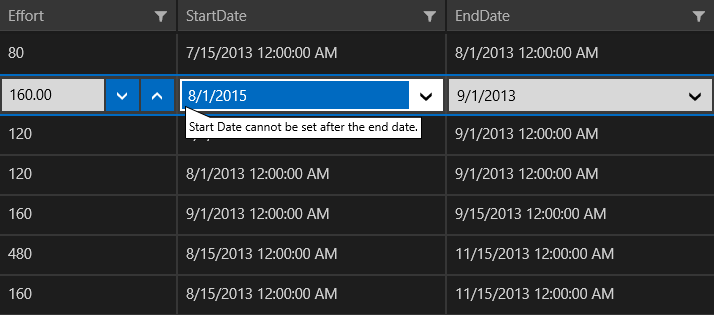
The DataGrid allows you to validate the data and display hints if the validation is not passed. To benefit from this feature, the objects populating the ItemsSource of the component need to implement the INotifyDataErrorInfo interface.
ValidateViewModelBase
You can use the ValidateViewModelBase class, which provides an implementation of INotifyDataErrorInfo to quickly set up your objects. The following examples demonstrate how to populate the DataGrid with objects that include some custom validation logic.
Define the DataGrid in XAML
XAML
<Grid xmlns:telerikGrid="using:Telerik.UI.Xaml.Controls.Grid">
	<Grid.DataContext>
		<local:ViewModel />
	</Grid.DataContext>
	<telerikGrid:RadDataGrid ItemsSource="{Binding Items}" AutoGenerateColumns="False" UserEditMode="Inline" >
		<telerikGrid:RadDataGrid.Columns>
			<telerikGrid:DataGridDateColumn PropertyName="Date" CellContentFormat="{}{0:d}"/>
		</telerikGrid:RadDataGrid.Columns>
	</telerikGrid:RadDataGrid>
</Grid>
Define the Model and ViewModel
C#
public class ViewModel
{
	public ViewModel()
	{
		this.Items = this.GetData();
	}

	public ObservableCollection<Data> Items { get; set; }

	private ObservableCollection<Data> GetData()
	{
		var data = new ObservableCollection<Data>();
		for (var i = 0; i < 10; i++)
		{
			data.Add(new Data { Date = DateTime.Today.AddDays(-i) });
		}

		return data;
	}
}
public class Data : ValidateViewModelBase
{
	private readonly DateTimeOffset maxDate = DateTime.Today.AddDays(10);

	private DateTimeOffset date;

	public DateTimeOffset Date
	{
		get
		{
			return this.date;
		}
		set
		{
			this.date = value;

			if (this.date > this.maxDate)
			{
				this.AddError("Date", string.Format("Date cannot be set after {0:d}.", this.maxDate));
			}
			else
			{
				this.RemoveErrors("Date");
			}

			this.OnPropertyChanged();
		}
	}
}
Result from the Examples