New to Telerik UI for WinUI? Start a free 30-day trial
PropertyGroupDescriptor
Updated on Mar 26, 2026
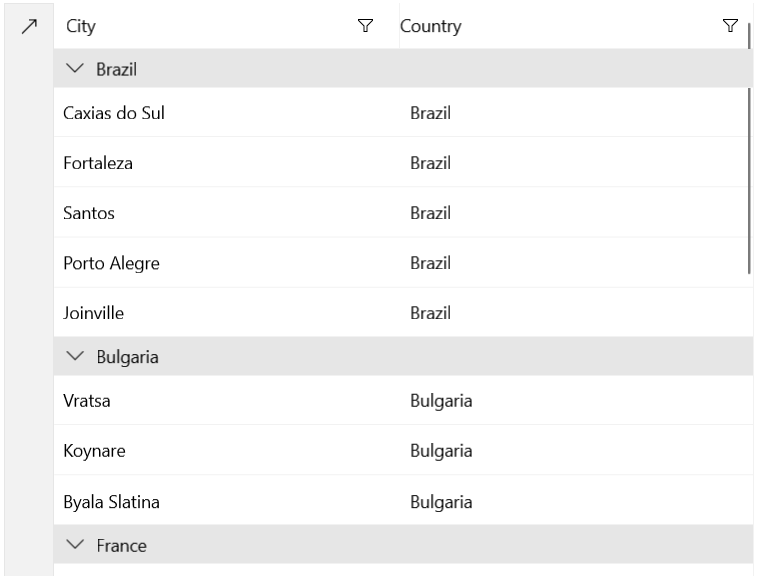
The PropertyGroupDescriptor is used to group the data in a DataGrid by a property from the class that defines your objects.
Adding a PropertyGroupDescriptor
The PropertyGroupDescriptor exposes a PropertyName property that specifies the property by which the data will be grouped. It also exposes a SortOrder property, which allows for controlling the sorting order. The following examples demonstrate how to set up the DataGrid and add a PropertySortDescriptor.
Define the DataGrid in XAML
XAML
<Grid xmlns:grid="using:Telerik.UI.Xaml.Controls.Grid"
	  xmlns:dataCore="using:Telerik.Data.Core">
	<grid:RadDataGrid Width="600" Height="460" x:Name="grid">
		<grid:RadDataGrid.GroupDescriptors>
			<dataCore:PropertyGroupDescriptor PropertyName="Country" />
		</grid:RadDataGrid.GroupDescriptors>
	</grid:RadDataGrid>
</Grid>
Example 2: Populating the RadDataGrid
C#
public sealed partial class MainPage : Page
{
	public MainPage()
	{
		this.InitializeComponent();

		List<Data> data = new List<Data>
		{
			new Data { Country = "Brazil", City = "Caxias do Sul"},
			new Data { Country = "Ghana", City = "Wa"},
			new Data { Country = "Brazil", City = "Fortaleza"},
			new Data { Country = "Italy", City = "Florence" },
			new Data { Country = "France", City = "Bordeaux" },
			new Data { Country = "Bulgaria", City = "Vratsa"},
			new Data { Country = "Spain", City = "Las Palmas"},
			new Data { Country = "France", City = "Le Mans" },
			new Data { Country = "Brazil", City = "Santos"},
			new Data { Country = "Ghana", City = "Ho"},
			new Data { Country = "Spain", City = "Malaga"},
			new Data { Country = "France", City = "Marseille" },
			new Data { Country = "Bulgaria", City = "Koynare" },
			new Data { Country = "Spain", City = "Valencia"},
			new Data { Country = "Ghana", City = "Kade" },
			new Data { Country = "Brazil", City = "Porto Alegre" },
			new Data { Country = "Bulgaria", City = "Byala Slatina"},
			new Data { Country = "Italy", City = "Naples" },
			new Data { Country = "Brazil", City = "Joinville" },
		};

		this.grid.ItemsSource = data;
	}
}

public class Data
{
	public string City { get; set; }
	public string Country { get; set; }
}
Figure 1: Grouped RadDataGrid