Visual Structure
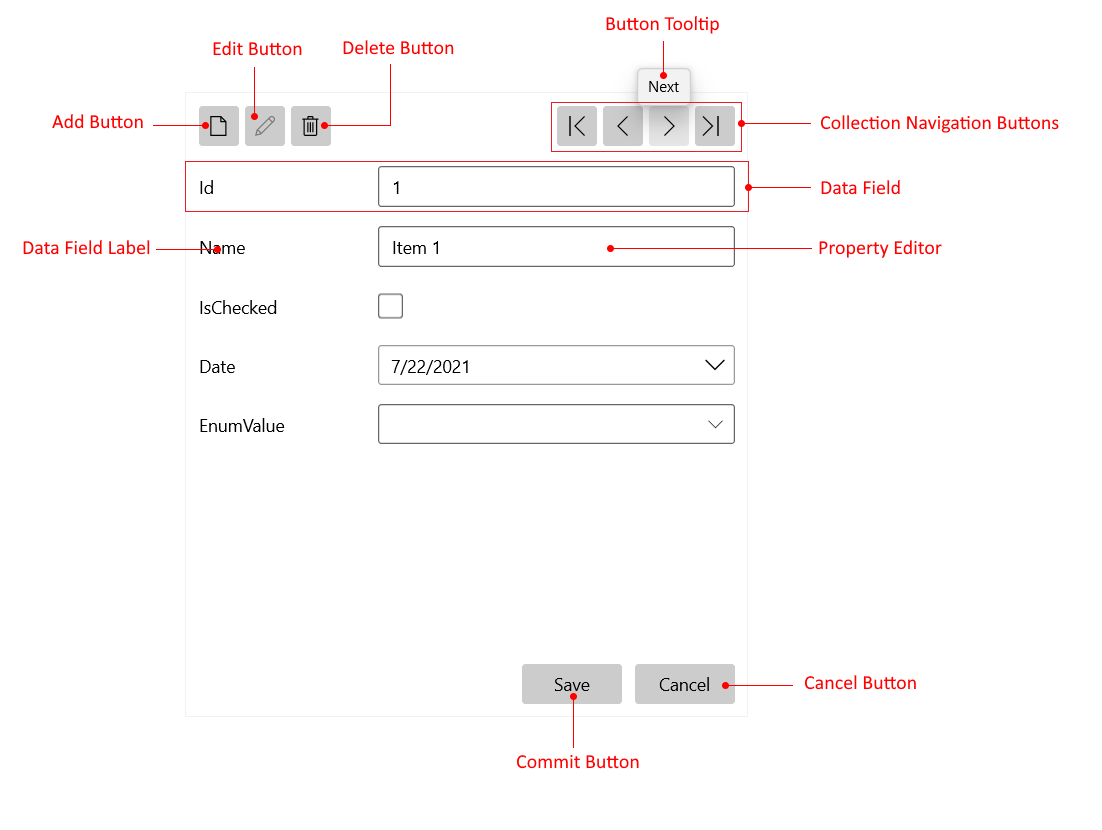
This article presents the visual elements of the DataForm component.
-
Collection Navigation Buttons—Enable running through the items either with a single step back and forth or by jumping to the first or last item.
-
Add Button—Inserts a new item into the items collection.
-
Edit Button—Enables the editing of the current item.
-
Delete Button—Deletes the currently displayed item.
-
Data Field—Represents a property of the current data item.
-
Data Field Label—Displays the name of the associated field.
-
Property Editor—Presents the editor for updating the associated field of the current data item.
-
Commit Button—Saves the changes, made in the UI, to the associated data item.
-
Cancel Button—Reverts the changes made in the UI.
-
Button Tooltip—Displays a tooltip on a button hover.