ToolBar Commands
Adding a Command
By default, the toolbar of RadChat will not be visible. When a ToolBarCommand is added to the ToolBarCommands collection, the ToggleButton for opening the toolbar will appear next to the Send Button. The ToolBarCommand element exposes the following two properties:
Text: The text Content that will be set to the generatedButton.Command: TheICommandthat is to be executed when clicking theButton.
Adding a ToolBarCommand to the ToolBarCommands collection
this.chat.ToolBarCommands.Add(new ToolBarCommand() { Text = "Click", Command = new DelegateCommand(MyCommandLogic) });RadChat with a ToolBarCommand added to the ToolBarCommands collection

ToolBarCommandTemplateSelector
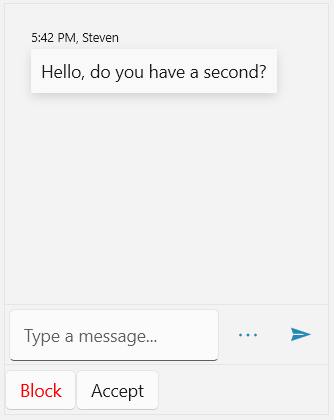
RadChat supports defining custom DataTemplate for the elements generated in its toolbar. This is done via its ToolBarCommandTemplateSelector property. Its conditional logic can be implemented based on the given ToolBarCommand.
Defining a custom DataTemplateSelector
public class ToolBarCommandTemplateSelector : DataTemplateSelector
{
	protected override DataTemplate SelectTemplateCore(object item, DependencyObject container)
	{
		var toolBarCommand = item as ToolBarCommand;

		if (toolBarCommand.Text == "Block")
		{
			return ClickTemplate;
		}
		else
		{
			return this.DefaultTemplate;

		}
	}

	public DataTemplate ClickTemplate { get; set; }
	public DataTemplate DefaultTemplate { get; set; }
}
Define the custom DataTemplateSelector in XAML.
Adding the ToolBarCommandTemplateSelector
<Grid.Resources>
	<my:ToolBarCommandTemplateSelector x:Key="ToolBarCommandTemplateSelector">
		<my:ToolBarCommandTemplateSelector.ClickTemplate>
			<DataTemplate>
				<Button Content="{Binding Text}" Foreground="Red"/>
			</DataTemplate>
		</my:ToolBarCommandTemplateSelector.ClickTemplate>
		<my:ToolBarCommandTemplateSelector.DefaultTemplate>
			<DataTemplate>
				<Button Content="{Binding Text}"/>
			</DataTemplate>
		</my:ToolBarCommandTemplateSelector.DefaultTemplate>
	</my:ToolBarCommandTemplateSelector>
</Grid.Resources>
Finally, the custom template selector can be set to the ToolBarCommandTemplateSelector property of RadChat.
Applying the ToolBarCommandTemplateSelector
<telerik:RadChat x:Name="chat" ToolBarCommandTemplate="{x:Null}" ToolBarCommandTemplateSelector="{StaticResource ToolBarCommandTemplateSelector}"/>RadChat with custom DataTemplateSelector set to the ToolBarCommandTemplateSelector