New to Telerik UI for WinUI? Start a free 30-day trial
Flight Card
Updated on Mar 26, 2026
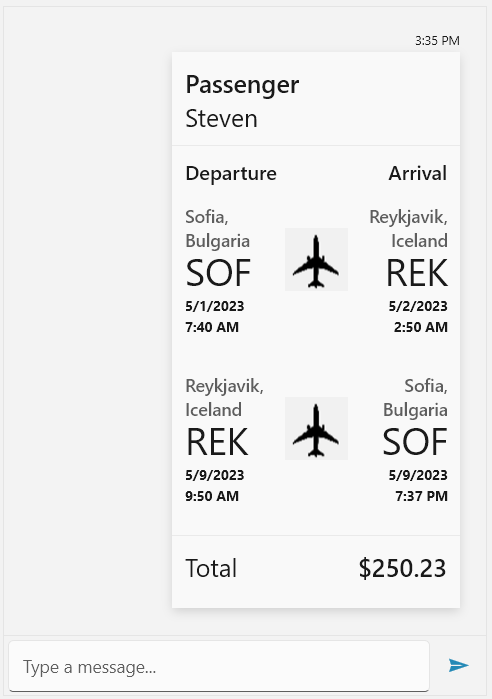
FlightCard is intended to display flight information in a structured user-friendly manner. Below are the properties exposed for this purpose. Specific for the FlightCard card is that it exposes the Flights collection, which is an IList of FlightInfo objects.
The FlightInfo class exposes the following properties:
DepartureCityDepartureAirportDepartureDateTimeArrivalCityArrivalAirportArrivalDateTime
__ Defining a FlightCardMessage__
C#
FlightCardMessage flightCardMessage = new FlightCardMessage(this.currentAuthor);

flightCardMessage.ImageSource = new BitmapImage(new Uri("ms-appx:///MyImage.png", UriKind.Absolute));

FlightInfo departureFlight = new FlightInfo();

departureFlight.DepartureAirport = "SOF";
departureFlight.DepartureCity = "Sofia, Bulgaria";
departureFlight.DepartureDateTime = new DateTime(2023, 5, 1, 7, 40, 0);

departureFlight.ArrivalAirport = "REK";
departureFlight.ArrivalCity = "Reykjavik, Iceland";
departureFlight.ArrivalDateTime = new DateTime(2023, 5, 2, 2, 50, 0);

flightCardMessage.Flights.Add(departureFlight);

FlightInfo arrivalFlight = new FlightInfo();

arrivalFlight.DepartureAirport = "REK";
arrivalFlight.DepartureCity = "Reykjavik, Iceland";
arrivalFlight.DepartureDateTime = new DateTime(2023, 5, 9, 9, 50, 0);

arrivalFlight.ArrivalAirport = "SOF";
arrivalFlight.ArrivalCity = "Sofia, Bulgaria";
arrivalFlight.ArrivalDateTime = new DateTime(2023, 5, 9, 19, 37, 0);

flightCardMessage.Flights.Add(arrivalFlight);

flightCardMessage.PassengerName = otherAuthor.Name;

flightCardMessage.Total = "$250.23";

this.chat.AddMessage(flightCardMessage);
RadChat with a FlightCardMessage