New to Telerik UI for WinUI? Start a free 30-day trial
Styling
Updated on Mar 26, 2026
The Barcode component allows you to customize its appearance.
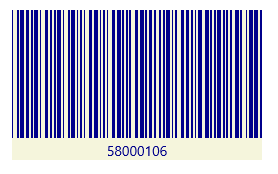
To change the colors of the symbology visualization and the background behind it, set the Foreground and Background properties of the component. The telerikDataViz namespace from the following example points to xmlns:telerikDataViz="using:Telerik.UI.Xaml.Controls.DataVisualization".
Change the Barcode colors
XAML
<telerikDataViz:RadBarcode Width="250" Height="150"
						   Foreground="DarkBlue" Background="Beige"
						   Value="58000106">
	<telerikDataViz:RadBarcode.Symbology>
		<telerikDataViz:Code39 SizingMode="Stretch" />
	</telerikDataViz:RadBarcode.Symbology>
</telerikDataViz:RadBarcode>
A Barcode with customized colors