New to Telerik UI for WPF? Start a free 30-day trial
Change Group Panel Text of RadGridView
Updated on Aug 25, 2026
Environment
| Product Version | 2025.1.211 |
| Product | RadGridView for WPF |
Description
How to change the text of the group panel of RadGridView.
Solution
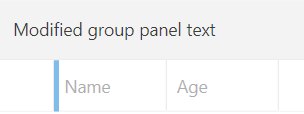
To change the text of the group panel of RadGridView, subscribe to its Loaded event and retrieve the TextBlock element with x:Name="panelText". To do so, you can use the ChildrenOfType extension method. Then, you can modify the Text property of the retrieved element.
Changing the text of the group panel of RadGridView
C#
    private void RadGridView_Loaded(object sender, RoutedEventArgs e)
    {
        var groupPanelTextBlock = this.gridView.ChildrenOfType<TextBlock>().FirstOrDefault(x => x.Name == "panelText");
        groupPanelTextBlock.Text = "Modified group panel text";
    }
RadGridView with modified group panel text