GroupFooterRowStyleSelector
The GroupFooterRowStyleSelector property of RadGridView can be used to style group footer rows differently based on a specific condition.
Bear in mind that the GroupFooterRowStyle takes precedence over the GroupFooterRowStyleSelector and will overwrite it if both are defined simultaneously.
To do so, first create a new class that inherits the StyleSelector class and override its SelectStyle method:
Example 1: The GroupFooterRowStyleSelector class
public class GroupFooterRowStyleSelector : StyleSelector
{
    public override Style SelectStyle(object item, DependencyObject container)
    {
        var group = item as QueryableCollectionViewGroup;

        if (group != null)
        {
            if (group.ItemCount > 1)
            {
                return BigGroupStyle;
            }
            else
            {
                return SmallGroupStyle;
            }
        }

        return null;
    }

    public Style BigGroupStyle { get; set; }
    public Style SmallGroupStyle { get; set; }
}Public Class GroupFooterRowStyleSelector
Inherits StyleSelector
Public Overrides Function SelectStyle(item As Object, container As DependencyObject) As Style
Dim group = TryCast(item, CollectionViewGroup)
If group IsNot Nothing Then
If group.ItemCount > 1 Then
Return BigGroupStyle
Else
Return SmallGroupStyle
End If
End If
Return Nothing
End Function
Public Property BigGroupStyle() As Style
Get
Return m_BigGroupStyle
End Get
Set
m_BigGroupStyle = Value
End Set
End Property
Private m_BigGroupStyle As Style
Public Property SmallGroupStyle() As Style
Get
Return m_SmallGroupStyle
End Get
Set
m_SmallGroupStyle = Value
End Set
End Property
Private m_SmallGroupStyle As Style
End ClassIn the XAML file, define the style selector as a resource and set the properties of the BigGroupStyle and SmallGroupStyle:
Example 2: Setting the BigGroupStyle and SmallGroupStyle
<Grid.Resources>
	<my:GroupFooterRowStyleSelector x:Key="StadiumCapacityStyleSelector">
		<my:GroupFooterRowStyleSelector.BigGroupStyle>
			<Style TargetType="telerik:GridViewGroupFooterRow">
				<Setter Property="Background" Value="Red"/>
			</Style>
		</my:GroupFooterRowStyleSelector.BigGroupStyle>
		<my:GroupFooterRowStyleSelector.SmallGroupStyle>
			<Style TargetType="telerik:GridViewGroupFooterRow">
				<Setter Property="Background" Value="Yellow" />
			</Style>
		</my:GroupFooterRowStyleSelector.SmallGroupStyle>
	</my:GroupFooterRowStyleSelector>
</Grid.Resources>
The "my:" prefix before GroupFooterRowStyleSelector specifies the mapping for the namespace of the project: xmlns:my="..."
Finally, set the GroupFooterRowStyleSelector property:
Example 3: Setting the GroupFooterRowStyleSelector property
<telerik:RadGridView GroupFooterRowStyleSelector="{StaticResource GroupFooterRowStyleSelector}" />And here is the final result:
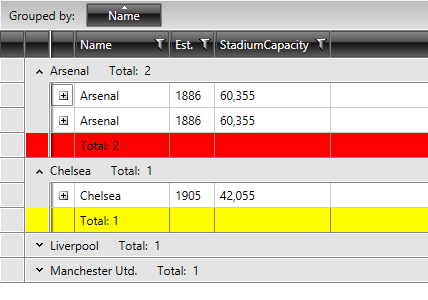
Figure 1: The group footer rows styled using the GroupFooterRowStyleSelector property