New to Telerik UI for WPF? Start a free 30-day trial
Set the Current Cell
Updated on Sep 23, 2026
You can set the current cell of the RadGridView control by using the CurrentCellInfo class.
Example 1 demonstrates how to so in the Loaded event handler by specifying an item from the control's Items collection and a column from the Columns collection.
Example 1: Setting the current cell via an item and a column
C#
private void gridView_Loaded(object sender, EventArgs e)
{
    gridView.CurrentCellInfo = new GridViewCellInfo(gridView.Items[5], gridView.Columns["Number"]);
    gridView.Focus();
}
VB.NET
Private Sub gridView_Loaded(ByVal sender As Object, ByVal e As EventArgs)
	gridView.CurrentCellInfo = New GridViewCellInfo(gridView.Items(5), gridView.Columns("Number"))
	gridView.Focus()
End Sub
Please note that for this to work, the control must be loaded.
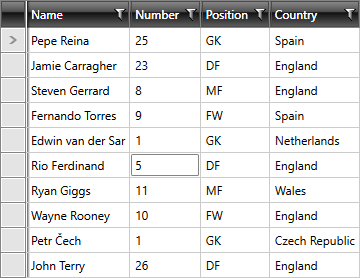
Figure 1 demonstrates that the current cell is set and at this point if you hit F2 that cell will go in edit mode.
RadGridView with changed current cell