Numeric Indicator
The Numeric Indicator is an indicator that displays its Value property as a digital indicator device.character templating.
The appearance of characters in the numeric indicator could be specified with a set of different NumericIndicator.Positions like "HexagonalNumberPosition", "SevenSegsNumberPosition", "GraphicNumberPosition" and etc.
To add a numeric indicator to the scale you have to include NumericIndicator element to the list of the scale indicators:
	<telerik:RadVerticalLinearGauge Width="150" Height="50" telerik:StyleManager.Theme="Windows8">
	    <telerik:NumericScale Min="0">
	        <telerik:NumericScale.Indicators>
	            <telerik:NumericIndicator Name="numericIndicator" Value="543.216"
	                    Format="{}{0:F2}"
	                    Foreground="#FF1E8D00"
	                    telerik:ScaleObject.RelativeX="0"
	                    telerik:ScaleObject.RelativeY="0"
	                    telerik:ScaleObject.RelativeWidth="1*"
	                    telerik:ScaleObject.RelativeHeight="1*">
	                <telerik:NumericIndicator.Positions>
	                    <telerik:HexagonalNumberPosition />
	                    <telerik:HexagonalNumberPosition />
	                    <telerik:HexagonalNumberPosition />
	                    <telerik:HexagonalNumberPosition />
	                    <telerik:HexagonalNumberPosition />
	                    <telerik:HexagonalNumberPosition />
	                </telerik:NumericIndicator.Positions>
	            </telerik:NumericIndicator>
	        </telerik:NumericScale.Indicators>
	    </telerik:NumericScale>
	</telerik:RadVerticalLinearGauge>
Every digital cell in the indicator is defined by a corresponding NumberPosition element. The topmost element in the list defines the rightmost digital cell.
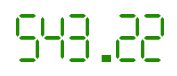
The Numeric indicator supports the following features:
-
Layout
-
The 'telerik:ScaleObject.RelativeX' property specifies the position of Numeric Indicator left side relative to a scale width.
-
The 'telerik:ScaleObject.RelativeY' property specifies the position of Numeric Indicator top side relative to a scale height.
-
The 'telerik:ScaleObject.RelativeHeight' property specifies the height of the Numeric Indicator relative to a scale height.
-
The 'telerik:ScaleObject.RelativeWidth' property specifies the width of the Numeric Indicator relative to a scale height.
-
Appearance
-
The 'Format' property specifies the position of the decimal point.
-
The standard Telerik provided Numeric Indicator templates allow the use of the BorderBrush and the BorderThickness properties to draw a border.
-
Telerik provided styles allow using the most popular types of Numeric Indicators.
-
The refresh rate allows calculating the displayed value using values which are assigned during the specified interval according to the specified method.