New to Telerik UI for WPF? Start a free 30-day trial
Hard Pages
Updated on Sep 23, 2026
To enable hard paper functionality, you have to set the HardPages property. The HardPages property is an enum with the following values:
-
None: None of the pages has the hard paper feature turned on
-
First: Only the first page has the hard paper feature turned on
-
Last: Only the last page has the hard paper feature turned on
-
FirstAndLast: The first and last pages have the hard paper feature turned on
-
All: All the pages have the hard paper feature turned on
-
Custom: Only certain pages have the hard paper feature turned on. It is up to the user to define which pages by setting the IsHardPaper property of the RadBookItem.
Example 1: Setting the hard pages mode to All
XAML
<FrameworkElement.Resources>
    <DataTemplate x:Key="LeftPageTemplate">
        <Grid>
            <Image Source="page1.jpg" Stretch="None" />
        </Grid>
    </DataTemplate>
    <DataTemplate x:Key="RightPageTemplate">
        <Grid>
            <Image Source="page2.jpg" Stretch="None" />
        </Grid>
    </DataTemplate>
</FrameworkElement.Resources>
<!-- -->
<Grid x:Name="LayoutRoot" Background="White">
    <telerik:RadBook x:Name="book1" Width="544" Height="444"
	    LeftPageTemplate="{StaticResource LeftPageTemplate}"
	    RightPageTemplate="{StaticResource RightPageTemplate}" FirstPagePosition="Right"
	    HardPages="All" />
</Grid>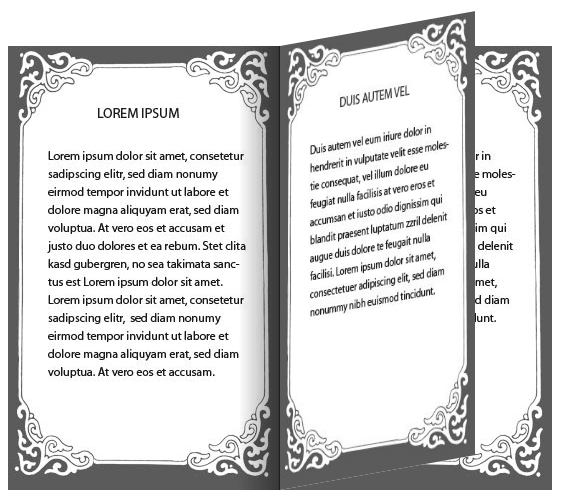
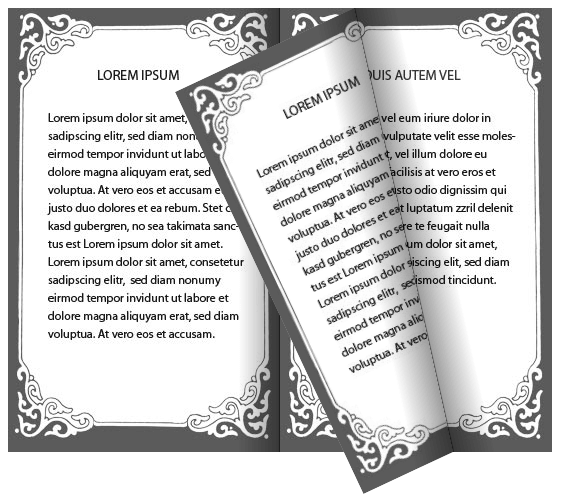
Example 2: Setting the hard pages mode to Custom
XAML
<telerik:RadBook x:Name="book2" Width="544" Height="444" FirstPagePosition="Right"
	    RightPageIndex="0" HardPages="Custom">
    <telerik:RadBookItem IsHardPaper="True">
        <Grid>
            <Image Source="page1.jpg" Stretch="None" />
        </Grid>
    </telerik:RadBookItem>
    <telerik:RadBookItem IsHardPaper="True">
        <Grid>
            <Image Source="page2.jpg" Stretch="None" />
        </Grid>
    </telerik:RadBookItem>
    <telerik:RadBookItem>
        <Grid>
            <Image Source="page1.jpg" Stretch="None" />
        </Grid>
    </telerik:RadBookItem>
    <telerik:RadBookItem>
        <Grid>
            <Image Source="page2.jpg" Stretch="None" />
        </Grid>
    </telerik:RadBookItem>
    <telerik:RadBookItem IsHardPaper="True">
        <Grid>
            <Image Source="page1.jpg" Stretch="None" />
        </Grid>
    </telerik:RadBookItem>
    <telerik:RadBookItem IsHardPaper="True">
        <Grid>
            <Image Source="page2.jpg" Stretch="None" />
        </Grid>
    </telerik:RadBookItem>
</telerik:RadBook>