New to Telerik UI for WinForms? Start a free 30-day trial
How to Rotate the Labels for BarSeries
Updated over 1 year ago
Environment
| Product Version | Product | Author |
|---|---|---|
| 2022.2.622 | RadChartView for WinForms | Desislava Yordanova |
Description
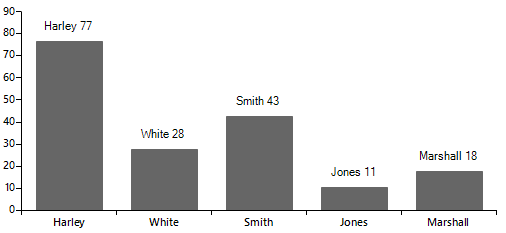
The article aims to demonstrate a sample approach how to rotate the labels for the BarSeries. Consider the following example:
C#
public RadForm1()
{
    InitializeComponent();
    this.radChartView1.LabelFormatting += RadChartView1_LabelFormatting;
    Telerik.WinControls.UI.BarSeries barSeries = new Telerik.WinControls.UI.BarSeries("Performance", "RepresentativeName");
    barSeries.ShowLabels = true;
    barSeries.DataPoints.Add(new CategoricalDataPoint(77, "Harley"));
    barSeries.DataPoints.Add(new CategoricalDataPoint(28, "White"));
    barSeries.DataPoints.Add(new CategoricalDataPoint(43, "Smith"));
    barSeries.DataPoints.Add(new CategoricalDataPoint(11, "Jones"));
    barSeries.DataPoints.Add(new CategoricalDataPoint(18, "Marshall"));
    this.radChartView1.Series.Add(barSeries);
}

private void RadChartView1_LabelFormatting(object sender, ChartViewLabelFormattingEventArgs e)
{
    CategoricalDataPoint categoricalDataPoint = e.LabelElement.DataPoint as CategoricalDataPoint;
    e.LabelElement.Text = categoricalDataPoint.Category + " " + categoricalDataPoint.Value;
}
Default BarSeries' labels
Solution
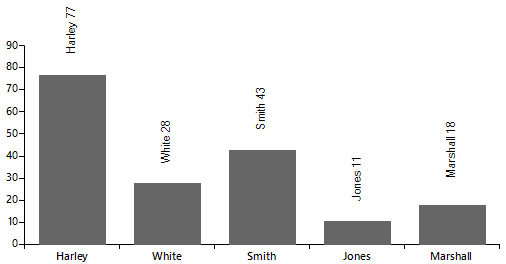
In order to rotate the labels for the bar elements, it is necessary to use a custom renderer and implement our own BarLabelElementDrawPart:
Make sure that you subscribe to the CreateRenderer event before populating the chart with data.
C#
private void RadChartView1_CreateRenderer(object sender, ChartViewCreateRendererEventArgs e)
{
    e.Renderer = new CustomCartesianRenderer(e.Area as CartesianArea);
}

public class CustomCartesianRenderer : CartesianRenderer
{
    public CustomCartesianRenderer(CartesianArea area)
        : base(area)
    {
    }
    protected override void InitializeSeriesLabels()
    {
        base.InitializeSeriesLabels();


        for (int i = 0; i <= this.DrawParts.Count - 1; i++)
        {
            BarLabelElementDrawPart labelPart = this.DrawParts[i] as BarLabelElementDrawPart;
            if (labelPart != null)
                this.DrawParts[i] = new CustomBarLabelElementDrawPart((BarSeries)labelPart.Element, this);
        }
    }
}

public class CustomBarLabelElementDrawPart : BarLabelElementDrawPart
{
    public CustomBarLabelElementDrawPart(BarSeries series, IChartRenderer renderer)
        : base(series, renderer)
    {
    }

    public override void Draw()
    {
        Graphics graphics = this.Renderer.Surface as Graphics;

        RadGdiGraphics radGraphics = new RadGdiGraphics(graphics);

        foreach (DataPointElement dataPointElement in this.Element.Children)
        {
            CategoricalDataPoint categoricalDataPoint = dataPointElement.DataPoint as CategoricalDataPoint;
            RadRect slot = categoricalDataPoint.LayoutSlot;
            RectangleF barBounds = new RectangleF(System.Convert.ToSingle((this.OffsetX + slot.X)),
                System.Convert.ToSingle((this.OffsetY + slot.Y)), System.Convert.ToSingle(slot.Width), System.Convert.ToSingle(slot.Height));
            float realHeight = barBounds.Height * dataPointElement.HeightAspectRatio;
            barBounds.Y += barBounds.Height - realHeight;
            barBounds.Height = realHeight;
            barBounds = this.AdjustBarDataPointBounds(dataPointElement, barBounds);
            barBounds.Width = Math.Max(barBounds.Width, 1.0F);
            object state = radGraphics.SaveState();
            int horizontalTranslate = System.Convert.ToInt32((barBounds.X + barBounds.Width / (double)2));
            int verticalTranslate = System.Convert.ToInt32((barBounds.Y + barBounds.Height / (double)2));
            float angle = System.Convert.ToSingle(this.Element.LabelRotationAngle) % 360.0F;

            if (angle != 0)
            {
                radGraphics.TranslateTransform(horizontalTranslate, verticalTranslate);
                radGraphics.RotateTransform(angle);
                radGraphics.TranslateTransform(-horizontalTranslate, -verticalTranslate);
            }

            var labelText = categoricalDataPoint.Category + " " + categoricalDataPoint.Value;

            SizeF desiredSize = graphics.MeasureString(labelText, dataPointElement.Font);
            FillPrimitiveImpl fill = new FillPrimitiveImpl(dataPointElement, null);
            fill.PaintFill(radGraphics, 0, System.Drawing.Size.Empty, barBounds);
            BorderPrimitiveImpl border = new BorderPrimitiveImpl(dataPointElement, null);
            border.PaintBorder(radGraphics, 0, System.Drawing.Size.Empty, barBounds);
            StringFormat format = new StringFormat();
            format.Alignment = StringAlignment.Center;

            RectangleF labelRect = new RectangleF(new PointF(barBounds.X + dataPointElement.Padding.Left +
                (barBounds.Width - desiredSize.Width) / 2, barBounds.Y - desiredSize.Width), new SizeF(desiredSize.Width, desiredSize.Height));

            horizontalTranslate = System.Convert.ToInt32((labelRect.X + labelRect.Width / (double)2));
            verticalTranslate = System.Convert.ToInt32((labelRect.Y + labelRect.Height / (double)2));

            radGraphics.TranslateTransform(horizontalTranslate, verticalTranslate);
            radGraphics.RotateTransform(-90);
            radGraphics.TranslateTransform(-horizontalTranslate, -verticalTranslate);

            graphics.DrawString(labelText, dataPointElement.Font, Brushes.Black, labelRect, format);
            if (angle != 0)
                radGraphics.ResetTransform();

            radGraphics.RestoreState(state);
        }
    }

    private RectangleF AdjustBarDataPointBounds(DataPointElement point, RectangleF bounds)
    {
        RectangleF barBounds = bounds;

        if (point.BorderBoxStyle == BorderBoxStyle.SingleBorder || point.BorderBoxStyle == BorderBoxStyle.OuterInnerBorders)
        {
            barBounds.X += point.BorderWidth - System.Convert.ToInt32(((point.BorderWidth - 1.0F) / (double)2.0F));
            barBounds.Width -= point.BorderWidth;
            barBounds.Y += point.BorderWidth - System.Convert.ToInt32(((point.BorderWidth - 1.0F) / (double)2.0F));
            barBounds.Height -= point.BorderWidth;
        }
        else if (point.BorderBoxStyle == BorderBoxStyle.FourBorders)
        {
            barBounds.Y += 1;
            barBounds.Height -= 1;
            barBounds.X += 1;
            barBounds.Width -= 1;
        }

        if (((CartesianRenderer)this.Renderer).Area.Orientation == System.Windows.Forms.Orientation.Horizontal)
            barBounds.X -= 1;

        return barBounds;
    }
}
Rotated BarSeries' labels