New to Telerik UI for WinForms? Start a free 30-day trial
Path Indicators in RadSyntaxEditor
Updated on Aug 27, 2026
Environment
| Product Version | Product | Author |
|---|---|---|
| 2021.2.615 | RadSyntaxEditor for WinForms | Desislava Yordanova |
Description
You can add indicators to particular lines of the RadSyntaxEditor control by using the IndicatorsMargin<T> class. This tutorial demonstrates how to achieve a Path indicator:
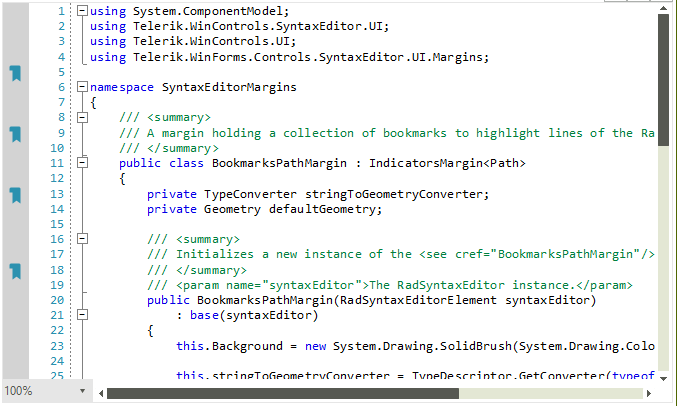
Solution
It is possible to construct a custom IndicatorsMargin<T>, where T is Path for example:
Defining Custom BookmarksPath Margins
C#
private void SetupBookmarksPathMargin()
{
    BookmarksPathMargin bookmarksPathMargin = new BookmarksPathMargin(this.radSyntaxEditor1.SyntaxEditorElement);
    this.radSyntaxEditor1.SyntaxEditorElement.Margins.ScrollableLeft.Insert(0, bookmarksPathMargin);
}
/// <summary>
/// A margin holding a collection of bookmarks to highlight lines of the RadSyntaxEditor control.
/// </summary>
public class BookmarksPathMargin : IndicatorsMargin<Path>
{
    private TypeConverter stringToGeometryConverter;
    private Geometry defaultGeometry;

    /// <summary>
    /// Initializes a new instance of the <see cref="BookmarksPathMargin"/> class.
    /// </summary>
    /// <param name="syntaxEditor">The RadSyntaxEditor instance.</param>
    public BookmarksPathMargin(RadSyntaxEditorElement syntaxEditor)
        : base(syntaxEditor)
    {
        this.Background = new System.Drawing.SolidBrush(System.Drawing.Color.LightGray);

        this.stringToGeometryConverter = TypeDescriptor.GetConverter(typeof(Geometry));
        string data = "M15,5H8C6.9,5,6,5.9,6,7v3h3v11l4-3l4,3V7C17,5.9,16.1,5,15,5z M9,9H7V7c0-0.6,0.4-1,1-1h1V9z";
        var convertor = new Telerik.WinForms.Controls.SyntaxEditor.Utilities.StringToPathGeometryConverter();
        var geometry = convertor.Convert(data);
        this.defaultGeometry = geometry;
    }

    /// <summary>
    /// Called when an indicator needs to be updated. This can happen when the indicator is
    /// first created, when it is brought inside or outside of the viewport or when
    /// the EditorFontSize property of the RadSyntaxEditor or the IndicatorBrush property
    /// of the margin change.
    /// </summary>
    /// <param name="path">The Path to update.</param>
    /// <param name="lineNumber">The line number the indicator is placed on.</param>
    protected override void UpdateIndicator(Path path, int lineNumber)
    {
        if (path.Data != this.defaultGeometry)
        {
            path.Data = this.defaultGeometry;
        }

        if (path.Width != this.Editor.EditorFontSize)
        {
            path.Width = this.Editor.EditorFontSize;
        }

        if (path.Height != this.Editor.EditorFontSize)
        {
            path.Height = this.Editor.EditorFontSize;
        }

        if (path.Fill != this.IndicatorBrush)
        {
            path.Fill = this.IndicatorBrush;
        }

        path.SmoothingMode = System.Drawing.Drawing2D.SmoothingMode.HighQuality;
        path.Margin = new System.Windows.Forms.Padding(-(int)(path.Width / 2f), -4, 0, 0);
    }
}