Integrating PanZoom, TrackBall and LassoZoom Controllers in RadChartView
| Date Posted | Product | Author |
|---|---|---|
| December 11, 2015 | RadChartView for WinForms | Hristo Merdjanov |
Problem
ChartPanZoomController, ChartTrackBallController and the LassoZoomController rely on the same mouse states in order to provide their functionality. Combining the tree in a single project might lead to an unexpected result, e.g. the panning feature would be overridden by the LassoZoomController.
Solution
Extend the LassoZoomController and perform lasso selection only if a modifier key is being pressed. In order to implement this feature we would need to create the following classes:
- MyLassoZoomController: Inheriting the base LassoZoomController class and overriding the OnMouseMove and OnMouseUp methods.
- MyLassoZoomView: A view class needed by the controller to render the selection rectangle.
The animation below demonstrates how the chart control behaves after implementing this solution:
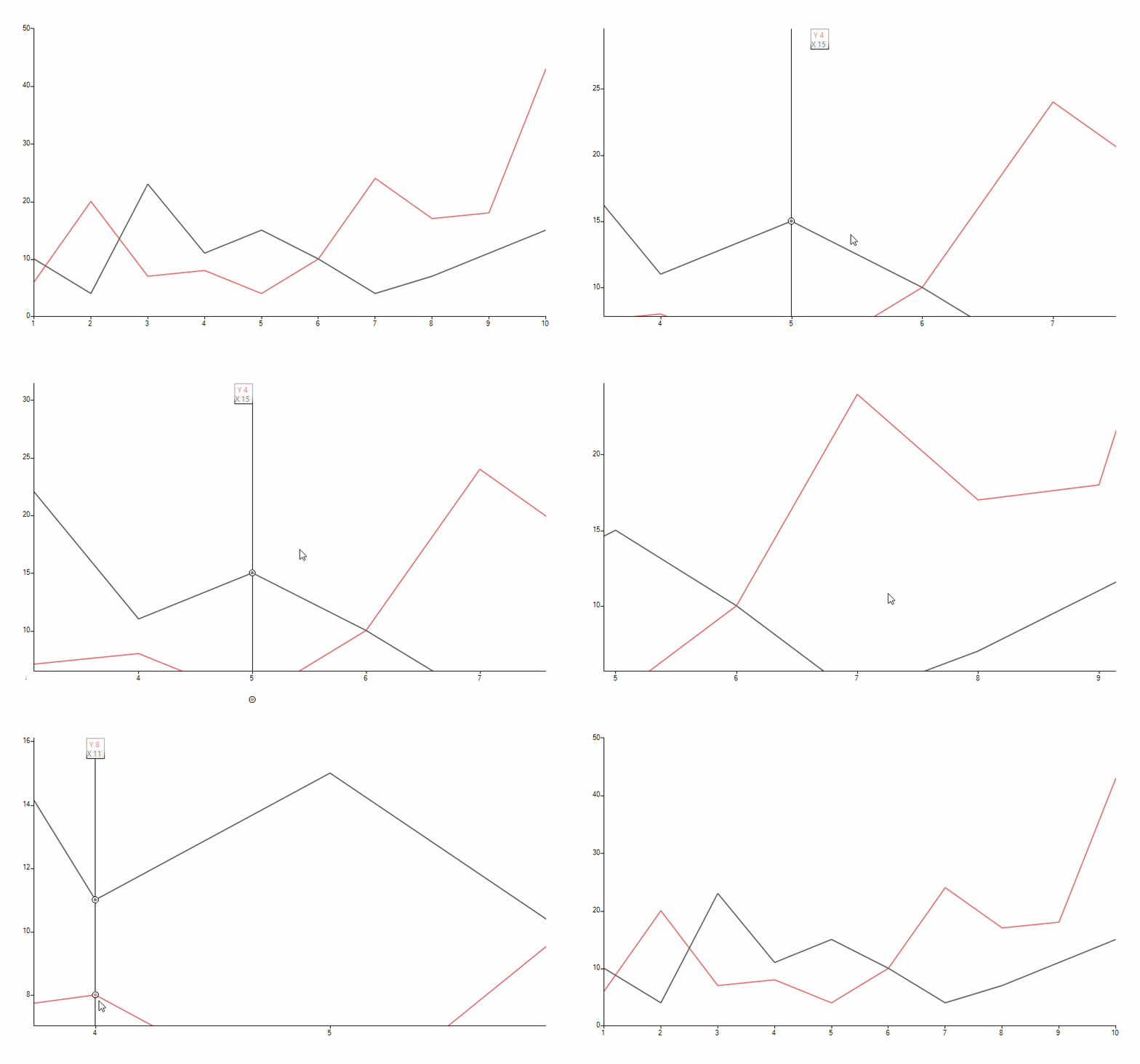
1. Let us first setup our chart control and bind it to some data:
public partial class Form1 : Form
{
    public Form1()
    {
        InitializeComponent();

        ChartPanZoomController panZoomController = new ChartPanZoomController();
        radChartView1.Controllers.Add(panZoomController);

        ChartTrackballController chartTrackBallController = new ChartTrackballController();
        radChartView1.Controllers.Add(chartTrackBallController);

        MyLassoZoomController lassoZoomController = new MyLassoZoomController();
        this.radChartView1.Controllers.Add(lassoZoomController);

        this.BindChart();
    }

    private void BindChart()
    {
        this.radChartView1.AreaType = ChartAreaType.Cartesian;

        LineSeries lineSeries1 = new LineSeries();
        lineSeries1.Name = "X";
        lineSeries1.DataPoints.Add(new CategoricalDataPoint(10, "1"));
        lineSeries1.DataPoints.Add(new CategoricalDataPoint(4, "2"));
        lineSeries1.DataPoints.Add(new CategoricalDataPoint(23, "3"));
        lineSeries1.DataPoints.Add(new CategoricalDataPoint(11, "4"));
        lineSeries1.DataPoints.Add(new CategoricalDataPoint(15, "5"));
        lineSeries1.DataPoints.Add(new CategoricalDataPoint(10, "6"));
        lineSeries1.DataPoints.Add(new CategoricalDataPoint(4, "7"));
        lineSeries1.DataPoints.Add(new CategoricalDataPoint(7, "8"));
        lineSeries1.DataPoints.Add(new CategoricalDataPoint(11, "9"));
        lineSeries1.DataPoints.Add(new CategoricalDataPoint(15, "10"));

        this.radChartView1.Series.Add(lineSeries1);

        LineSeries lineSeries2 = new LineSeries();
        lineSeries2.Name = "Y";
        lineSeries2.DataPoints.Add(new CategoricalDataPoint(6, "1"));
        lineSeries2.DataPoints.Add(new CategoricalDataPoint(20, "2"));
        lineSeries2.DataPoints.Add(new CategoricalDataPoint(7, "3"));
        lineSeries2.DataPoints.Add(new CategoricalDataPoint(8, "4"));
        lineSeries2.DataPoints.Add(new CategoricalDataPoint(4, "5"));
        lineSeries2.DataPoints.Add(new CategoricalDataPoint(10, "6"));
        lineSeries2.DataPoints.Add(new CategoricalDataPoint(24, "7"));
        lineSeries2.DataPoints.Add(new CategoricalDataPoint(17, "8"));
        lineSeries2.DataPoints.Add(new CategoricalDataPoint(18, "9"));
        lineSeries2.DataPoints.Add(new CategoricalDataPoint(43, "10"));

        this.radChartView1.Series.Add(lineSeries2);
    }
}
2. Now we need to create the view class responsible for painting the selection rectangle:
public class MyLassoZoomView : IView
{
    private LassoZoomController owner;

    public MyLassoZoomView(LassoZoomController owner)
    {
        this.owner = owner;
    }

    public void Render(object context)
    {
        Graphics graphics = context as Graphics;

        using (SolidBrush brush = new SolidBrush(Color.FromArgb(127, Color.LightBlue)))
        {
            Rectangle rect = this.owner.CreateLassoRectangle();
            graphics.FillRectangle(brush, rect);
            graphics.DrawRectangle(Pens.LightBlue, rect);
        }
    }
}
3. It is time to implement the custom functionality in our version of the "lasso" controller. The new controller will provide an option for assigning a modifier key and lasso zooming will only be allowed if this key is in pressed state while the selection is being performed. Besides the overrides of the mentioned above OnMouseMove and OnMouseUp we also need logic for receiving precise coordinates of the mouse so that the selection rectangle can be built:
public class MyLassoZoomController : LassoZoomController
{
    private ViewResult result;
    private Keys modifierKey;

    public MyLassoZoomController()
        : this(Keys.Control) { }

    public MyLassoZoomController(Keys key)
    {
        this.result = new ViewResult(new MyLassoZoomView(this));
        this.modifierKey = key;
    }

    public Keys ModifierKey
    {
        get
        {
            return this.modifierKey;
        }
        set
        {
            if (value == (Keys.Control | Keys.Shift | Keys.Alt))
            {
                this.modifierKey = value;
            }
            else
            {
                throw new ArgumentException("Passed key needs to be Control, Shift or Alt");
            }
        }
    }

    protected override ActionResult OnMouseUp(MouseEventArgs e)
    {
        if (Control.ModifierKeys == this.modifierKey)
        {
            this.View.ShowTrackBall = true;
            this.View.ShowPanZoom = true;
        }

        return base.OnMouseUp(e);
    }

    protected override ActionResult OnMouseDown(System.Windows.Forms.MouseEventArgs e)
    {
        if (e.Button == MouseButtons.Left && Control.ModifierKeys == this.modifierKey)
        {
            this.View.ShowTrackBall = false;
            this.View.ShowPanZoom = false;
            this.MouseDownLocation = this.ClipLocation(e.Location);
            this.result.ShouldInvalidate = true;

            return base.OnMouseDown(e);
        }

        return Controller.Empty;
    }

    protected override ActionResult OnMouseMove(MouseEventArgs e)
    {
        if (e.Button == MouseButtons.Left && Control.ModifierKeys == this.modifierKey)
        {
            this.MouseMoveLocation = this.ClipLocation(e.Location);
            this.result.ShouldInvalidate = true;

            return this.result;
        }

        return Controller.Empty;
    }

    private Point ClipLocation(Point point)
    {
        CartesianArea area = this.Area.View.GetArea<CartesianArea>();
        if (area != null)
        {
            RectangleF clipRect = this.GetCartesianClipRect();

            if (point.X < clipRect.X)
            {
                point = new Point((int)clipRect.X, point.Y);
            }

            if (point.X > clipRect.Width + clipRect.X)
            {
                point = new Point((int)clipRect.Width + (int)clipRect.X, point.Y);
            }

            if (point.Y < clipRect.Y)
            {
                point = new Point(point.X, (int)clipRect.Y);
            }

            if (point.Y > clipRect.Height + clipRect.Y)
            {
                point = new Point(point.X, (int)clipRect.Height + (int)clipRect.Y);
            }
        }

        return point;
    }

    private RectangleF GetCartesianClipRect()
    {
        float x1, x2, y1, y2;
        x1 = 0;
        y1 = 0;
        x2 = (float)this.Area.View.Viewport.Right;
        y2 = (float)this.Area.View.Viewport.Bottom;

        foreach (Axis axis in this.Area.View.Axes)
        {
            if (axis.AxisType == AxisType.First)
            {
                if (axis.Model.VerticalLocation == AxisVerticalLocation.Bottom)
                {
                    y2 = Math.Min(y2, (float)axis.Model.LayoutSlot.Y);
                }
                else
                {
                    y1 = Math.Max(y1, (float)axis.Model.LayoutSlot.Bottom);

                }

                x1 = Math.Min(x1, (float)axis.Model.LayoutSlot.X);
                x2 = Math.Min(x2, (float)axis.Model.LayoutSlot.Right);
            }
            else
            {
                if (axis.Model.HorizontalLocation == AxisHorizontalLocation.Left)
                {
                    x1 = Math.Max(x1, (float)axis.Model.LayoutSlot.Right);
                }
                else
                {
                    x2 = Math.Min(x2, (float)axis.Model.LayoutSlot.X);
                }

                y1 = Math.Max(y1, (float)axis.Model.LayoutSlot.Y);
                y2 = Math.Min(y2, (float)axis.Model.LayoutSlot.Bottom);
            }
        }

        RectangleF result = new RectangleF((float)this.Area.View.Viewport.X + x1, (float)this.Area.View.Viewport.Y + y1, x2 - x1 + 1, y2 - y1 + 1);

        return result;
    }
}