Implementing custom editor for RadTreeNode
| Product Version | Product | Author | Last modified |
|---|---|---|---|
| Q2 2010 SP2 | RadTreeView for WinForms | Stefan Stefanov | Sep 22, 2010 |
PROBLEM
This article will demonstrate how to take advantage of a custom editor. In this case using such an editor you will allow you to change the data contained in the RadTreeNode.Tag.
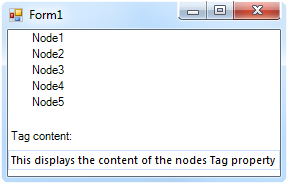
Text = "Node1" Tag = "Initial Tag Text"
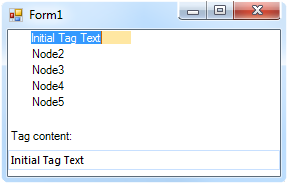
Editing the node i.e. the tag property
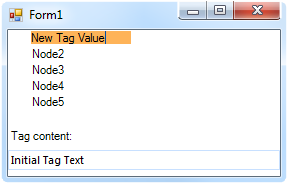
Setting "New Tag Value" as Tag value
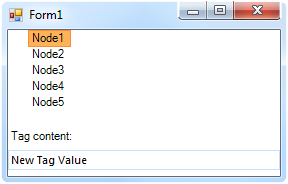 Text is back to "Node 1", Tag = "New Tag Value"
SOLUTION
You can create a custom TextBox editor by inheriting from RadTextBoxItem and implementing the IValueEditor interface. The following sample implementation demonstrates how to create an editor and replace the default editor for RadTreeNode. This editor behavior is as follows:
-
Initially the nodes' Text is the default text ("Node 1", "Node 2" ) or something that was explicitly set.
-
When editing a node by hitting F2, the editor displayes the text that is contained in the Tag property of the same node
-
After entering some data, and submitting it, the original Text value appears as text for the node, and the submitted text is now the new value for the Tag property
1.Creating the editor:
class MyEditor : RadTextBoxItem, IValueEditor
{
    #region IValueEditor Members

    string oldValue;
    RadTreeNode owner;

    public void BeginEdit()
    {
        this.Focus();
        this.HostedControl.Focus();
    }

    public bool EndEdit()
    {
        this.owner.Tag = this.Text;
        this.owner.Text = oldText;
        this.owner.TreeView.EndEdit(true);
        return true;
    }
    private static readonly object ValueChangedEventKey = new object();
    protected virtual void OnValueChanged(EventArgs args)
    {
        EventHandler handler1 = (EventHandler)base.Events[ValueChangedEventKey];
        if (handler1 != null)
        {
            handler1(this, args);
        }
    }

    protected override void OnKeyDown(KeyEventArgs e)
    {
        base.OnKeyDown(e);
        string oldEditorValue = this.Text;
        Keys pressedKey = e.KeyCode;
        if (pressedKey == Keys.Return)
        {
            if (e.Modifiers == Keys.None)
            {
                e.SuppressKeyPress = true;
                e.Handled = true;
                this.EndEdit();

                return;
            }
        }
        else if (pressedKey == Keys.Escape)
        {
            e.Handled = true;
            this.Value = this.oldValue;
            this.EndEdit();
            return;
        }
    }

    string oldText = "";
    public void Initialize(object owner, object value)
    {
        this.owner = (RadTreeNode)owner;
        oldText = this.owner.Text;
        this.Text = this.owner.Tag.ToString();
        this.oldValue = this.Text;
    }

    public bool Validate()
    {
        return true;
    }

    public event ValidationErrorEventHandler ValidationError;

    public object Value
    {
        set
        {
            this.Text = value.ToString();
        }
        get
        {
            return this.Text;
        }
    }

    public event EventHandler ValueChanged;

    public event ValueChangingEventHandler ValueChanging;

    #endregion
}
2.Changing the default editor in RadTreeView:
void radTreeView1_EditorRequired(object sender, EditorRequiredEventArgs e)
{
    e.EditorType = typeof(MyEditor);
    MyEditor editor = new MyEditor();
    e.Editor = editor;
}