New to Telerik UI for WinForms? Start a free 30-day trial
How to add footer area to TaskCardElement
Updated over 1 year ago
Environment
| Product Version | Product | Author |
|---|---|---|
| 2021.3.914 | RadTaskBoard for WinForms | Dinko Krastev |
Description
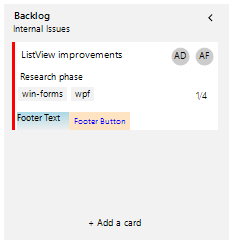
This article demonstrates how we can add a footer area to RadTaskBoard RadTaskCardElement.
Solution
First we will need to create a custom class which derives from RadTaskCardElement. In the custom class we can override the CreateChildElements() method in which we can create our footer area. Then we need to measure and arrange the custom area in the MeasureOverride() and ArrangeOverride() methods.
C#
	public class MyTaskCardElement : RadTaskCardElement
	{
		RadButtonElement button;
		StackLayoutElement footerArea;

		public MyTaskCardElement() : base()
		{
			footerArea.BackColor = Color.LightBlue;
			footerArea.DrawFill = true;
			footerArea.ElementSpacing = 5;
			footerArea.FitInAvailableSize = true;
			footerArea.Margin = new Padding(5, 0, 0, 0);
			button.ButtonFillElement.BackColor = Color.Bisque;
			button.ForeColor = Color.Blue;
			button.Margin = new Padding(5, 0, 0, 0);
		}
		protected override void CreateChildElements()
		{
			base.CreateChildElements();
			button = new RadButtonElement() { Text = "Footer Button" };
			footerArea = new StackLayoutElement();
			footerArea.Children.Add(new TextBlockElement() {Text= "Footer Text" });
			footerArea.Children.Add(button);
			this.Children.Add(footerArea);
		}

		protected override SizeF MeasureOverride(SizeF availableSize)
		{
			var size = base.MeasureOverride(availableSize);
			footerArea.Measure(new SizeF(availableSize.Width, float.PositiveInfinity));
			return new SizeF(size.Width, size.Height + footerArea.DesiredSize.Height);
		}
		protected override SizeF ArrangeOverride(SizeF finalSize)
		{
			var size = base.ArrangeOverride(finalSize);
			footerArea.Arrange(new RectangleF(0, size.Height - footerArea.DesiredSize.Height, footerArea.DesiredSize.Width, footerArea.DesiredSize.Height));
			return finalSize;
		}
	}
The final step is to replace the default RadTaskCardElement with our custom MyTaskCardElement class and populate the RadTaskBoard control. Keep in mind that you will need to subscribe to the TaskCardAdding event of the RadTaskBoard so that any new card which is added will be replaced with the custom one containing a footer.
C#
	public partial class RadForm1 : Telerik.WinControls.UI.RadForm
	{
		RadTaskBoard radTaskBoard1;
		public RadForm1()
		{
			InitializeComponent(); new RadControlSpyForm().Show();
			radTaskBoard1 = new RadTaskBoard();
			UserInfo user1 = new UserInfo();
			user1.FirstName = "Anne";
			user1.LastName = "Dodsworth";

			UserInfo user2 = new UserInfo();
			user2.FirstName = "Andrew";
			user2.LastName = "Fuller";
			MyTaskCardElement card = new MyTaskCardElement();
			RadTaskBoardColumnElement c1 = new RadTaskBoardColumnElement();
			c1.Title = "Backlog";
			c1.Subtitle = "Internal Issues";
			RadTaskBoardColumnElement c2 = new RadTaskBoardColumnElement();
			c2.Title = "In Development";
			c2.Subtitle = "Prioritized Issues";
			c2.IsCollapsed = true;
			this.radTaskBoard1.Columns.Add(c1);
			this.radTaskBoard1.Columns.Add(c2);
			card.TitleText = "ListView improvements";
			card.DescriptionText = "Research phase";
			card.AccentSettings.Color = Color.Red;

			card.Users.Add(user1);
			card.Users.Add(user2);
			RadTaskCardTagElement tagWF = new RadTaskCardTagElement();
			tagWF.Text = "win-forms";
			RadTaskCardTagElement tagWPF = new RadTaskCardTagElement();
			tagWPF.Text = "wpf";
			card.TagElements.Add(tagWF);
			card.TagElements.Add(tagWPF);
			card.SubTasks.Add(new SubTask(card));
			card.SubTasks.Add(new SubTask(card));
			card.SubTasks.Add(new SubTask(card));
			SubTask x = new SubTask(card);
			x.Completed = true;
			card.SubTasks.Add(x);
			c1.TaskCardCollection.Add(card);
			foreach (RadTaskBoardColumnElement col in this.radTaskBoard1.Columns)
			{
				col.TaskCardAdding += col_TaskCardAdding;
			}
			this.Controls.Add(radTaskBoard1);
		}

		private void col_TaskCardAdding(RadTaskBoardColumnElement.TaskCardAddingEventArgs args)
		{
			MyTaskCardElement newCard = new MyTaskCardElement();
			args.TaskCard = newCard;
		}
	}