New to Telerik UI for WinForms? Start a free 30-day trial
Use RadPopupEditor in RadGridView
Updated on Sep 15, 2025
| Product Version | Product | Author |
|---|---|---|
| 2019.1.117 (.NET 4.0 or later) | RadGridView for WinForms | Dimitar |
Description
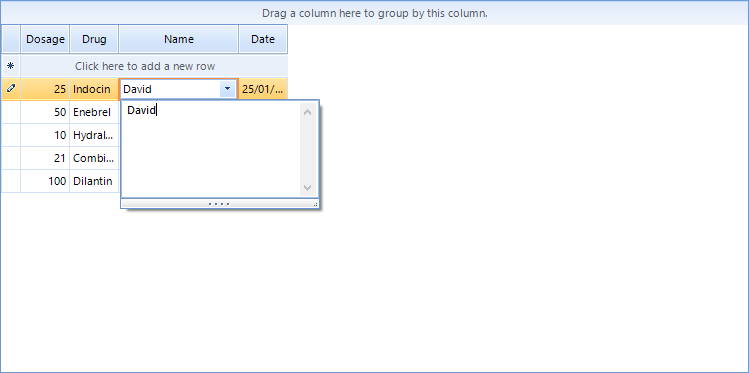
This article demonstrates how one can use RadPopupEditor as an editor in RadGridView. For example this will allow the end user to easily view or enter multi line text.
Solutionn
The tricky part is that you should have an existing PopupContainer and set it contents dynamically. You need to use RadHostitem as well.
C#
public class GridPopupEditor : BaseGridEditor
{
    RadPopupEditor popupEditor = new RadPopupEditor();
    MemoPopupContainer container = new MemoPopupContainer();
    public GridPopupEditor()
    {

        popupEditor.SetAssociatedControlRuntime(container);
    }
    public override object Value
    {
        get
        {
            return container.TextBox.Text;
        }
        set
        {
            if (value != null)
            {
                container.TextBox.Text = value.ToString();
            }

        }
    }
    public override void BeginEdit()
    {
        base.BeginEdit();
        this.EditorElement.Focus();

    }

    private void TextBox_TextChanged(object sender, EventArgs e)
    {
        OnValueChanged();
        popupEditor.Text = container.TextBox.Text;
    }

    public override bool EndEdit()
    {
        this.container.TextBox.TextChanged -= TextBox_TextChanged;
        return base.EndEdit();
    }

    protected override RadElement CreateEditorElement()
    {
        var host = new RadHostItem(popupEditor);

        return host;
    }
}
Here is a sample container that can be used with the above example:
C#
class MemoPopupContainer : RadPopupContainer
{
    public MemoPopupContainer()
    {
        TextBox = new RadTextBox
        {
            Dock = DockStyle.Fill,
            Multiline = true,
            ScrollBars = ScrollBars.Both,
        };
        Controls.Add(TextBox);
    }
    public RadTextBox TextBox { get; }
}
Figure 1: PopupEditor in RadGridView