New to Telerik UI for WinForms? Start a free 30-day trial
Format child cells on group cell click in RadGridView
Updated over 1 year ago
Environment
| Product Version | Product | Author |
|---|---|---|
| 2023.1.314 | RadGridView for WinForms | Dinko Krastev |
Description
When performing a grouping operation you may need to format specific child cells. For example, when the user right mouse clicks on a group cell, you may want to highlight important cell values.
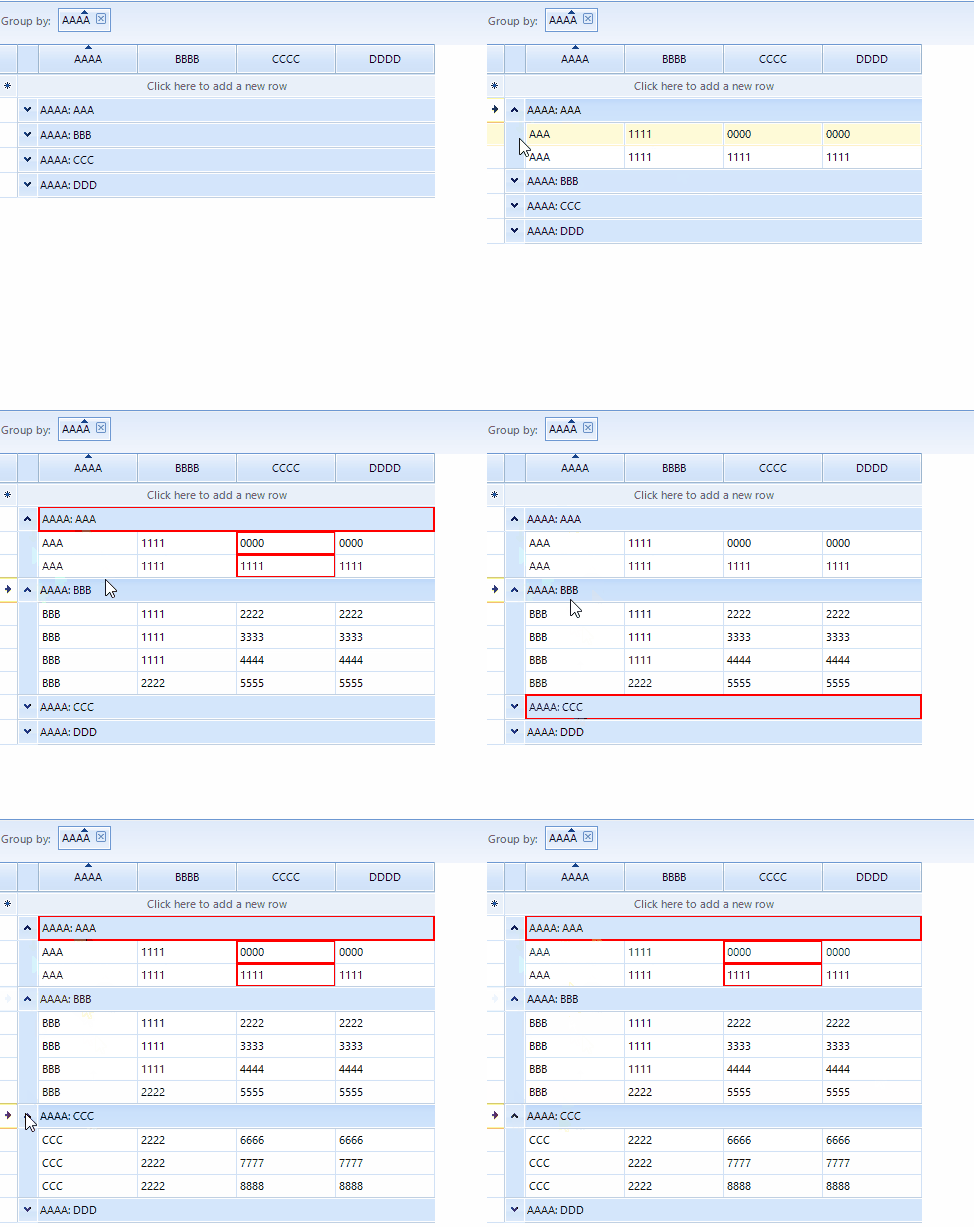
Solution
To implement this requirement you will need to create custom GridGroupRowBehavior, in which you can indentify which group is clicked.
C#
public class CustomGridGroupHeaderRowElement : GridGroupRowBehavior
{
    GridViewGroupRowInfo lastclickedGroupRowInfo;

    protected override bool OnMouseDownRight(MouseEventArgs e)
    {
        var clickedElement = this.GridViewElement.ElementTree.GetElementAtPoint(e.Location) as GridGroupContentCellElement;

        if (lastclickedGroupRowInfo != null)
        {
            lastclickedGroupRowInfo.Tag = null;
            lastclickedGroupRowInfo.InvalidateRow();
            foreach (var row in lastclickedGroupRowInfo.ChildRows)
            {
                row.InvalidateRow();
            }
        }

        if (clickedElement != null)
        {
            clickedElement.RowInfo.Tag = "clickedGroup";
            lastclickedGroupRowInfo = clickedElement.RowInfo as GridViewGroupRowInfo;
            clickedElement.RowInfo.InvalidateRow();
            foreach (var row in lastclickedGroupRowInfo.ChildRows)
            {
                row.InvalidateRow();
            }
        }

        return true;
    }
}
Then you can call the InvalidateRow() method for the group row and its child rows to trigger the ViewCellFormatting event. In this event handler, you can customize the last clicked group and its child cells. The following code snippet demonstrates how to populate the grid with sample data and register the custom GridGroupRowBehavior.
C#
public partial class Form1 : Form
{
    public Form1()
    {
        InitializeComponent();
        this.radGridView1.ShowGroupedColumns = true;
        this.radGridView1.DataSource = new List<Item>()
        {
            new Item("AAA", "1111", "0000", "0000"),
            new Item("AAA", "1111", "1111", "1111"),
            new Item("BBB", "1111", "2222", "2222"),
            new Item("BBB", "1111", "3333", "3333"),
            new Item("BBB", "1111", "4444", "4444"),
            new Item("BBB", "2222", "5555", "5555"),
            new Item("CCC", "2222", "6666", "6666"),
            new Item("CCC", "2222", "7777", "7777"),
            new Item("CCC", "2222", "8888", "8888"),
            new Item("DDD","2222", "9999", "9999"),
        };
        //register the custom row  behavior
        BaseGridBehavior gridBehavior = radGridView1.GridBehavior as BaseGridBehavior;
        gridBehavior.UnregisterBehavior(typeof(GridGroupRowBehavior));
        gridBehavior.RegisterBehavior(typeof(GridViewGroupRowInfo), new CustomGridGroupHeaderRowElement());
        this.radGridView1.ViewCellFormatting += RadGridView1_ViewCellFormatting;
    }

    private void RadGridView1_ViewCellFormatting(object sender, CellFormattingEventArgs e)
    {
        if (e.CellElement is GridGroupContentCellElement)
        {
            var cellTag = (e.CellElement as GridGroupContentCellElement).RowInfo.Tag;
            if (cellTag != null)
            {
                ApplyCellStyle(e.CellElement);
            }
            else
            {
                ResetStyles(e.CellElement);
            }
        }

        else if (e.CellElement.RowInfo.Parent is GridViewGroupRowInfo)
        {
            var cellTag = (e.CellElement.RowInfo.Parent as GridViewGroupRowInfo).Tag;
            if (cellTag != null && e.Column.Name == "CCCC")
            {
                ApplyCellStyle(e.CellElement);
            }
            else
            {
                ResetStyles(e.CellElement);
            }
        }
        else
        {
            ResetStyles(e.CellElement);
        }
    }

    private void ApplyCellStyle(GridCellElement cellElement)
    {
        cellElement.BorderColor = Color.Red;
        cellElement.BorderWidth = 2;
        cellElement.BorderBoxStyle = Telerik.WinControls.BorderBoxStyle.SingleBorder;
        cellElement.BorderGradientStyle = Telerik.WinControls.GradientStyles.Solid;
    }

    void ResetStyles(GridCellElement cellElement)
    {
        cellElement.ResetValue(LightVisualElement.BorderColorProperty, Telerik.WinControls.ValueResetFlags.Local);
        cellElement.ResetValue(LightVisualElement.BorderWidthProperty, Telerik.WinControls.ValueResetFlags.Local);
        cellElement.ResetValue(LightVisualElement.BorderBoxStyleProperty, Telerik.WinControls.ValueResetFlags.Local);
        cellElement.ResetValue(LightVisualElement.BorderGradientStyleProperty, Telerik.WinControls.ValueResetFlags.Local);
    }
}

public class Item
{
    public Item(string aaaa, string bbbb, string cccc, string dddd, bool isPinned = false)
    {
        AAAA = aaaa;
        BBBB = bbbb;
        CCCC = cccc;
        DDDD = dddd;
    }
    public string AAAA { get; set; }
    public string BBBB { get; set; }
    public string CCCC { get; set; }
    public string DDDD { get; set; }
}