Freeze Pane in RadGridView
| Date Posted | Product | Author |
|---|---|---|
| March 17, 2016 | RadGridView for WinForms | Desislava Yordanova |
Problem
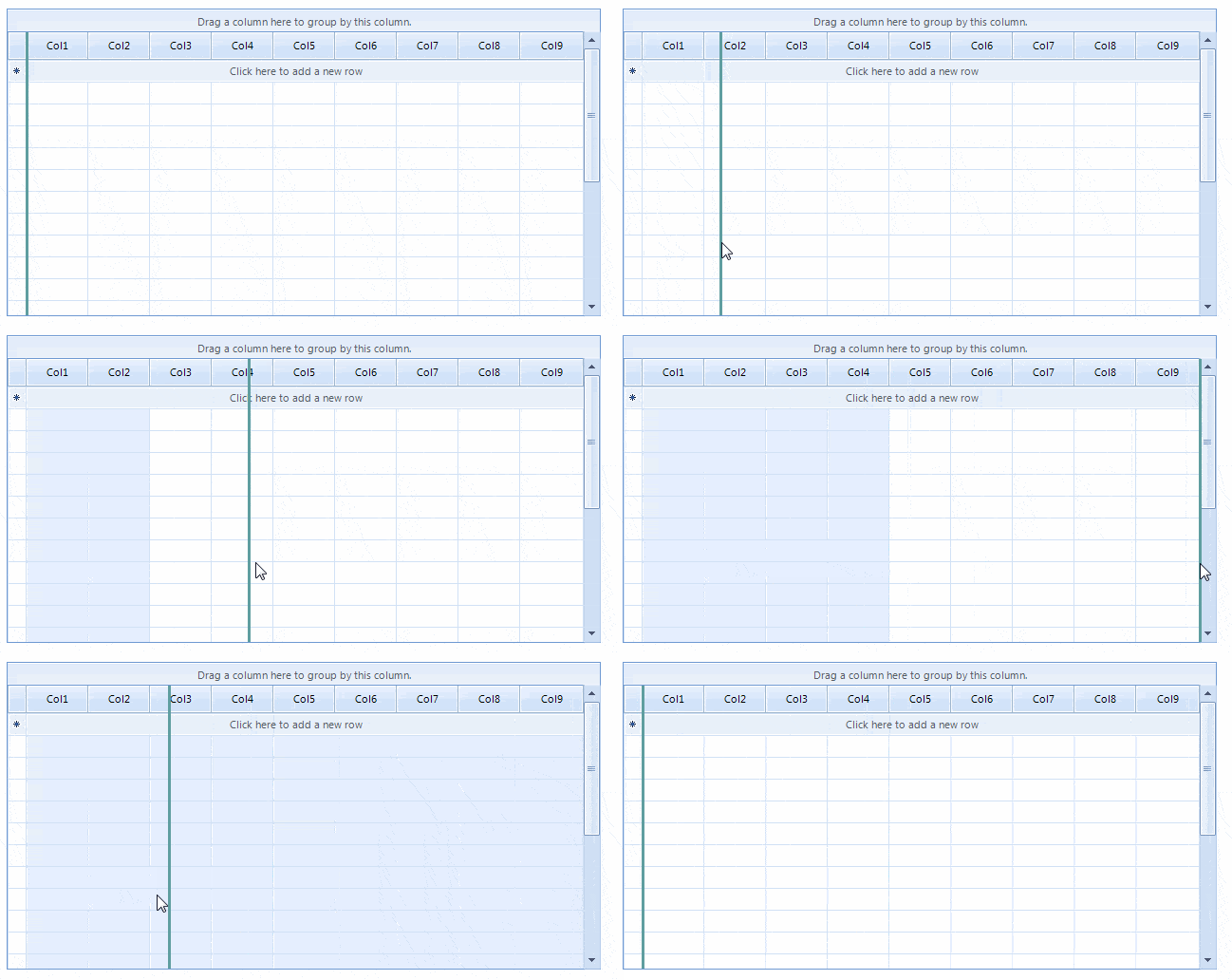
Columns in RadGridView can be pinned which will result in anchored columns to the left or right side of the grid. This article demonstrates a sample approach how to achieve left freeze pane.
Solution
Extend the GridTableElement and add a LightVisualElement which will be used as a splitter element. It is necessary to arrange the splitter considering the pinned columns container’s width. While moving the splitter, you should adjust its PositionOffset in order to position it correctly. When the mouse is released, all columns on the left side of the splitter should be pinned. The rest of them should be unpinned. Last, replace the default GridTableElement by using a derivative of the TableViewDefinition. You can find below a complete code snippet:
public Form1()
{
    InitializeComponent();
    this.radGridView1.ViewDefinition = new MyTableViewDefinition();
    for (int i = 1; i < 10; i++)
    {
        this.radGridView1.Columns.Add("Col" + i);
    }
    this.radGridView1.AutoSizeColumnsMode = Telerik.WinControls.UI.GridViewAutoSizeColumnsMode.Fill;
    for (int i = 0; i < 20; i++)
    {
        GridViewRowInfo row = this.radGridView1.Rows.NewRow();
        this.radGridView1.Rows.Add(row);
    }
}
public class MyGridTableElement : GridTableElement
{
    private int splitterWidth = 3;
    private MySplitter freezePaneSplitter;
    protected override void CreateChildElements()
    {
        base.CreateChildElements();
        this.freezePaneSplitter = new MySplitter(this);
        this.freezePaneSplitter.DrawFill = true;
        this.freezePaneSplitter.BackColor = Color.CadetBlue;
        this.freezePaneSplitter.GradientStyle = Telerik.WinControls.GradientStyles.Solid;
        this.Children.Add(this.freezePaneSplitter);
    }
    public override void Initialize(RadGridViewElement gridRootElement, GridViewInfo viewInfo)
    {
        base.Initialize(gridRootElement, viewInfo);
        this.freezePaneSplitter.Visibility = Telerik.WinControls.ElementVisibility.Visible;
    }
    protected override Type ThemeEffectiveType
    {
        get
        {
            return typeof(GridTableElement);
        }
    }
    protected override SizeF MeasureCore(SizeF availableSize)
    {
        SizeF size = base.MeasureCore(availableSize);
        this.freezePaneSplitter.Measure(new SizeF(this.splitterWidth, size.Height));
        return size;
    }
    protected override SizeF ArrangeOverride(SizeF finalSize)
    {
        SizeF size = base.ArrangeOverride(finalSize);
        RectangleF clientRect = this.GetClientRectangle(finalSize);
        PinnedColumnTraverser traverser = new PinnedColumnTraverser(this.ViewElement.RowLayout.RenderColumns, PinnedColumnPosition.Left);
        SizeF leftPinnedColumns = this.ViewElement.RowLayout.MeasurePinnedColumns(traverser);
        this.freezePaneSplitter.Arrange(new RectangleF(leftPinnedColumns.Width - this.splitterWidth / 2,
            clientRect.Y, this.splitterWidth, clientRect.Height));
        return size;
    }
}
public class MyTableViewDefinition : TableViewDefinition
{
    public override IRowView CreateViewUIElement(GridViewInfo viewInfo)
    {
        return new MyGridTableElement();
    }
}
public class MySplitter : LightVisualElement
{
    private bool moving = false;
    private Point mouseDownLocation;
    private GridTableElement owner;
    public MySplitter(GridTableElement owner)
    {
        this.owner = owner;
    }
    protected override void OnMouseDown(MouseEventArgs e)
    {
        base.OnMouseDown(e);
        this.Capture = true;
        this.moving = true;
        this.mouseDownLocation = e.Location;
    }
    protected override void OnMouseMove(MouseEventArgs e)
    {
        base.OnMouseMove(e);
        if (!this.moving)
        {
            return;
        }
        this.PositionOffset = new SizeF(e.X - this.mouseDownLocation.X, 0);
    }
    protected override void OnMouseUp(MouseEventArgs e)
    {
        base.OnMouseUp(e);
        this.Capture = false;
        this.moving = false;
        GridTableHeaderRowElement headerRowElement = this.owner.GetRowElement(this.owner.ViewInfo.TableHeaderRow) as GridTableHeaderRowElement;
        if (headerRowElement != null)
        {
            Point point = new Point(e.X, headerRowElement.ControlBoundingRectangle.Y + headerRowElement.ControlBoundingRectangle.Height / 2);
            GridHeaderCellElement cellElement = this.ElementTree.GetElementAtPoint<GridHeaderCellElement>(point);
            if (cellElement != null)
            {
                int half = 0;
                if (e.X > cellElement.ControlBoundingRectangle.X + cellElement.ControlBoundingRectangle.Width / 2)
                {
                    half++;
                }
                while (this.owner.ViewTemplate.PinnedColumns.Count > 0)
                {
                    this.owner.ViewTemplate.PinnedColumns[0].IsPinned = false;
                }
                for (int i = 0; i < cellElement.ColumnIndex + half; i++)
                {
                    this.owner.ViewTemplate.Columns[i].IsPinned = true;
                }
            }
            else
            {
                if (e.X < this.owner.RowHeaderColumnWidth)
                {
                    while (this.owner.ViewTemplate.PinnedColumns.Count > 0)
                    {
                        this.owner.ViewTemplate.PinnedColumns[0].IsPinned = false;
                    }
                }
                else if (e.X > this.owner.ControlBoundingRectangle.Right - this.owner.VScrollBar.Size.Width)
                {
                    foreach (GridViewColumn col in this.owner.ViewTemplate.Columns)
                    {
                        col.IsPinned = true;
                    }
                }
            }
        }
        this.PositionOffset = SizeF.Empty;
        this.owner.InvalidateMeasure();
        this.owner.UpdateLayout();
    }
}
A complete solution in C# and VB.NET can be found here.