Filter by using a CheckBox in RadVirtualGrid
Environment
| Product Version | Product | Author |
|---|---|---|
| 2020.3.1020 | RadVirtualGrid for WinForms | Desislava Yordanova |
Description
RadVirtualGrid loads its data on demand. Hence, it doesn't know what data will be displayed and it shows the data as text. If you want to show Boolean data (true/false), it would be more appropriate to show check boxes that store the true/false value. The Creating custom cells help article demonstrates a sample approach how to create a check box data cell.
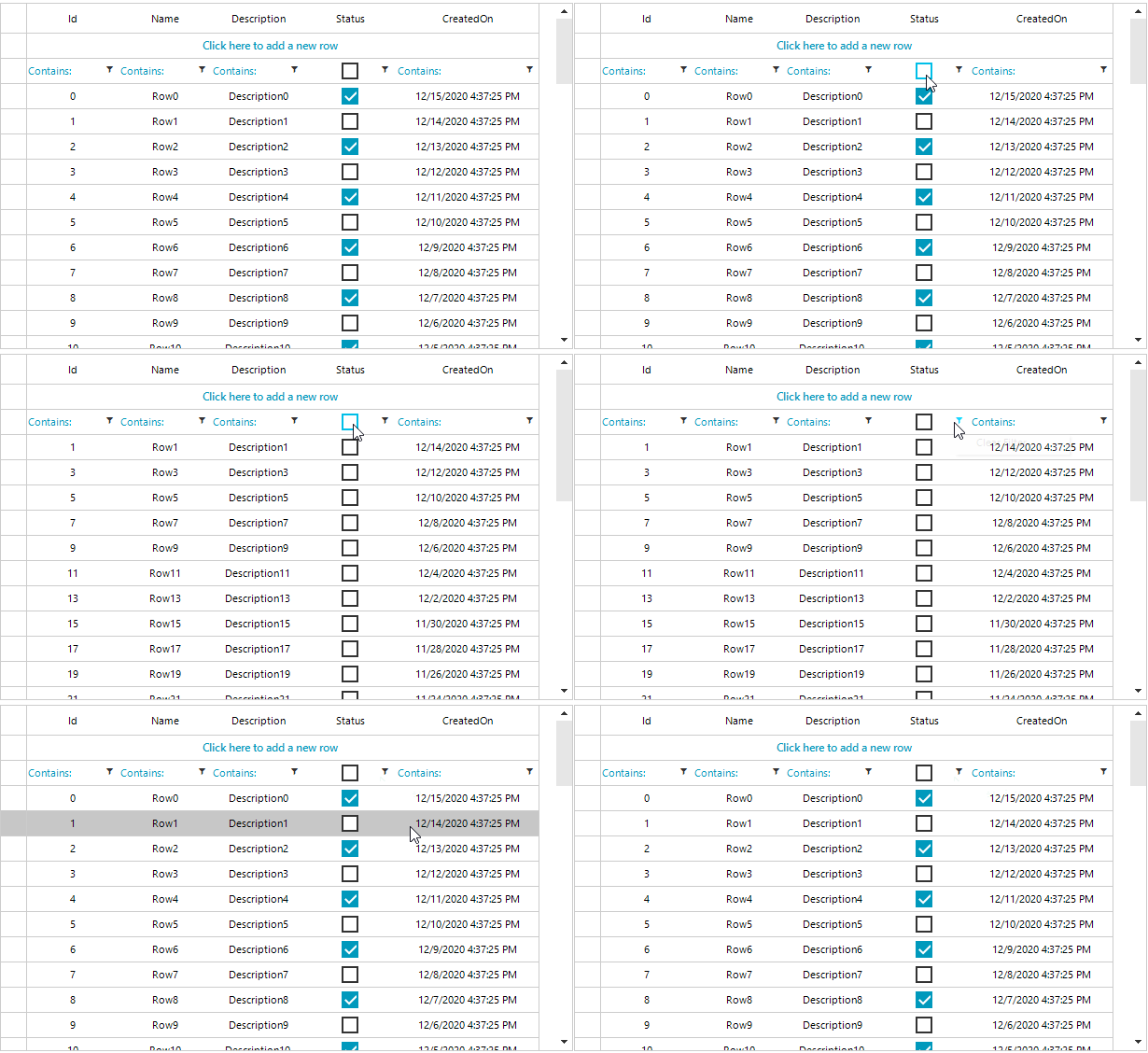
However, once the filtering functionality is enabled, we will need a check box in the filter cell to filter the data easily. This article demonstrates a sample approach how to extend the approach explained in the referred article and achieve the filtering.
Solution
First, make sure that you have already implemented the custom data cells with check boxes: Creating custom cells.
The above illustrated result can be accomplished by following the steps below:
1. Create a derivative of VirtualGridFilterCellElement and add a RadCheckBoxElement to it in order to filter the data by its ToggleState.
2. Handle the CreateCellElement event and replace the default filter cell with the custom defined one.
3. In the ContextMenuOpening event you can add a menu item for clearing the FilterDescriptor.
DataTable dt = new DataTable();
DataView dv = new DataView();
DataTable filteredTable = new DataTable();

public RadForm1()
{
    InitializeComponent();

    dt.Columns.Add("Id",typeof(int));
    dt.Columns.Add("Name", typeof(string));
    dt.Columns.Add("Description", typeof(string));
    dt.Columns.Add("Status", typeof(bool));
    dt.Columns.Add("CreatedOn", typeof(DateTime));

    for (int i = 0; i < 50; i++)
    {
        dt.Rows.Add(i, "Row" + i, "Description" + i, i % 2 == 0, DateTime.Now.AddDays(-i));
    }
    dv = new DataView(dt);
    filteredTable = dv.ToTable();

    this.radVirtualGrid1.ColumnCount = dt.Columns.Count;
    this.radVirtualGrid1.RowCount = dt.Rows.Count;
    this.radVirtualGrid1.CellValueNeeded += radVirtualGrid1_CellValueNeeded;
    this.radVirtualGrid1.CreateCellElement += radVirtualGrid1_CreateCellElement;
    this.radVirtualGrid1.CellFormatting += RadVirtualGrid1_CellFormatting;

    this.radVirtualGrid1.MasterViewInfo.SetColumnDataType(3, typeof(int));

   this.radVirtualGrid1.ContextMenuOpening += radVirtualGrid1_ContextMenuOpening;
    this.radVirtualGrid1.FilterChanged += RadVirtualGrid1_FilterChanged;
}

private void RadVirtualGrid1_FilterChanged(object sender, VirtualGridEventArgs e)
{
    dv.RowFilter = this.radVirtualGrid1.FilterDescriptors.Expression;
    filteredTable = dv.ToTable();
    dt.DefaultView.RowStateFilter = DataViewRowState.ModifiedCurrent;
    this.radVirtualGrid1.RowCount = filteredTable.Rows.Count;
}
private void RadVirtualGrid1_CellFormatting(object sender, VirtualGridCellElementEventArgs e)
{
    if (e.CellElement.RowIndex == -3 && e.CellElement.ColumnIndex > -1)
    {
        VirtualGridFilterCellElement filterCell = e.CellElement as VirtualGridFilterCellElement;
        if (e.CellElement.ColumnIndex == 3)
        {
            filterCell.FilterOperatorText.Visibility = ElementVisibility.Collapsed;
        }
        else
        {
            filterCell.FilterOperatorText.Visibility = ElementVisibility.Visible;
        }
    }
}

private void radVirtualGrid1_CreateCellElement(object sender, VirtualGridCreateCellEventArgs e)
{
    if (e.ColumnIndex == 3)
    {
        if (e.RowIndex == -3)
        {
            e.CellElement = new MyFilterVirtualGridCheckBoxCellElement();
        }
        else if (e.RowIndex >= 0)
        {
            e.CellElement = new MyVirtualGridCheckBoxCellElement();
        }
    }

}

private void radVirtualGrid1_ContextMenuOpening(object sender, VirtualGridContextMenuOpeningEventArgs e)
{
    if (e.ColumnIndex == 3 && e.RowIndex == -3)
    {
        e.ContextMenu.Items.Clear();

        RadMenuItem item = new RadMenuItem("Clear Filter");
        item.Click += Item_Click;
        item.Tag = e.ColumnIndex;
        e.ContextMenu.Items.Add(item);
    }

}
private void Item_Click(object sender, EventArgs e)
{
    RadMenuItem item = sender as RadMenuItem;
    this.radVirtualGrid1.FilterDescriptors.Remove("Status");
    this.radVirtualGrid1.TableElement.SynchronizeRows();
}

private void radVirtualGrid1_CellValueNeeded(object sender, VirtualGridCellValueNeededEventArgs e)
{
    if (e.ColumnIndex > -1 && e.RowIndex > -1)
    {
        e.FieldName = dt.Columns[e.ColumnIndex].ColumnName;
        e.Value = filteredTable.Rows[e.RowIndex][e.ColumnIndex];

    }
    else if (e.RowIndex == -1 && e.ColumnIndex > -1)
    {
        e.FieldName = dt.Columns[e.ColumnIndex].ColumnName;
        e.Value = filteredTable.Columns[e.ColumnIndex].ColumnName;
    }
}

public class MyFilterVirtualGridCheckBoxCellElement : VirtualGridFilterCellElement
{
    private RadCheckBoxElement checkBox;

    protected override void CreateChildElements()
    {
        base.CreateChildElements();

        this.checkBox = new RadCheckBoxElement();
        this.Children.Add(this.checkBox);
    }


    protected override void UpdateInfo(VirtualGridCellValueNeededEventArgs args)
    {
        base.UpdateInfo(args);

        if (args.Value is bool)
        {
            this.checkBox.Checked = (bool)args.Value;
        }

        this.Text = String.Empty;
    }

    public override bool IsCompatible(int data, object context)
    {
        VirtualGridRowElement rowElement = context as VirtualGridRowElement;

        return data == 3 && rowElement.RowIndex == -3;
    }

    public override void Attach(int data, object context)
    {
        base.Attach(data, context);

        this.checkBox.ToggleStateChanged += checkBox_ToggleStateChanged;
    }

    public override void Detach()
    {
        this.checkBox.ToggleStateChanged -= checkBox_ToggleStateChanged;

        base.Detach();
    }

    protected override SizeF ArrangeOverride(SizeF finalSize)
    {
        SizeF size = base.ArrangeOverride(finalSize);

        this.checkBox.Arrange(new RectangleF((finalSize.Width - this.checkBox.DesiredSize.Width) / 2f,
            (finalSize.Height - this.checkBox.DesiredSize.Height) / 2f, this.checkBox.DesiredSize.Width, this.checkBox.DesiredSize.Height));

        return size;
    }

    protected override Type ThemeEffectiveType
    {
        get
        {
            return typeof(VirtualGridCellElement);
        }
    }

    private void checkBox_ToggleStateChanged(object sender, StateChangedEventArgs args)
    {
        this.TableElement.GridElement.SetCellValue(this.checkBox.Checked, this.RowIndex, this.ColumnIndex, this.ViewInfo);

        FilterDescriptor descriptor;
        if (this.TableElement.GridElement.FilterDescriptors.Contains("Status"))
        {
            this.TableElement.GridElement.FilterDescriptors.Remove("Status");

        }

        descriptor = new FilterDescriptor("Status", FilterOperator.IsEqualTo, this.checkBox.Checked);
        this.SetFilterDescriptor(descriptor);

    }
}