How to Embed RadRichTextEditor in GridView Cells
Environment
| Product Version | Product | Author |
|---|---|---|
| 2022.2.622 | RadGridView for WinForms | Desislava Yordanova |
Description
A common requirement is to display and edit HTML text in RadGridView. RadGridView offers rich text formatting mechanism that uses plain HTML tags to display formatted text such as font style, font color, font size, etc. This can be used to display plain HTML in the grid cells. However, it is also necessary to provide a convenient editing mechanism for this HTML. This article demonstrates a sample approach how to embed a RadRichTextEditor in each cell in RadGridView.
Note that RadRichTextEditor is a heavy control due to its diversity of supported features. Since RadRichTextEditor can't work as an element, it should be hosted as a control in a RadHostItem. Thus, it can be used inside the custom cell element. Note that since this approach uses controls (instead of elements), some visual glitches are possible as controls do not support clipping. In addition, if you are having a lot of rows, performance implications may occur for the same reason.
Display and Edit rich text
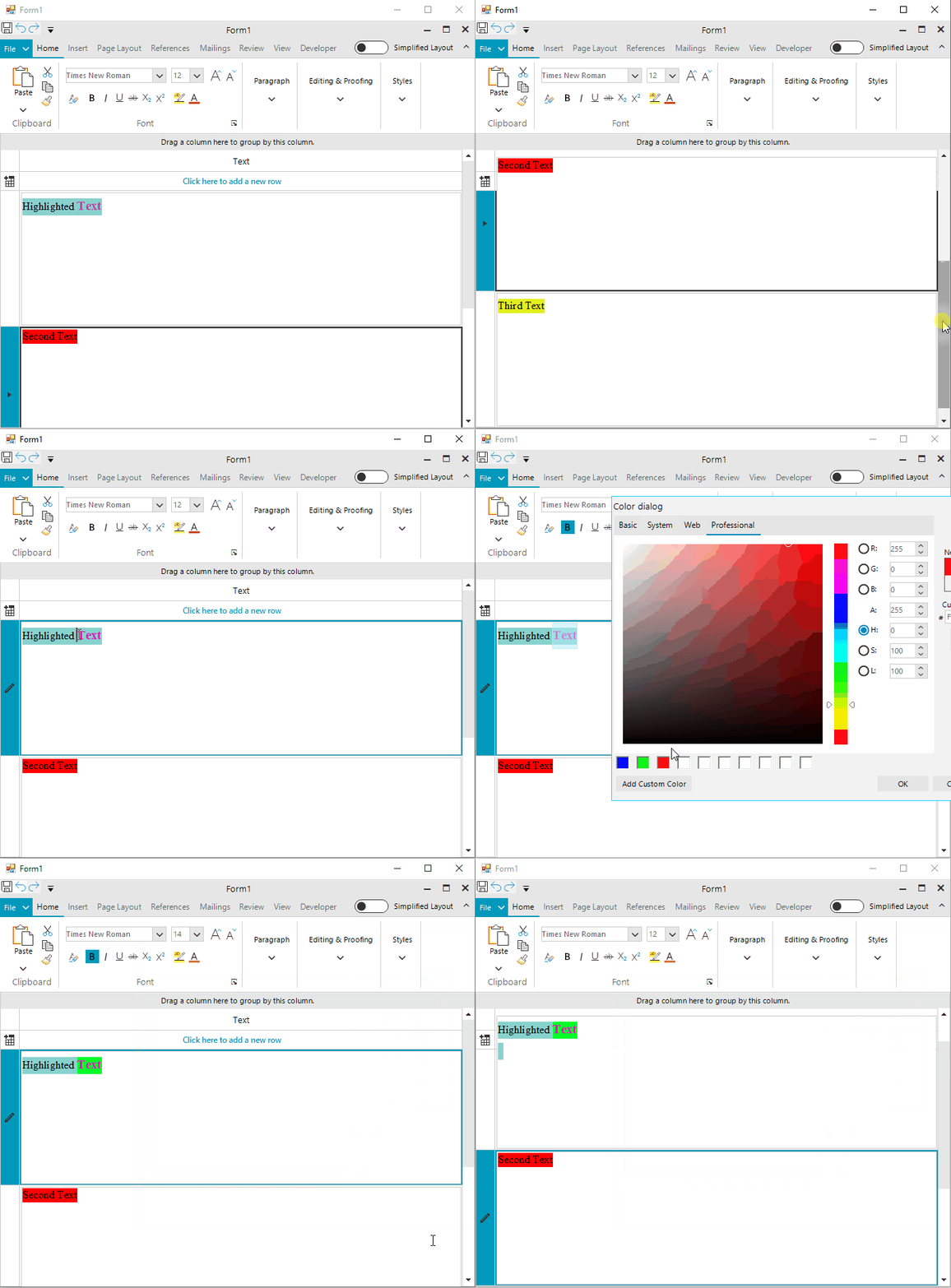
Solution
Add a RichTextEditorRibbonUI and a RadGridView to the form. It is necessary to create a custom column that uses a specific cell element that shows a RadRichTextEditor.
Custom Column
public class GridViewRichTextColumn : GridViewTextBoxColumn
{
    public GridViewRichTextColumn()
    {
    }

    public GridViewRichTextColumn(string fieldName)
        : base(fieldName)
    {
    }


    public GridViewRichTextColumn(string uniqueName, string fieldName)
        : base(uniqueName, fieldName)
    {
    }

    public override System.Type GetCellType(GridViewRowInfo row)
    {
        if (row is GridViewDataRowInfo)
        {
            return typeof(RichTextEditorCellElement);
        }

        return base.GetCellType(row);
    }

    public override System.Type GetDefaultEditorType()
    {
        return typeof(RichTextEditor);
    }

    public override IInputEditor GetDefaultEditor()
    {
        return new RichTextEditor();
    }
}
Custom Cell Element
public class RichTextEditorCellElement : GridDataCellElement
{
    private RichTextEditor editor;

    public RichTextEditorCellElement(GridViewColumn col, GridRowElement row)
        : base(col, row)
    {

    }

    protected override Type ThemeEffectiveType
    {
        get
        {
            return typeof(GridDataCellElement);
        }
    }

    public override IInputEditor Editor
    {
        get
        {
            return this.editor;
        }
    }

    protected override void CreateChildElements()
    {
        base.CreateChildElements();
        this.editor = new RichTextEditor();

        this.Children.Add(this.editor.EditorElement);
    }

    protected override void SetContentCore(object value)
    {
        try
        {
            this.editor.Value = Convert.ToString(value);

            if (this.Value != null && this.Value != DBNull.Value && this.Value.ToString() != "")
            {
                RichTextEditorElement element = (RichTextEditorElement)this.editor.EditorElement;
                RadRichTextEditor textBox = (RadRichTextEditor)element.HostedControl;
                HtmlFormatProvider provider = new HtmlFormatProvider();

                RadDocument document = provider.Import(this.Value.ToString());
                textBox.Document = document;
                document.LayoutMode = DocumentLayoutMode.Flow;
            }
        }
        catch (Exception ex)
        {
            MessageBox.Show(null, ex.ToString(), "EXCEPTION", MessageBoxButtons.OK, MessageBoxIcon.Error);
        }
    }

    public override void Attach(GridViewColumn data, object context)
    {
        base.Attach(data, context);

        if (this.RowElement != null)
        {
            this.GridViewElement.EditorManager.RegisterPermanentEditorType(typeof(RichTextEditor));
        }
    }
}
Custom BaseGridEditor
public class RichTextEditor : BaseGridEditor
{
    public override object Value
    {
        get
        {
            RichTextEditorElement element = (RichTextEditorElement)EditorElement;
            RadRichTextEditor textBox = (RadRichTextEditor)element.HostedControl;
           HtmlFormatProvider provider = new HtmlFormatProvider();
            return provider.Export(textBox.Document);
        }
        set
        {
            RichTextEditorElement element = (RichTextEditorElement)EditorElement;
            RadRichTextEditor textBox = (RadRichTextEditor)element.HostedControl;
            HtmlFormatProvider provider = new HtmlFormatProvider();
            if (value != null)
            {
                textBox.Document = provider.Import(value.ToString());
            }
            else
            {
                textBox.Document = provider.Import(@"<html><body></body></html>");
            }
        }
    }

    public override void BeginEdit()
    {
        base.BeginEdit();

        RichTextEditorElement element = this.EditorElement as RichTextEditorElement;
        RadRichTextEditor richTextEditor = element.HostedControl as RadRichTextEditor;
        richTextEditor.Document.DocumentContentChanged += this.OnDocumentContentChanged;
    }

    private void OnDocumentContentChanged(object sender, System.EventArgs e)
    {
        this.OnValueChanged();
    }

    public override bool EndEdit()
    {
        RichTextEditorElement element = this.EditorElement as RichTextEditorElement;
        RadRichTextEditor richTextEditor = element.HostedControl as RadRichTextEditor;
        richTextEditor.Document.DocumentContentChanged -= this.OnDocumentContentChanged;

        return base.EndEdit();
    }

    protected override RadElement CreateEditorElement()
    {
        return new RichTextEditorElement();
    }
}

public class RichTextEditorElement : RadHostItem
{
    public RichTextEditorElement()
        : base(new RadRichTextEditor())
    {
        RouteMessages = false;
        this.HostedControl.GotFocus += new EventHandler(HostedControl_GotFocus);
        this.HostedControl.KeyDown += new KeyEventHandler(HostedControl_KeyDown);
    }

    private void HostedControl_GotFocus(object sender, EventArgs e)
    {
        RichTextEditorCellElement cell = this.Parent as RichTextEditorCellElement;
        if (cell != null)
        {
            cell.ColumnInfo.IsCurrent = true;
            cell.RowInfo.IsCurrent = true;
            cell.GridViewElement.BeginEdit();
        }
    }

    void HostedControl_KeyDown(object sender, KeyEventArgs e)
    {
        if (e.Control && e.KeyCode == Keys.Enter)
        {
            ((RadGridView)this.ElementTree.Control).EndEdit();
        }
    }
}
Last, but not least, the following code snippet demonstrates how to use it in RadGridView:
public Form1()
{
    InitializeComponent();

    this.radGridView1.AutoSizeColumnsMode = GridViewAutoSizeColumnsMode.Fill;
    this.radGridView1.Columns.Add(new GridViewRichTextColumn("Text", "Text"));

    GridViewRowInfo row = radGridView1.Rows.AddNew();
    row.Height = 200;
    row.Cells[0].Value = "<html><span style=\"background-color:red\">Highlighted Text</span></html>";

     row = radGridView1.Rows.AddNew();
    row.Height = 200;
    row.Cells[0].Value = "<html><span style=\"background-color:red\">Second Text</span></html>";

     row = radGridView1.Rows.AddNew();
    row.Height = 200;
    row.Cells[0].Value = "<html><span style=\"background-color:red\">Third Text</span></html>";

    this.radGridView1.CurrentCellChanged += RadGridView1_CurrentCellChanged;
}

private void RadGridView1_CurrentCellChanged(object sender, CurrentCellChangedEventArgs e)
{
    if (e.NewCell != null && e.NewCell.ColumnInfo is GridViewRichTextColumn)
    {
        RichTextEditorCellElement cellElement = this.radGridView1.TableElement.GetCellElement(e.NewCell.RowInfo,
            e.NewCell.ColumnInfo) as RichTextEditorCellElement;
        if (cellElement != null)
        {
            RichTextEditorElement element = (RichTextEditorElement)((RichTextEditor)cellElement.Editor).EditorElement;
            RadRichTextEditor textBox = (RadRichTextEditor)element.HostedControl;
            this.richTextEditorRibbonBar1.AssociatedRichTextEditor = textBox;
            Console.WriteLine(textBox.GetHashCode());
        }
    }
}
A complete C# and VB project is available here.