Drag and drop functionality from RadGridView to RadTreeView
| Product Version | Product | Author | Last modified |
|---|---|---|---|
| 2016.1.112 | RadGridView for WinForms | Desislava Yordanova | February 04, 2016 |
Problem
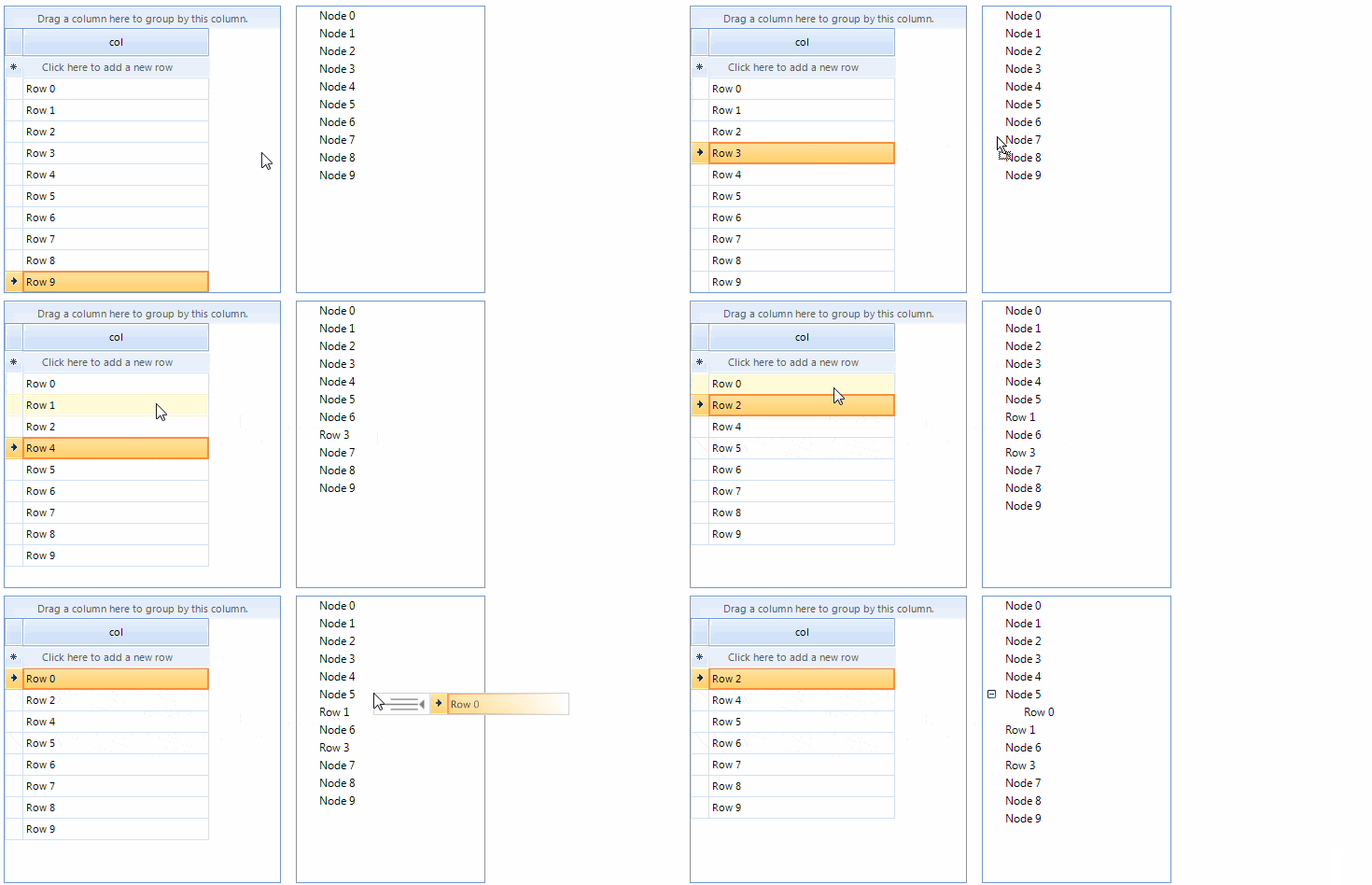
This article demonstrates how to achieve drag and drop behavior from RadGridView to RadTreeView by using the RadGridViewDragDropService.
Solution
Consider the RadGridView and RadTreeView are populated with data in unbound mode.
In order to start the drag and drop service when the user clicks on a row with the left mouse button, it is necessary to create a custom grid behavior. To do this, create a new class that inherits the GridDataRowBehavior class. In addition, the drag and drop service allows you to disable the auto scrolling while dragging functionality:
public class CustomGridDataRowBehavior : GridDataRowBehavior
{
    protected override bool OnMouseDownLeft(MouseEventArgs e)
    {
        GridDataRowElement row = this.GetRowAtPoint(e.Location) as GridDataRowElement;
        if (row != null)
        {
            RadGridViewDragDropService svc = this.GridViewElement.GetService<RadGridViewDragDropService>();
            svc.AllowAutoScrollColumnsWhileDragging = false;
            svc.AllowAutoScrollRowsWhileDragging = false;
            svc.Start(row);
        }
        return base.OnMouseDownLeft(e);
    }
}
It is important to register this behavior in RadGridView.
BaseGridBehavior gridBehavior = this.radGridView1.GridBehavior as BaseGridBehavior;
gridBehavior.UnregisterBehavior(typeof(GridViewDataRowInfo));
gridBehavior.RegisterBehavior(typeof(GridViewDataRowInfo), new CustomGridDataRowBehavior());
The PreviewDragStart event is fired once the drag and drop service on the grid is started. In this case, we should tell the drag and drop service if the drag operation can move forward. Implement the PreviewDragStart event handler as follows:
private void dragDropService_PreviewDragStart(object sender, PreviewDragStartEventArgs e)
{
    e.CanStart = true;
}
The next event we should handle is the PreviewDragOver event. This event allows you to control on what targets the row being dragged can be dropped on. In this case, as long as it’s being dropped somewhere on the target RadTreeView, we should allow the drag over operation. Here is the appropriate place to show the appropriate indication for the preview drop operation before, after or over a node. For this purpose we will use a RadLayeredWindow that displays the relevant image for the drop position together with the image of the row being dragged. In the PreviewDragHint event we should set the PreviewDragHintEventArgs.UseDefaultHint property to false in order to use our custom hint. Implement the handler as follows:
void dragDropService_PreviewDragHint(object sender, PreviewDragHintEventArgs e)
{
    e.UseDefaultHint = false;
}

RadLayeredWindow dropHintWindow = new RadLayeredWindow();

private void dragDropService_PreviewDragOver(object sender, RadDragOverEventArgs e)
{
    dropHintWindow.Hide();
    if (e.DragInstance is GridDataRowElement)
    {
        if (e.HitTarget is RadTreeViewElement)
        {
            e.CanDrop = true;
        }
        else if (e.HitTarget is TreeNodeElement)
        {
            e.CanDrop = true;
            SetHintWindowPosition(MousePosition, (TreeNodeElement)e.HitTarget, e.DragInstance.GetDragHint());
        }
    }
}

protected void SetHintWindowPosition(Point mousePt, TreeNodeElement nodeElement, Image originalHintImage)
{
    dropHintWindow.Hide();
    Point point = this.radTreeView1.ElementTree.Control.PointToClient(mousePt);
    point = nodeElement.PointFromScreen(mousePt);
    DropPosition dropPosition = this.GetDropPosition(point, nodeElement);
    Image dropPositionImage = null;
    switch (dropPosition)
    {
        case DropPosition.None:
            break;
        case DropPosition.BeforeNode:
            dropPositionImage = Properties.Resources.RadTreeViewDropBefore;
            break;
        case DropPosition.AfterNode:
            dropPositionImage = Properties.Resources.RadTreeViewDropAfter;
            break;
        case DropPosition.AsChildNode:
            dropPositionImage = Properties.Resources.RadTreeViewDropAsChild;
            break;
    }

    int offset = 10;
    Bitmap newHintImage = new Bitmap(originalHintImage.Width + dropPositionImage.Width + offset, Math.Max(originalHintImage.Height, dropPositionImage.Height));
    using (Graphics g = Graphics.FromImage(newHintImage))
    {
        g.Clear(Color.White);
        g.DrawImage(dropPositionImage, Point.Empty);
        g.DrawImage(originalHintImage, new Point(dropPositionImage.Width + offset, 0));
        g.DrawRectangle(Pens.LightGray, new Rectangle(0, 0, newHintImage.Width - 1, newHintImage.Height - 1));
    }

    dropHintWindow.TopMost = true;
    dropHintWindow.BackgroundImage = newHintImage;
    dropHintWindow.ShowWindow(mousePt);
}

protected DropPosition GetDropPosition(Point dropLocation, TreeNodeElement targetNodeElement)
{
    int part = targetNodeElement.Size.Height / 3;
    int mouseY = dropLocation.Y;
    bool dropAtTop = mouseY < part;

    if (dropAtTop)
    {
        return DropPosition.BeforeNode;
    }

    if (mouseY >= part && mouseY <= part * 2)
    {
        return DropPosition.AsChildNode;
    }

    return DropPosition.AfterNode;
}
The last event we should handle in our implementation is the PreviewDragDrop event. This event allows you to get a handle on all the aspects of the drag and drop operation, the source (drag) grid, the destination (target) treeview, as well as the row being dragged. This is where we will initiate the actual physical move of the row from the source control to the target one. In the Stopped event we should hide the RadLayeredWindow. Implement the handler as follows:
private void dragDropService_PreviewDragDrop(object sender, RadDropEventArgs e)
{
    GridDataRowElement rowElement = e.DragInstance as GridDataRowElement;
    if (rowElement == null)
    {
        return;
    }
    string sourceText = rowElement.RowInfo.Cells[0].Value.ToString();
    TreeNodeElement targetNodeElement = e.HitTarget as TreeNodeElement;
    if (targetNodeElement != null)
    {
        RadTreeViewElement treeViewElement = targetNodeElement.TreeViewElement;
        RadTreeNode targetNode = targetNodeElement.Data;
        DropPosition dropPosition = this.GetDropPosition(e.DropLocation, targetNodeElement);

        switch (dropPosition)
        {
            case DropPosition.None:
                break;
            case DropPosition.BeforeNode:
                radGridView1.Rows.Remove(rowElement.RowInfo);

                RadTreeNodeCollection nodes = targetNode.Parent == null ? treeViewElement.Nodes : targetNode.Parent.Nodes;
                nodes.Insert(targetNode.Index, new RadTreeNode(sourceText));
                break;
            case DropPosition.AfterNode:
                radGridView1.Rows.Remove(rowElement.RowInfo);

                RadTreeNodeCollection nodes1 = targetNode.Parent == null ? treeViewElement.Nodes : targetNode.Parent.Nodes;
                int targetIndex = targetNodeElement.Data.Index <= treeViewElement.Nodes.Count - 1 ?
                    (targetNodeElement.Data.Index + 1) : treeViewElement.Nodes.Count - 1;
                nodes1.Insert(targetIndex, new RadTreeNode(sourceText));
                break;
            case DropPosition.AsChildNode:
                radGridView1.Rows.Remove(rowElement.RowInfo);
                targetNode.Nodes.Add(new RadTreeNode(sourceText));
                break;
        }
    }

    RadTreeViewElement treeElement = e.HitTarget as RadTreeViewElement;
    if (treeElement != null)
    {
        radGridView1.Rows.Remove(rowElement.RowInfo);
        radTreeView1.Nodes.Add(new RadTreeNode(sourceText));
    }
}
void dragDropService_Stopped(object sender, EventArgs e)
{
    dropHintWindow.Hide();
}
You can download a VB and C# project from the following link.