Drag and Drop Behavior from GanttView to Scheduler
Environment
| Product Version | Product | Author |
|---|---|---|
| 2019.2.618 | RadGanttView for WinForms | Desislava Yordanova |
Description
RadGanttView supports drag and drop functionality for its tasks out of the box. A common requirement is to drag a task outside the ganttview, e.g. to RadScheduler and add an appointment after dropping the task to a specific cell.
Drag and Drop from RadGanttView to RadScheduler
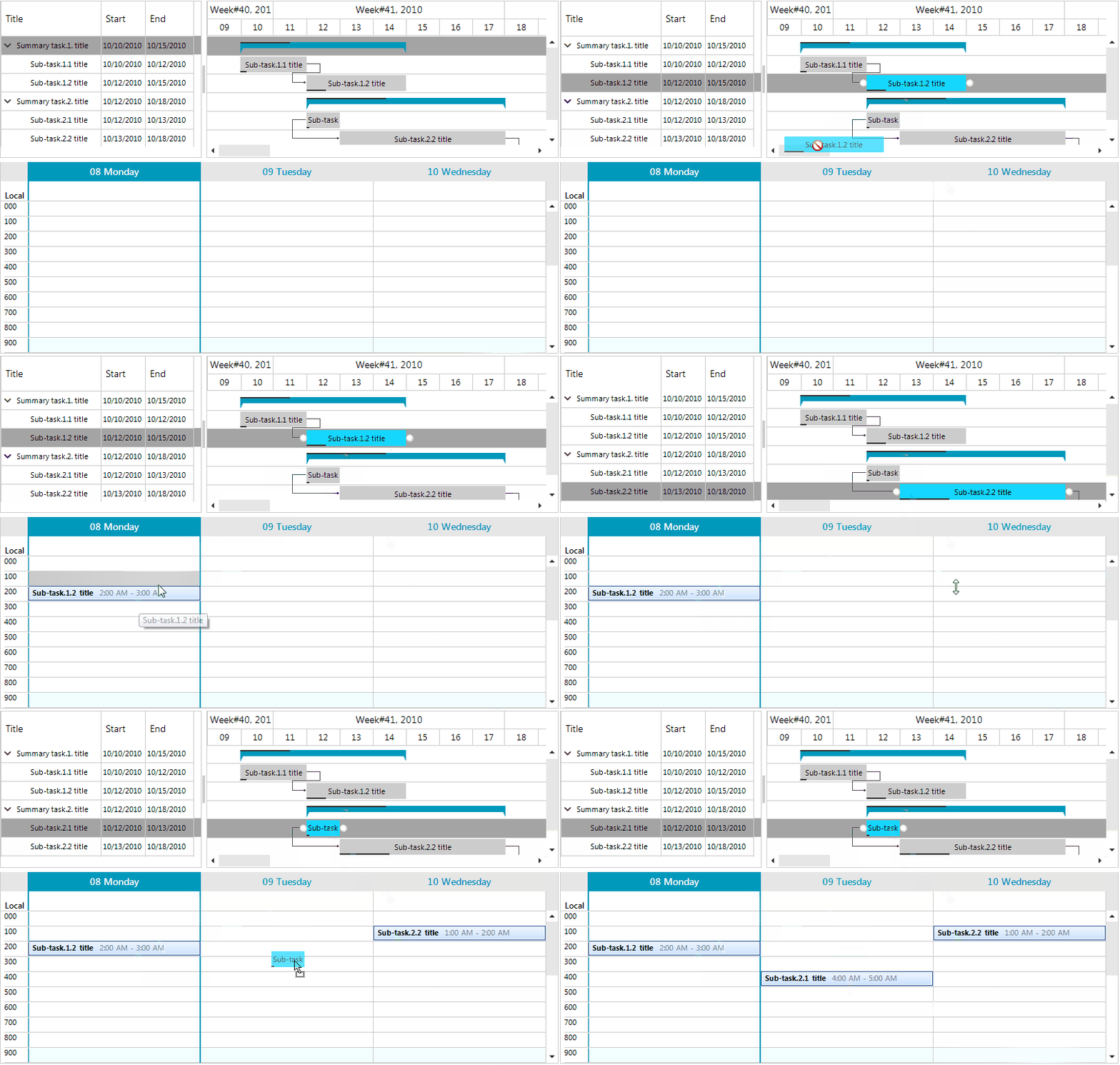
Solution
This behavior can be achieved by the GanttViewDragDropService which is accessed by the GanttViewElement.DragDropService property. As a descendant of RadDragDropService, GanttViewDragDropService handles the whole drag and drop operation. The PreviewDragOver event allows you to control on what targets the task being dragged can be dropped on. The PreviewDragDrop event allows you to get a handle on all the aspects of the drag and drop operation, the source (drag) RadGanttView, the destination (target) control, as well as the task being dragged.
It is necessary to implement a custom BaseGanttViewBehavior in order to start the service on mouse down. Since RadGanttView allows only horizontal dragging of a task, the HandleMouseMove method of the inherited GanttViewDragDropService ensures that you can drag the task outside the associated row.
Consider RadGanttView is populated programmatically with GanttViewDataItems in the PopulateGanttView method.
Drag tasks from RadGanttView to RadScheduler
          public RadForm1()
        {
            InitializeComponent();

            PopulateGanttView();

            this.radGanttView1.GanttViewBehavior = new CustomGanttViewBehavior();
            this.radGanttView1.DragDropService = new CustomGanttViewDragDropService(this.radGanttView1.GanttViewElement);

            this.radGanttView1.DragDropService.PreviewDragOver += GanttViewDragDropService_PreviewDragOver;
            this.radGanttView1.DragDropService.PreviewDragDrop += GanttViewDragDropService_PreviewDragDrop;

            GanttViewTextViewColumn titleColumn = new GanttViewTextViewColumn("Title");
            GanttViewTextViewColumn startColumn = new GanttViewTextViewColumn("Start");
            GanttViewTextViewColumn endColumn = new GanttViewTextViewColumn("End");
            this.radGanttView1.GanttViewElement.Columns.Add(titleColumn);
            this.radGanttView1.GanttViewElement.Columns.Add(startColumn);
            this.radGanttView1.GanttViewElement.Columns.Add(endColumn);

            this.radGanttView1.DragDropService.PreviewDragStart += DragDropService_PreviewDragStart;
        }

        private void GanttViewDragDropService_PreviewDragOver(object sender, Telerik.WinControls.RadDragOverEventArgs e)
        {
            e.CanDrop = e.HitTarget is SchedulerCellElement | e.HitTarget is GanttViewTextViewCellElement;
        }

        public class CustomGanttViewBehavior : BaseGanttViewBehavior
        {
            protected override void ProcessScrolling(Point mousePosition, bool scrollVertical)
            {
            }

            public override bool ProcessMouseDown(MouseEventArgs e)
            {
                GanttViewTextViewCellElement cellElement = this.GanttViewElement.ElementTree.GetElementAtPoint(e.Location) as GanttViewTextViewCellElement;
                if (cellElement != null && e.Button == System.Windows.Forms.MouseButtons.Left)
                    this.GanttViewElement.DragDropService.Start(cellElement);

                return base.ProcessMouseDown(e);
            }
        }

        private void DragDropService_PreviewDragStart(object sender, Telerik.WinControls.PreviewDragStartEventArgs e)
        {
            GanttViewTextViewCellElement cellElement = e.DragInstance as GanttViewTextViewCellElement;
            if (cellElement != null)
                e.CanStart = true;
        }

        private void GanttViewDragDropService_PreviewDragDrop(object sender, Telerik.WinControls.RadDropEventArgs e)
        {
            SchedulerCellElement schedulerCell = e.HitTarget as SchedulerCellElement;
            if (schedulerCell == null)
            {
                DayViewAllDayHeader allDay = ((SchedulerDayViewElement)this.radScheduler1.SchedulerElement.ViewElement).AllDayHeaderElement;
                schedulerCell = SchedulerUIHelper.GetCellAtPoint(e.DropLocation, allDay.Children);
            }
            if (schedulerCell == null)
                return;
            GanttViewTaskElement draggedTaskElement = e.DragInstance as GanttViewTaskElement;
            GanttViewTextViewCellElement cellElement = e.DragInstance as GanttViewTextViewCellElement;
            if (draggedTaskElement == null && cellElement == null)
                return;
            Appointment appointment = new Appointment();
            appointment.Start = schedulerCell.Date;
            appointment.End = schedulerCell.Date.Add(schedulerCell.Duration);

            if (draggedTaskElement != null)
                appointment.Summary = draggedTaskElement.Text;
            else if (cellElement != null
            )
                appointment.Summary = cellElement.DataItem.Title;

            this.radScheduler1.Appointments.Add(appointment);
        }

        public class CustomGanttViewDragDropService : GanttViewDragDropService
        {
            public CustomGanttViewDragDropService(RadGanttViewElement owner)
                : base(owner)
            {
            }

            protected override void HandleMouseMove(Point mousePos)
            {
                var l = this.Location;
                this.Location = mousePos;
                base.HandleMouseMove(mousePos);
                this.Location = l;
            }
        }