New to Telerik UI for WinForms? Start a free 30-day trial
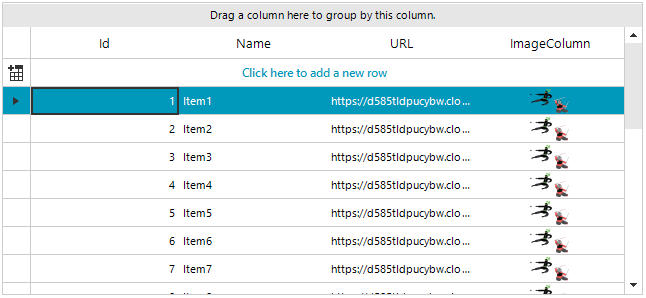
Display Images in GridView Cells from URL
Updated over 1 year ago
Environment
| Product Version | Product | Author |
|---|---|---|
| 2020.3.1020 | RadGridView for WinForms | Desislava Yordanova |
Description
A common scenario is to store image URLs in the database instead of the actual image. However, when you bind a RadGridView to this DataTable, it generates a GridViewTextBoxColumn by default. Even if you add a GridViewImageColumn and map the respective column from the DataTable by the FieldName column's property, the images are not loaded in the GridViewImageColumn. This is because the GridViewImageColumn expects Image values stored in its cells.

Solution
It is necessary to convert the URL text to an image. The easiest way to do it is to use a TypeConverter:
Image converter
C#
public RadForm1()
{
    InitializeComponent();
    DataTable dt = new DataTable();
    dt.Columns.Add("Id", typeof(int));
    dt.Columns.Add("Name", typeof(string));
    dt.Columns.Add("URL", typeof(string));

    for (var index = 1; index <= 20; index++)
        dt.Rows.Add(index, "Item" + index, "https://d585tldpucybw.cloudfront.net/sfimages/default-source/return-of-ui/ninjas-action.png");

    this.radGridView1.DataSource = dt;
    GridViewImageColumn imageColumn = new GridViewImageColumn("ImageColumn");
    imageColumn.FieldName = "URL";
    imageColumn.DataTypeConverter = new MyTypeConverter();
    imageColumn.ImageLayout = ImageLayout.Zoom;
    radGridView1.MasterTemplate.Columns.Add(imageColumn);

    this.radGridView1.AutoSizeColumnsMode = Telerik.WinControls.UI.GridViewAutoSizeColumnsMode.Fill;
}

public class MyTypeConverter : TypeConverter
{
    public override bool CanConvertTo(ITypeDescriptorContext context, Type destinationType)
    {
        if (destinationType.Equals(typeof(Image)))
            return true;

        return base.CanConvertTo(context, destinationType);
    }

    public override object ConvertTo(ITypeDescriptorContext context,
        System.Globalization.CultureInfo culture, object value, Type destinationType)
    {
        if (destinationType.Equals(typeof(Image)))
        {
            WebRequest request = System.Net.WebRequest.Create(value + "");

            using (var response = request.GetResponse())
            {
                using (var stream = response.GetResponseStream())
                {
                    return Bitmap.FromStream(stream);
                }
            }
        }
        return base.ConvertTo(context, culture, value, destinationType);
    }
}