How to Detect if Mouse Click Location Belongs to ScatterLineSeries
Environment
| Product Version | Product | Author |
|---|---|---|
| 2023.1.314 | RadChartView for WinForms | Desislava Yordanova |
Description
Consider the case we have a ScatterLineSeries with several data points. When the user clicks on the chart area, we need to detect if the location overlaps an existing ScatterDataPoint and show a tooltip for it or the mouse coordinates belong to the line itself. This article demonstrates a sample approach how to achieve such behavior.
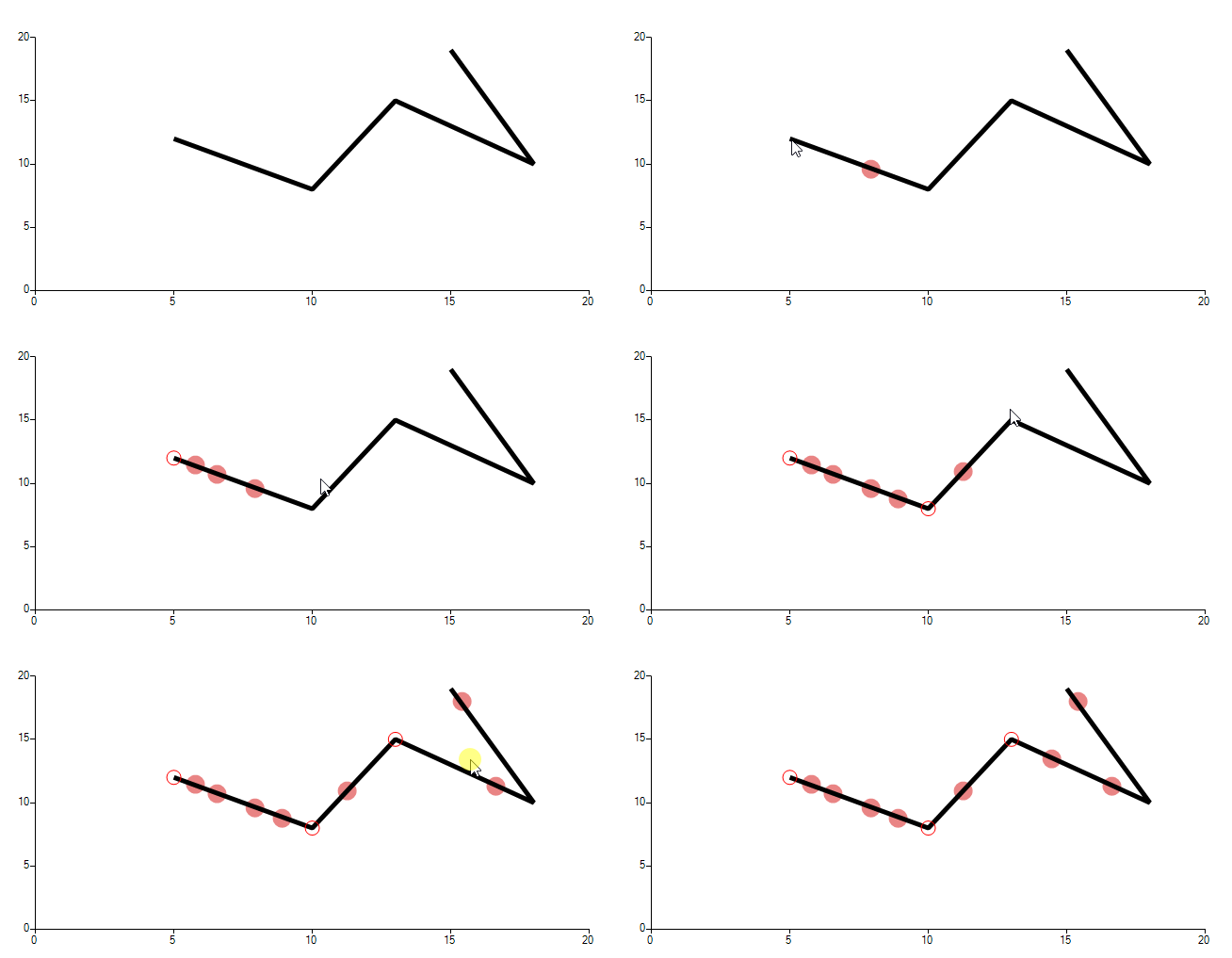
The red solid dots indicate the clicked location that doesn't overlap an existing ScatterDataPoint. The transparent circles shows actual data points from the series.
Solution
The actual line path is being calculated in the ScatterLineSeriesDrawPart while the CartesianRenderer draws the GraphicsPath according to the added data points. In order to calculate whether the currently clicked location belongs to the ScatterLineSeries itself without hitting actually a ScatterDataPoint, it is required to implement custom logic to do the job.
The custom implementation includes the logic which is used for the rendering the line and now you have the GraphicsPath in the MouseDown event handler. The MouseEventArgs gives you access to the Location. Please have in mind that adding a new data point to the series may draw additional lines to the series as the GraphicsPath will be calculated with the new data points included. Instead of adding points to the existing series, a better option is to use a separate ScatterSeries. The above gif file illustrates the achieved result: the solid red dots are the newly added points that are added to the secondary series when the user clicks the line and no data point is hit:
        public Form1()
        {
            InitializeComponent();
            this.radChartView1.Anchor = AnchorStyles.Right | AnchorStyles.Bottom | AnchorStyles.Left ;
            ScatterLineSeries scatterLineSeries = new ScatterLineSeries();
            scatterLineSeries.BorderColor = Color.Black ;
            scatterLineSeries.BorderWidth = 5;
            scatterLineSeries.Shape = new CircleShape();
            scatterLineSeries.PointSize = new SizeF(15,15);
            scatterLineSeries.BackColor = Color.Transparent;
            scatterLineSeries.ShowLabels = true;
            scatterLineSeries.Name = "";
            scatterLineSeries.DataPoints.Add(new ScatterDataPoint(15, 19));
            scatterLineSeries.DataPoints.Add(new ScatterDataPoint(18, 10));
            scatterLineSeries.DataPoints.Add(new ScatterDataPoint(13, 15));
            scatterLineSeries.DataPoints.Add(new ScatterDataPoint(10, 8));
            scatterLineSeries.DataPoints.Add(new ScatterDataPoint(5, 12));
            this.radChartView1.Series.Add(scatterLineSeries);
            this.radChartView1.MouseDown += RadChartView1_MouseDown;


            redDots.PointSize = new SizeF(20, 20);
            redDots.BorderWidth = 1;
            redDots.BorderColor = Color.Red;
            this.radChartView1.Series.Add(redDots);
        }

        ScatterSeries redDots = new ScatterSeries();
        RadToolTip toolTip = new RadToolTip();
        private object GetHorizontalAxisValueFromMouse(MouseEventArgs e)
        {
            LinearAxis axis = radChartView1.Axes[1] as LinearAxis;
            double delta = axis.ActualRange.Maximum - axis.ActualRange.Minimum;
            double totalHeight = axis.Model.LayoutSlot.Height;
            double ratio = 1 - (e.Location.Y - this.radChartView1.Area.View.Viewport.Y - axis.Model.LayoutSlot.Y) / totalHeight;
            double value = axis.ActualRange.Minimum + delta * ratio;

            return value;
        }

        private object GetVerticalAxisValueFromMouse(MouseEventArgs e)
        {
            LinearAxis axis = radChartView1.Axes[0] as LinearAxis;
            double delta = axis.ActualRange.Maximum - axis.ActualRange.Minimum;
            double totalWidth = axis.Model.LayoutSlot.Width;
            double ratio = (e.Location.X - this.radChartView1.Area.View.Viewport.X - axis.Model.LayoutSlot.X) / totalWidth;
            double value = axis.ActualRange.Minimum + delta * ratio;

            return value;
        }

        private void RadChartView1_MouseDown(object sender, MouseEventArgs e)
        {
            ScatterLineSeries scatterSeries = this.radChartView1.Series[0] as ScatterLineSeries;
            ScatterDataPoint clickedDataPoint = null;
            DataPoint dp = scatterSeries.HitTest(e.Location.X, e.Location.Y);

            if (scatterSeries != null && dp != null)
            {
                clickedDataPoint = dp as ScatterDataPoint;
                var scatterPointElement = scatterSeries.Children.FirstOrDefault(x => (x as ScatterPointElement).DataPoint == clickedDataPoint);
                if (scatterPointElement != null)
                {
                    scatterPointElement.BorderWidth = 1;
                    scatterPointElement.BorderColor = Color.Red;
                    Point pt = this.radChartView1.PointToScreen(e.Location);
                    toolTip.Show("X: " + clickedDataPoint.XValue + " Y: " + clickedDataPoint.YValue, pt, 2000);
                    this.Text = "Existing Data Point: XValue: " + clickedDataPoint.XValue + " YValue: " + clickedDataPoint.YValue;
                }
            }

            if (clickedDataPoint == null)
            {
                GraphicsPath linePath= GetLinePath(scatterSeries);
                bool isInPath = linePath.IsOutlineVisible(e.Location,new Pen(Brushes.Black,5));
                object hValue = this.GetVerticalAxisValueFromMouse(e);
                object vValue = this.GetHorizontalAxisValueFromMouse(e);
                double horizontalValue = Math.Round(double.Parse(hValue.ToString()),2);
                double verticvalValue = Math.Round(double.Parse(vValue.ToString()), 2);
                this.Text = horizontalValue + " " + verticvalValue;

                if (isInPath)
                {
                    redDots.DataPoints.Add(new ScatterDataPoint(horizontalValue, verticvalValue));
                }
            }
        }

        private GraphicsPath GetLinePath(ScatterLineSeries scatterSeries)
        {
            PointF[] points = GetPointsPositionsArray(scatterSeries);
            return this.GetLinePaths(points, scatterSeries);
        }

        private PointF[] GetPointsPositionsArray(ScatterLineSeries scatterSeries)
        {
            List<PointF> points = new List<PointF>();

            for (int i = 0; i < scatterSeries.Children.Count; i++)
            {
                if (!scatterSeries.Children[i].IsVisible)
                {
                    break;
                }
               float offsetX=(float)(scatterSeries.View.Viewport.X + ((IChartView)scatterSeries.View).PlotOriginX);
                ScatterDataPoint scatterPoint = scatterSeries.DataPoints[i] as ScatterDataPoint;
                RadRect layoutSlot = scatterPoint.LayoutSlot;
                points.Add(new PointF(offsetX + (float)layoutSlot.X, offsetX + (float)layoutSlot.Y));
            }

            return points.ToArray();
        }

        private   GraphicsPath GetLinePaths(PointF[] points, ScatterLineSeries scatterSeries)
        {
            GraphicsPath path = new GraphicsPath();

            if (points.Length == 2)
            {
                path.AddLine(points[0], points[1]);
            }
            else if (points.Length > 1)
            {
                path.AddLines(points);
            }
            else
            {
                return null;
            }

            return path;
        }