Cascading ComboBoxes in PropertyGrid
Environment
| Product Version | Product | Author |
|---|---|---|
| 2022.2.622 | RadPropertyGrid for WinForms | Desislava Yordanova |
Description
RadPropertyGrid uses a PropertyGridDropDownListEditor for editing properties that have a type converter supporting standard values and do not have a UITypeEditor. When the editor is activated, a list of options is presented to the end user to choose from.
This article demonstrates a sample approach how to use the PropertyGridDropDownListEditor to achieve the well-known scenario for cascading comboboxes. Consider that you have Category and Product properties. When you select a certain category, then the listed products should be relevant for the selected category.
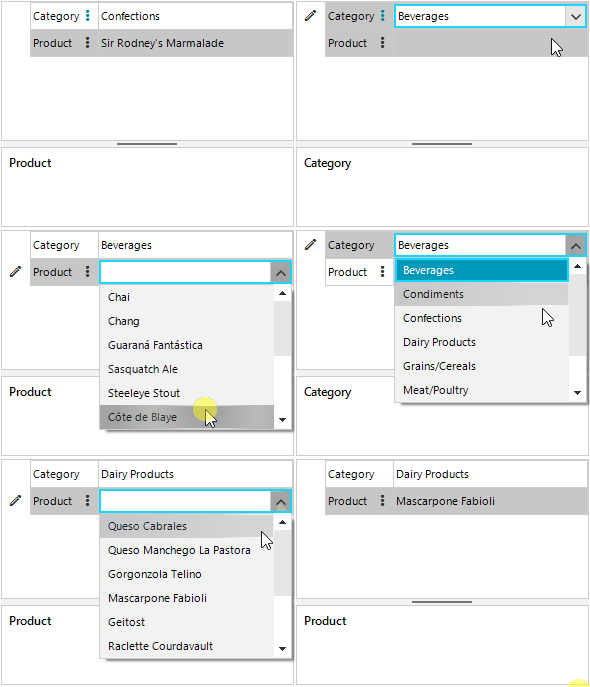
Solution
For this example we will use the Northwind database and its Categories and Products tables. When an editor is required in RadPropertyGrid, a PropertyGridDropDownListEditor will be created filled with the respective DataSource collection. For the Product property, the assigned Northwind.Products table will be filtered according to the selected category in the Category property.
public RadForm1()
{
    InitializeComponent();

    PropertyStoreItem categoryItem = new PropertyStoreItem(typeof(string), "Category","Beverages");
    PropertyStoreItem productItem = new PropertyStoreItem(typeof(string), "Product","Chai");
    RadPropertyStore store = new RadPropertyStore();
    store.Add(categoryItem);
    store.Add(productItem);
    this.radPropertyGrid1.SelectedObject = store;
    this.radPropertyGrid1.EditorRequired += radPropertyGrid1_EditorRequired;
    this.radPropertyGrid1.EditorInitialized += radPropertyGrid1_EditorInitialized;
    this.radPropertyGrid1.Edited += RadPropertyGrid1_Edited;
}

private void RadPropertyGrid1_Edited(object sender, PropertyGridItemEditedEventArgs e)
{
    if (e.Item.Label == "Category")
    {
        lastSelectedCategory = ((PropertyGridItem)e.Item).Value + "";
    }
}

string lastSelectedCategory = "Beverages";
private void radPropertyGrid1_EditorInitialized(object sender, PropertyGridItemEditorInitializedEventArgs e)
{
    PropertyGridDropDownListEditor editor = e.Editor as PropertyGridDropDownListEditor;
    if (editor != null)
    {
       BaseDropDownListEditorElement el = editor.EditorElement as BaseDropDownListEditorElement;
       el.SelectedValue = ((PropertyGridItem)e.Item).Value;
        if (e.Item.Label=="Category")
        {
            el.SelectedIndexChanged -= El_SelectedIndexChanged;
            el.SelectedIndexChanged += El_SelectedIndexChanged;
        }
    }
}

private void El_SelectedIndexChanged(object sender, Telerik.WinControls.UI.Data.PositionChangedEventArgs e)
{
    RadPropertyStore store = this.radPropertyGrid1.SelectedObject as RadPropertyStore;
    store["Product"].Value = null;
}

private void radPropertyGrid1_EditorRequired(object sender, PropertyGridEditorRequiredEventArgs e)
{
    if (e.Item.Label == "Category")
    {
        PropertyGridDropDownListEditor editor = new PropertyGridDropDownListEditor();
        BaseDropDownListEditorElement el = editor.EditorElement as BaseDropDownListEditorElement;
        el.DisplayMember = "CategoryName";
        el.ValueMember = "CategoryName";
        el.DataSource = this.categoriesBindingSource;
        e.Editor = editor;
    }
    else if (e.Item.Label == "Product")
    {
        PropertyGridDropDownListEditor editor = new PropertyGridDropDownListEditor();
        BaseDropDownListEditorElement el = editor.EditorElement as BaseDropDownListEditorElement;
        el.DisplayMember = "ProductName";
        el.ValueMember = "ProductName";
        DataTable productsTable = ((DataSet)this.productsBindingSource.DataSource).Tables["Products"];
        DataView dv = new DataView(productsTable);

        dv.RowFilter = "CategoryID="+ GetCategoryIDByName(lastSelectedCategory);
        el.DataSource = dv;
        e.Editor = editor;
    }
}

private int GetCategoryIDByName(string lastSelectedCategory)
{
    int id = -1;
    DataTable categoriesTable = ((DataSet)this.productsBindingSource.DataSource).Tables["Categories"];
    foreach (NwindDataSet.CategoriesRow row in categoriesTable.Rows)
    {
        if (row.CategoryName == lastSelectedCategory)
        {
            id = row.CategoryID;
            break;
        }
    }
    return id;
}

private void RadForm1_Load(object sender, EventArgs e)
{
    this.productsTableAdapter.Fill(this.nwindDataSet.Products);
    this.categoriesTableAdapter.Fill(this.nwindDataSet.Categories);
}