New to Telerik UI for WinForms? Start a free 30-day trial
Barcode Column in RadGridView
Updated on Aug 27, 2026
Environment
| Product Version | Product | Author |
|---|---|---|
| 2021.2.511 | RadGridView | Desislava Yordanova |
Description
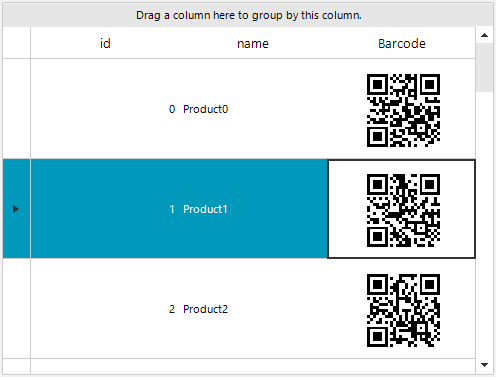
Learn how to create a Barcode column in RadGridView:
Solution
It is necessary to create a custom GridViewDataColumn which uses a custom GridDataCellElement for the data rows (GridViewDataRowInfo). In the custom cell, override the CreateChildElements method where you can host the RadBarcodeElement with the symbology you need.
C#
public RadForm1()
{
    InitializeComponent();

    DataTable dt = new DataTable();
    dt.Columns.Add("id", typeof(int));
    dt.Columns.Add("name", typeof(string));
    dt.Columns.Add("barcode", typeof(string));

    for (int i = 0; i < 20; i++)
    {
        dt.Rows.Add(i, "Product" + i, Guid.NewGuid());
    }

    this.radGridView1.DataSource = dt;

    this.radGridView1.Columns.Remove("Barcode");

    BarcodeColumn barcodeColumn = new BarcodeColumn("Barcode");
    this.radGridView1.Columns.Add(barcodeColumn);

    this.radGridView1.AllowAddNewRow = false;
    this.radGridView1.AutoSizeColumnsMode = GridViewAutoSizeColumnsMode.Fill;
    this.radGridView1.TableElement.RowHeight = 100;
}

public class BarcodeColumn : GridViewDataColumn
{
    public BarcodeColumn(string fieldName) : base(fieldName)
    {
    }

    public override Type GetCellType(GridViewRowInfo row)
    {
        if (row is GridViewDataRowInfo)
        {
            return typeof(BarcodeGridDataCellElement);
        }
        return base.GetCellType(row);
    }
}

public class BarcodeGridDataCellElement : GridDataCellElement
{
    public BarcodeGridDataCellElement(GridViewColumn column, GridRowElement row) : base(column, row)
    {
    }

    protected override Type ThemeEffectiveType
    {
        get
        {
            return typeof(GridDataCellElement);
        }
    }

    public override bool IsCompatible(GridViewColumn data, object context)
    {
        return data is BarcodeColumn && context is GridDataRowElement;
    }

    RadBarcodeElement barcode;

    protected override void CreateChildElements()
    {
        base.CreateChildElements();

        barcode = new RadBarcodeElement();
        barcode.StretchHorizontally = true;
        barcode.StretchVertically = true;

        Telerik.WinControls.UI.Barcode.Symbology.QRCode encoder = new Telerik.WinControls.UI.Barcode.Symbology.QRCode();
        encoder.Version = 0;
        encoder.ErrorCorrectionLevel = Telerik.WinControls.UI.Barcode.Symbology.ErrorCorrectionLevel.M;
        encoder.ECIMode = Telerik.WinControls.UI.Barcode.Symbology.ECIMode.CP437;
        encoder.CodeMode = Telerik.WinControls.UI.Barcode.Symbology.CodeMode.Alphanumeric;
        encoder.FNC1Mode = Telerik.WinControls.UI.Barcode.Symbology.FNC1Mode.SecondPosition;
        encoder.ApplicationIndicator = "00";
        barcode.Symbology = encoder;

        this.Children.Add(barcode);
    }

    protected override void SetContentCore(object value)
    {
        base.SetContentCore(value);

        this.ToolTipText = value + "";
        barcode.Value = value + "";
    }
}
The example shows the QRCode. This approach can be followed for the rest of the barcode types as well.