New to Telerik UI for WinForms? Start a free 30-day trial
Allow End-Users to Add Items to MultiColumnCombobox Editor
Updated over 1 year ago
Environment
| Product Version | Product | Author |
|---|---|---|
| 2019.3.1022 | RadGridView for WinForms | Desislava Yordanova |
Description
GridViewMultiComboBoxColumn has RadMultiColumnComboBoxElement as an editor. It covers the features that the RadMultiColumnComboBox control has. This column allows only valid values according to the specified DataSource collection. That is why if you enter some value that is not a part of the source collection, the value can't be preserved to the cell.
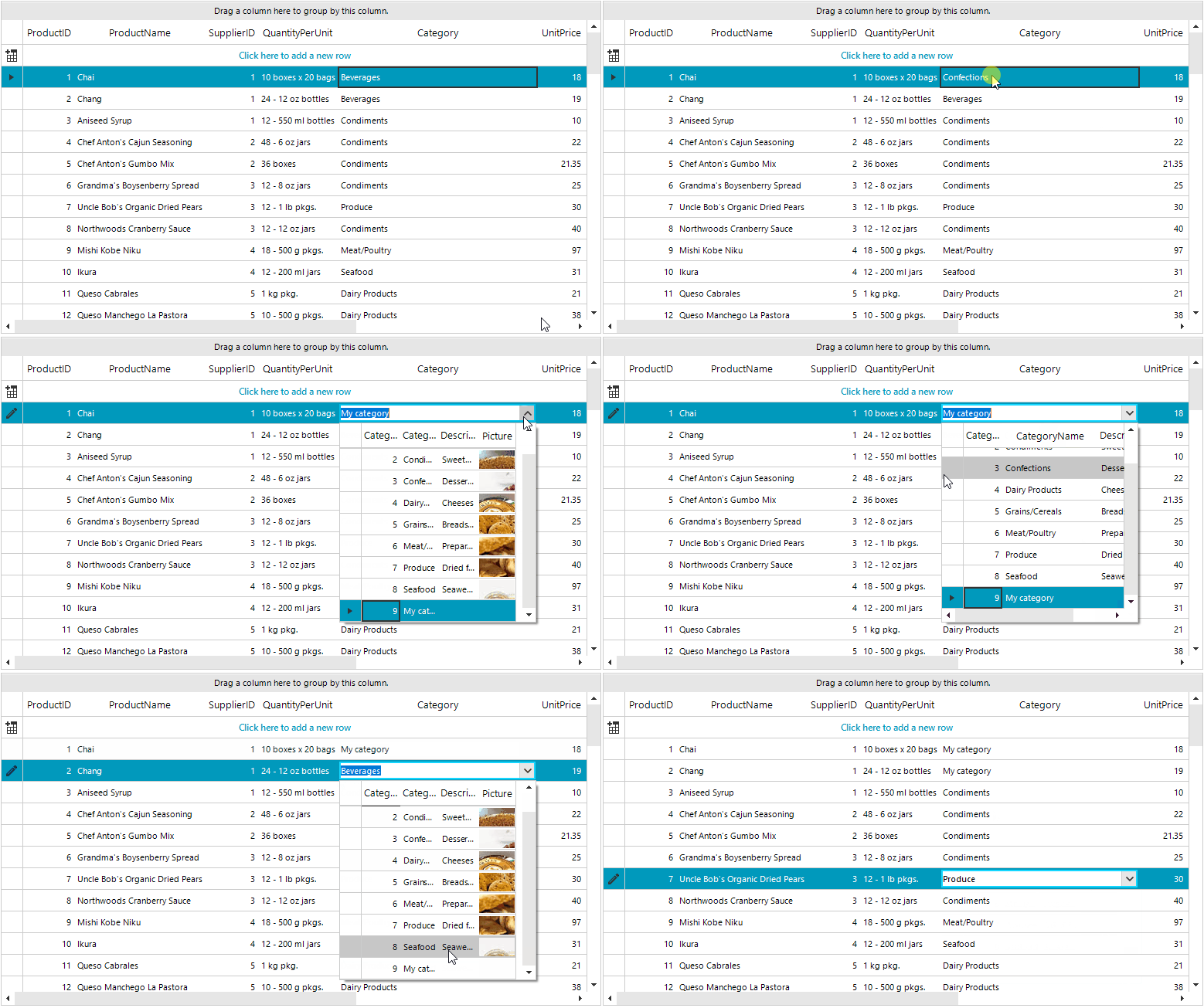
This tutorial demonstrates how to achieve such functionality.
Solution
The custom value needs to be added to the DataSource collection that is applied to the GridViewMultiComboBoxColumn. Please refer to the following code snippet:
C#
public partial class RadForm1 : Telerik.WinControls.UI.RadForm
{
    public NwindDataSet DataSet
    {
        get
        {
            return this.nwindDataSet;
        }
    }

    public CategoriesTableAdapter CategoriesTA
    {
        get
        {
            return this.categoriesTableAdapter;
        }
    }

    public RadForm1()
    {
        InitializeComponent();
    }

    private void RadForm1_Load(object sender, EventArgs e)
    {
        this.productsTableAdapter.Fill(this.nwindDataSet.Products);
        this.categoriesTableAdapter.Fill(this.nwindDataSet.Categories);

        this.radGridView1.Columns.Remove("CategoryID");

        GridViewMultiComboBoxColumn categoriesColumn = new GridViewMultiComboBoxColumn("Category");
        categoriesColumn.DisplayMember = "CategoryName";
        categoriesColumn.ValueMember = "CategoryID";
        categoriesColumn.FieldName = "CategoryID";
        categoriesColumn.HeaderText = "Category";
        categoriesColumn.DataSource = this.categoriesBindingSource;
        categoriesColumn.DropDownStyle = Telerik.WinControls.RadDropDownStyle.DropDown;
        categoriesColumn.Width = 150;
        this.radGridView1.Columns.Insert(4, categoriesColumn);

        this.radGridView1.CellEndEdit += radGridView1_CellEndEdit;
        this.radGridView1.EditorRequired += radGridView1_EditorRequired;

        this.radGridView1.BestFitColumns();
    }

    private void radGridView1_EditorRequired(object sender, EditorRequiredEventArgs e)
    {
        if (e.EditorType == typeof(RadMultiColumnComboBoxElement))
        {
            e.Editor = new CustomRadMultiColumnComboBoxElement();
        }
    }

    private void radGridView1_CellEndEdit(object sender, GridViewCellEventArgs e)
    {
        if (this.radGridView1.CurrentCell.Tag != null)
        {
            this.radGridView1.CurrentCell.Value = this.radGridView1.CurrentCell.Tag;
            this.radGridView1.CurrentCell.Tag = null;
        }
    }

    public class CustomRadMultiColumnComboBoxElement : RadMultiColumnComboBoxElement
    {
        protected override Type ThemeEffectiveType
        {
            get
            {
                return typeof(RadMultiColumnComboBoxElement);
            }
        }

        public override bool EndEdit()
        {
            GridComboBoxCellElement cellElement = this.Parent as GridComboBoxCellElement;
            RadGridView grid = cellElement.GridControl;
            RadForm1 f = (RadForm1)grid.FindForm();

            NwindDataSet.CategoriesDataTable dt = f.DataSet.Categories;
            for (int i = 0; i < dt.Rows.Count; i++)
            {
                if (dt.Rows[i]["CategoryName"].ToString() == this.Text)
                {
                    return base.EndEdit();
                }
            }

            NwindDataSet.CategoriesRow newCategoriesRow = dt.NewCategoriesRow();
            newCategoriesRow.CategoryName = this.Text;
            f.DataSet.Categories.Rows.Add(newCategoriesRow);

            f.CategoriesTA.Update(f.DataSet.Categories);
            cellElement.Tag = newCategoriesRow.CategoryID;
            return base.EndEdit();
        }
    }
}
RadGridView is bound to the Northwind.Products table. The GridViewMultiComboBoxColumn uses the Northwind.Categories table.